

School Flyer Scanner & Planner
Takayuki Goto Productivity iPhoneiPadiPod touch
School Flyer Scanner & Planner is a free Productivity app for iPhone and iPad by Takayuki Goto. Requires iOS 18.0. Updated September 8, 2026.
- Price
- Free
- on the App Store
- Size
- 66 MB
- Age 4+
- Updated
- Sep 8
- 2026 · v2.4.1
Screenshots
About School Flyer Scanner & Planner
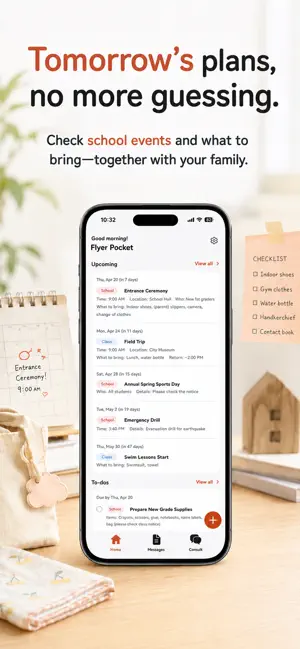
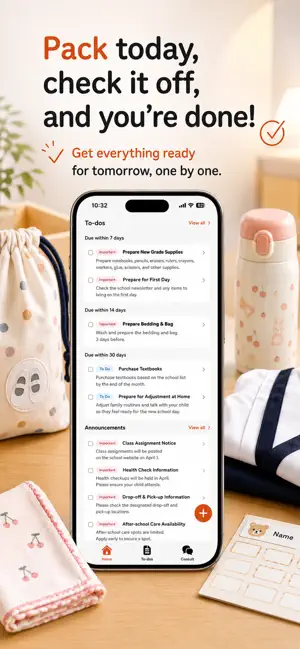
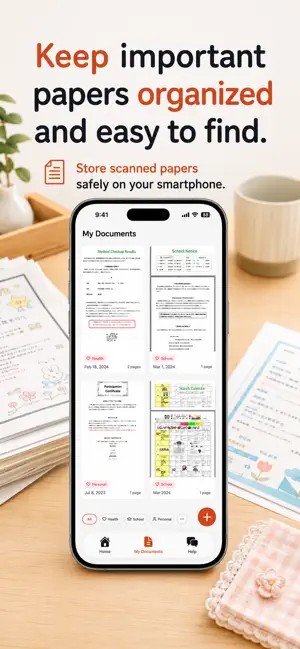
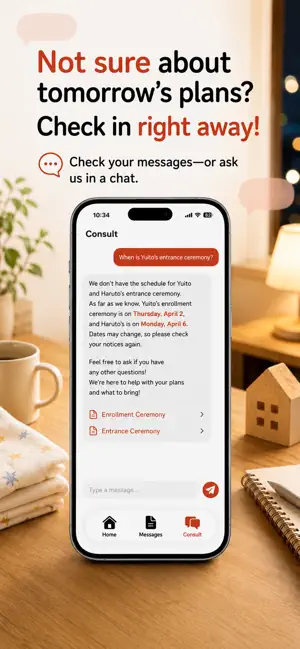
School handouts piling up? Missed events, forgotten supplies — when you're a busy parent, you can't read every flyer. Flyer Pocket reads school notices for you — just snap a photo. Schedules go to your family calendar, supplies to a packing list, everything shared with the people who matter. No more "I didn't know about that" or "I forgot to bring it." Free to start. Go Premium when you want more. ■ Snap a Photo, See the Important Bits Faster Take a photo or pick one from your camera roll. Flyer Pocket reads the school flyer and sorts it into 6 categories: school events, parent meetings, supplies, health, holidays, and outings. Works with daycare, preschool, kindergarten, elementary school, and after-school activities. ■ Never Miss an Event Events are automatically added to your family calendar with dates, times, and categories at a glance. No more "When was that event again?" ■ Never Forget Supplies "Bring PE clothes," "Pack a lunch" — items become a packing list, sorted by deadline. Check the night before and relax in the morning. ■ Just Ask, Find What You Need "What does my child need for tomorrow?" "Any events next week?" Your concierge answers instantly based on the school notices you've snapped. No more digging through paper piles. ■ Everyone Stays in the Loop Invite family with a code. Schedules, packing lists, and notices shared in real time. Your partner never has to say "Nobody told me." ■ Multiple Kids, No Problem Switch between children for their notices and schedules. Different schools? Everything stays organized. ■ Sound Familiar? - School papers piling up on the fridge - Forgetting event dates and deadlines - Scrambling to prepare supplies the night before - Your partner not knowing what's happening at school - No time to read through every newsletter - Losing track of permission slips and notices Flyer Pocket works independently — no setup required from your school. Start using it right away. ■ Pricing [Free Plan] 1 notice scan per day, share with up to 5 family members, register up to 5 children, all core features included. [Premium Plan] Premium subscription available — see the App Store for current pricing in your region. Monthly, yearly, and lifetime options. - Unlimited notice scanning - Unlimited chat answers - Smart search across all your notices - Unlimited family members - Ad-free experience ■ Privacy Because this app handles information about your children, we take privacy seriously. All images and data are securely tied to your account and completely deleted when you delete your account. ■ Contact Questions, suggestions, or bug reports — reach us at [email protected] Terms of Use: https://otayori-app.com/terms Privacy Policy: https://otayori-app.com/privacy ■ About Flyer Pocket Flyer Pocket is a mobile app made by First Penguin LLC, a Japan-based developer. It uses OCR and AI to read photos of school notices, flyers, and newsletters, then extracts events, supplies, and to-dos into a family-shared calendar and packing list. Built for parents of children in preschool, daycare, kindergarten, and elementary school. The free plan covers 1 scan per day; Premium unlocks unlimited scans and chat.
What’s new
Version 2.4.1 · Updated September 8, 2026
Thanks for using Flyer Pocket! ■ Fixed an issue that could cause the app to close during startup. ■ A clearer home screen — refreshed colors and text make flyers and plans easier to scan, and the "See all" button is easier to tap. ■ "Coming up" now shows only today onward — yesterday's events no longer linger in the list. ■ Your first 3 flyers don't count toward the daily limit — try it out fully before the daily limit applies. ■ Sharing from other apps is more reliable — the import screen now opens every time. Plus small polish and stability improvements — just in time for the back-to-school season.
App privacy
The developer, Takayuki Goto, reported these privacy practices to Apple.
Data Used to Track You
The following data may be used to track you across apps and websites owned by other companies:
- Identifiers: Device ID
- Usage Data: Advertising Data
Data Linked to You
The following data, which may be collected and linked to your identity, may be used for the following purposes:
- Purchases: Purchase History
- Contact Info: Email Address, Name
- User Content: Photos or Videos, Other User Content
- Identifiers: User ID
Used for: App Functionality
Data Not Linked to You
The following data, which may be collected but is not linked to your identity, may be used for the following purposes:
- Identifiers: Device ID
- Usage Data: Advertising Data, Product Interaction
- Diagnostics: Crash Data, Performance Data
Used for: Third-Party Advertising, Analytics, App Functionality
Alternatives to School Flyer Scanner & Planner
Looking for apps like School Flyer Scanner & Planner? Here are 6 similar apps on the App Store.
-
 Kotomemo:AI Print Secretary
-
 こども年間スケジュール
-
 Otayori Post
-
 NoticeBox
-
 プリント整理 - 保育園・幼稚園のおたより管理
-
 おたよりAI - AIが自動で認識!おたよりから予定検知も!
| App | Rating | Price | Last updated | Compare |
|---|---|---|---|---|
| School Flyer Scanner & Planner | – | Free | September 8, 2026 | |
| Kotomemo:AI Print Secretary | – | Free | Sep 22, 2026 | Compare |
| こども年間スケジュール | – | Free | Oct 24, 2026 | Compare |
| Otayori Post | – | Free | Aug 21, 2026 | Compare |
| NoticeBox | – | Free | Jun 14, 2026 | Compare |
| プリント整理 - 保育園・幼稚園のおたより管理 | – | Free | Jun 12, 2026 | Compare |
| おたよりAI - AIが自動で認識!おたよりから予定検知も! | – | Free | Sep 2, 2024 | Compare |