

Calendar Alarm: Loud & Shift
KeiK LLC Lifestyle iPhoneiPadiPod touch
Calendar Alarm: Loud & Shift is a free Lifestyle app for iPhone and iPad by KeiK LLC. Rated 3.7/5 from 3 ratings. Requires iOS 17.0. Updated October 7, 2026.
- Rating
- 3.7
- 3 ratings
- Price
- Free
- on the App Store
- Size
- 95 MB
- Age 4+
- Updated
- Oct 7
- 2026 · v2.50
Screenshots

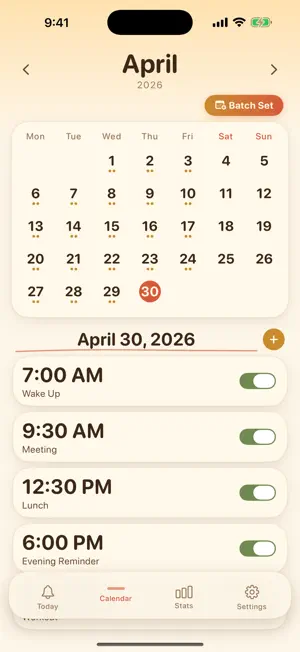
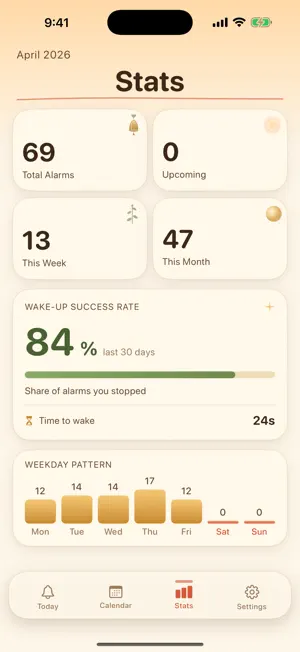
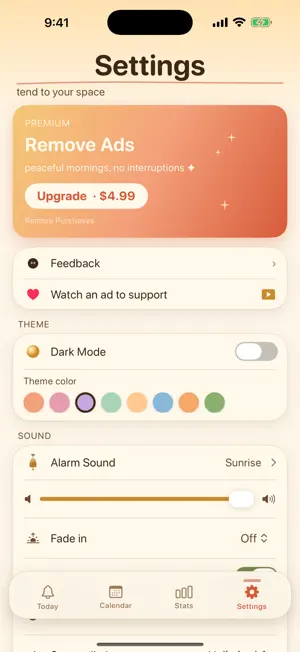
About Calendar Alarm: Loud & Shift
Never oversleep again. A loud, reliable alarm clock that lays every alarm out on a monthly calendar — set it in seconds and see your whole month of wake-ups at a glance. Daily alarms for work, weekday wake-ups for school, shift patterns, or a one-off early appointment: tap the dates on the calendar and you're done. No more recreating the same 7 AM alarm every night. MyDailyAlarm turns waking up on time into a routine that actually sticks. ◆ Repeat Alarms That Just Work Set any alarm to ring Daily, Weekdays (Mon–Fri), Weekends (Sat–Sun), or Weekly on the same day. No more recreating the same 7 AM alarm every night. ◆ Calendar-Based Planning See your entire week and month at a glance. Tap any date to add, edit, or delete an alarm instantly. Perfect for shift workers, students, and anyone with a changing schedule. ◆ 3 Batch Setting Modes - Multi-Select: Tap multiple dates on the calendar to create the same alarm at once. - Weekday Pattern: Choose days of the week and apply alarms automatically. - Date Range: Pick a start and end date to fill in alarms across an entire period. ◆ Loud, Reliable Wake-Up A looping alarm sound with vibration ensures you actually wake up. Works even when your phone is on silent mode or Do Not Disturb. ◆ 43 Alarm Sounds, Including 35 Original Songs Choose from 8 alarm tones — Sunrise, Classic, Chiptune, Marimba, Arpeggio, Birdsong, Bell, and Default — or 35 original songs composed just for this app: 3 energizing wake-up songs and 32 relaxing ones. Every alarm can have its own sound (batch-created alarms too), or keep "Same as Settings" to follow your default. The notification plays the first 30 seconds; open the app and the full song keeps playing. Adjust the volume with a slider in Settings. ◆ Wake Up to a YouTube Video (Optional) Pick a YouTube video for any alarm. Leave the app open in Bedside Mode while your phone charges, and the video plays at alarm time instead of the alarm sound. If the app is closed or your phone is locked, your usual alarm rings and the video starts as soon as you stop it. If the video can't play, the alarm keeps ringing — so you still wake up. ◆ Bedtime Timer Drift off to a relaxing song. Pick 15, 30, 60, or 90 minutes and the music fades out gently over the final 30 seconds. It keeps playing with the screen locked, stops when a call comes in, and can be controlled from the Lock Screen. ◆ Smart Snooze Not ready to get up? Snooze for 1, 5, or 10 minutes with a single tap. After snoozing, we show you exactly when the next ring will happen. ◆ Holiday Skip Don't want to be woken on public holidays? Turn on Holiday Skip and your repeat alarms stay silent on national holidays — sleep in on your days off without touching a single alarm. Holidays for 31 countries are included through 2030. ◆ Good Morning Screen After you stop the alarm, a calm morning dashboard greets you with the time, the date, and how many alarms you have left today — a peaceful replacement for the jarring snooze cycle. ◆ Wake-Up Success Rate (30 days) See how often you've actually stopped your alarm over the past 30 days, with a calm empty state when you're just getting started. Turn waking up into a habit you can measure. ◆ Stats & Insights See your weekday patterns, alarm counts, and wake-up streaks. Build a routine that actually sticks. ◆ Remove Ads (One-Time Purchase) Prefer no ads? A single one-time purchase from Settings keeps the app ad-free forever. No subscription, no recurring charges. ◆ Privacy First No account required. All your data stays on your device. We never collect personal information. Start your mornings right with MyDailyAlarm — the calendar alarm clock built for people who are tired of fighting their phone every morning. Privacy Policy: https://keik.co.jp/mydailyalarm/privacy-en.html Terms of Use: https://www.apple.com/legal/internet-services/itunes/dev/stdeula/
What’s new
Version 2.50 · Updated October 7, 2026
- New in Settings: "Share the app to support". Send friends the download link in a message - Refreshed the recommended and related apps in Settings - Ad privacy choices are now available in some regions. Plus minor improvements
App privacy
The developer, KeiK LLC, reported these privacy practices to Apple.
Data Used to Track You
The following data may be used to track you across apps and websites owned by other companies:
- Identifiers: Device ID
- Usage Data: Advertising Data, Other Usage Data
Data Linked to You
The following data, which may be collected and linked to your identity, may be used for the following purposes:
- Contact Info: Email Address, Name
Used for: App Functionality
Data Not Linked to You
The following data, which may be collected but is not linked to your identity, may be used for the following purposes:
- Identifiers: Device ID
- Usage Data: Advertising Data, Product Interaction, Other Usage Data
- Purchases: Purchase History
- User Content: Photos or Videos, Other User Content
Used for: Third-Party Advertising, Developer’s Advertising or Marketing, Analytics, Product Personalization, App Functionality
Alternatives to Calendar Alarm: Loud & Shift
Looking for apps like Calendar Alarm: Loud & Shift? Here are 6 similar apps on the App Store. The highest rated is Loud Alarm Clock for Sleepers (4.6/5), and all 6 are free to download.
-
 闹钟管家-智能调休闹&钟法定节假日轮班大小周
4.0
闹钟管家-智能调休闹&钟法定节假日轮班大小周
4.0
-
 ShiftDay: Weekly Work Alarm
-
 Alarms Pro: Music Wake-Up
3.3
Alarms Pro: Music Wake-Up
3.3
-
 Morning Mission Alarm Clock
-
 Wakekin: Loud Alarm Clock
4.0
Wakekin: Loud Alarm Clock
4.0
-
 Loud Alarm Clock for Sleepers
4.6
Loud Alarm Clock for Sleepers
4.6
| App | Rating | Price | Last updated | Compare |
|---|---|---|---|---|
| Calendar Alarm: Loud & Shift | 3.7 / 5 (3 ratings) | Free | October 7, 2026 | |
| 闹钟管家-智能调休闹&钟法定节假日轮班大小周 | 4.0 / 5 (2) | Free | Jan 23, 2026 | Compare |
| ShiftDay: Weekly Work Alarm | – | Free | Mar 16, 2026 | Compare |
| Alarms Pro: Music Wake-Up | 3.3 / 5 (3) | Free | Aug 26, 2026 | Compare |
| Morning Mission Alarm Clock | – | Free | Aug 16, 2026 | Compare |
| Wakekin: Loud Alarm Clock | 4.0 / 5 (5) | Free | Sep 3, 2026 | Compare |
| Loud Alarm Clock for Sleepers | 4.6 / 5 (31) | Free | Jun 10, 2026 | Compare |