

SVG to PNG & JPG: SVGPX
Vikram Singh Graphics & Design iPhoneiPadiPod touch
SVG to PNG & JPG: SVGPX is a free Graphics & Design app for iPhone and iPad by Vikram Singh. Requires iOS 26.2. Updated September 7, 2026.
- Price
- Free
- on the App Store
- Size
- 3 MB
- Age 4+
- Updated
- Sep 7
- 2026 · v2.0
Screenshots

About SVG to PNG & JPG: SVGPX
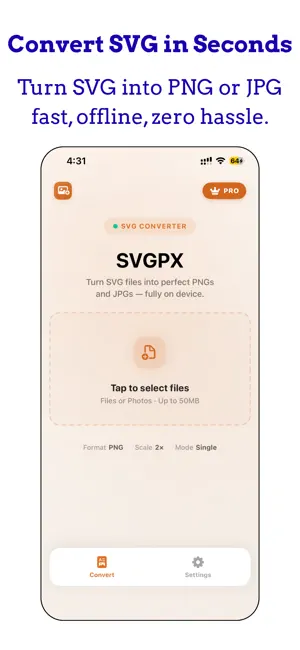
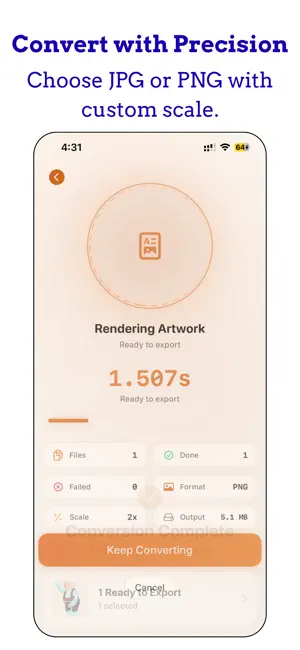
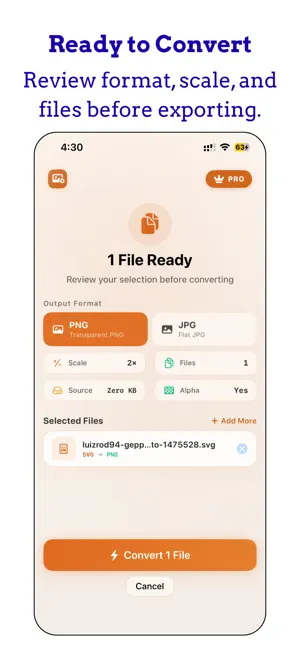
SVGPX is an SVG to PNG and JPG converter for iPhone. If you have SVG logos, icons, or artwork that need to be PNG or JPG, SVGPX is built for that one job. Choose SVG files from Files or Photos, convert them on your iPhone, and preview the PNG or JPG result first. CONVERT AND PREVIEW FIRST Start with the files you already have. Pick one SVG or several at once, convert them, and look at the result. You can see the PNG or JPG before you subscribe. Saving, sharing, and exporting require an SVGPX Pro subscription. HOW IT WORKS 1. Choose SVG files from the Files app or Photos 2. Pick PNG or JPG 3. Convert and preview the result 4. Subscribe to save to Photos, share, or export SVG CONVERTER FEATURES • SVG to PNG conversion, including files that need a transparent background • SVG to JPG conversion for smaller image files • Batch conversion from Files or Photos • Files up to 50 MB • Conversion scale from 1× to 3×, and up to 4× with SVGPX Pro • JPG quality: Compact, Balanced, or High • Conversion can continue while you return to the home screen • Light, Dark, or System appearance MADE FOR PEOPLE WHO NEED A USABLE IMAGE Designers, marketers, students, and anyone with an SVG logo, icon, or graphic can convert it to PNG or JPG on iPhone, then decide whether to keep the file. SVGPX PRO Processing and preview are included so you can try the conversion before you pay. An SVGPX Pro subscription is required to save PNG and JPG files to Photos, share them, or export them. SVGPX Pro is an auto-renewable subscription: • Weekly Plan • Annual Plan Prices are shown in the app and may vary by region. Payment is charged to your Apple ID when you confirm. The subscription renews unless you turn off auto-renew at least 24 hours before the current period ends. Manage or cancel in Settings > Apple ID > Subscriptions. Restore Purchases is available in the app if you already subscribed with this Apple ID. Subscriptions begin at purchase. There is no trial period. PRIVACY AND SUPPORT Conversion happens on your iPhone. SVGPX asks for Photos access only when you save a converted PNG or JPG. Terms of Use: https://www.apple.com/legal/internet-services/itunes/dev/stdeula/ Privacy Policy: https://1kbapps.com/svgpx/
What’s new
Version 2.0 · Updated September 7, 2026
Version 2.0 makes SVG to PNG and JPG conversion clearer from the first screen. • Convert SVG files and preview PNG or JPG results before you subscribe • Save, share, or export with an SVGPX Pro subscription • Improved conversion flow, progress, and file handling • Clearer subscription wording and Restore Purchases • Design and accessibility refinements throughout the app
App privacy
The developer, Vikram Singh, reported these privacy practices to Apple.
Data Not Collected
The developer does not collect any data from this app.
Alternatives to SVG to PNG & JPG: SVGPX
Looking for apps like SVG to PNG & JPG: SVGPX? Here are 6 similar apps on the App Store. The highest rated is SVGR (5.0/5), and all 6 are free to download.
-
 InkCut: Image to SVG & Stencil
-
 Vectorly: Image to SVG
-
 Cutline: Image to SVG
-
 No Prompts – AI Icon Generator
-
 SVG Illustrator - PolySVG
-
 SVGR
5.0
SVGR
5.0
| App | Rating | Price | Last updated | Compare |
|---|---|---|---|---|
| SVG to PNG & JPG: SVGPX | – | Free | September 7, 2026 | |
| InkCut: Image to SVG & Stencil | – | Free | Oct 21, 2026 | Compare |
| Vectorly: Image to SVG | – | Free | Sep 28, 2026 | Compare |
| Cutline: Image to SVG | – | Free | Sep 6, 2026 | Compare |
| No Prompts – AI Icon Generator | – | Free | Jul 18, 2026 | Compare |
| SVG Illustrator - PolySVG | – | Free | Oct 12, 2026 | Compare |
| SVGR | 5.0 / 5 (1) | Free | Sep 30, 2026 | Compare |