

Vidlify: Video Editor
Amr Saied Photo & Video iPhoneiPadiPod touch
Vidlify: Video Editor is a free Photo & Video app for iPhone and iPad by Amr Saied. Requires iOS 15.0. Updated April 9, 2026.
- Price
- Free
- on the App Store
- Size
- 80 MB
- Age 4+
- Updated
- Apr 9
- 2026 · v1.0.10
Screenshots

About Vidlify: Video Editor
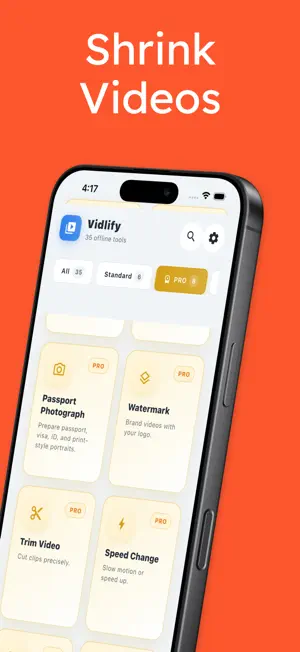
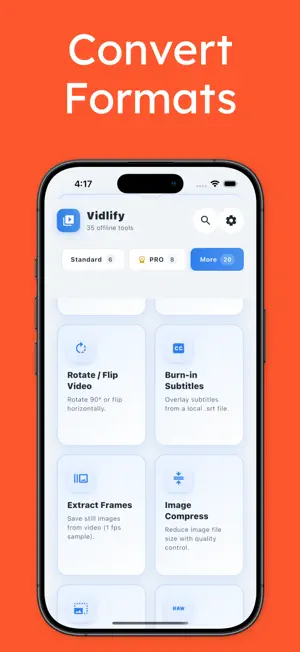
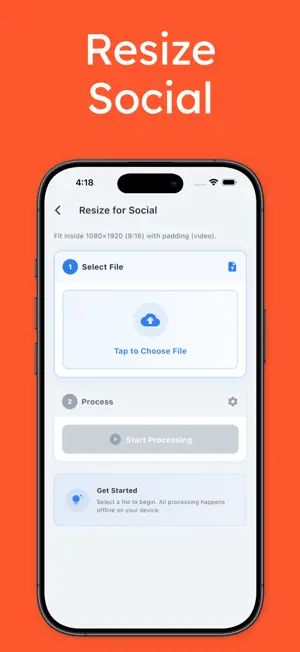
Vidlify empowers creators, small businesses, and anyone who needs quick, reliable video and image processing all within the palm of your hand. With a comprehensive suite of tools, Vidlify allows you to work offline, ensuring your files stay private while offering a seamless editing experience. VIDEO ESSENTIALS (STANDARD) • Compress video: Reduce file sizes for easier sharing without compromising quality. • Convert to MP4: Ensure compatibility across devices by converting common video formats to MP4. • Resize for social: Adapt videos to vertical 9:16 layouts with padding, perfect for social media. • Remove audio: Mute clips effortlessly with a single step. • Image to JPEG: Transform still images from PNG, WEBP, or GIF into JPEG for universal use. • Product card: Create clean, professional product listing-style cards from your photos. PRO TOOLS Unlock advanced manual editing features for more precise control: • Trim video: Cut clips with precision to focus on the moments that matter. • Speed change: Adjust playback speed for dramatic slow-motion or fast-forward effects. • Extract audio: Save audio tracks as MP3 files for independent use from video content. • GIF maker: Convert video moments into animated GIFs to share easily. • Watermark: Overlay your logo or watermark to protect your video content. • Passport photograph: Prepare ID-style portraits with ease using our specialized tool. • Status splitter: Divide long videos into shorter segments for status updates and sharing. MORE OFFLINE TOOLS Vidlify offers a wide range of additional tools, all available offline: • Merge two videos • Crop, rotate, or flip • Burn-in subtitles from local .srt files • Extract frames as images • Video reverse • Loop a segment • Audio fade • Loudness normalize • Replace audio track • Resolution and bitrate controls • Change frame rate • Picture-in-picture (overlay video on video) IMAGE TOOLKIT Our image tools further extend Vidlify's capabilities: • Compress & resize • HEIC to JPEG conversion • Strip EXIF metadata • Rotate and flip • Adjust brightness & contrast • Create collage grids WHY VIDLIFY? • Offline-first workflow: Process all your media locally on your device. • Many tools, one app: From quick compress tasks to detailed edits, it's all here. • Straightforward flows: Pick a tool, choose a file, and export with ease. Vidlify is your go-to solution for all video and image editing needs, delivering powerful features in an intuitive package. Note that some operations, such as reversing video or heavy re-encodes, may require more time and battery on larger files. While most functions are offline, an internet connection may occasionally be necessary for updates and support. Experience the freedom of offline editing with Vidlify. Download now and unlock the potential of your media creations.
What’s new
Version 1.0.10 · Updated April 9, 2026
Bug fixes and performance improvements.
App privacy
The developer, Amr Saied, reported these privacy practices to Apple.
Data Not Collected
The developer does not collect any data from this app.
Alternatives to Vidlify: Video Editor
Looking for apps like Vidlify: Video Editor? Here are 6 similar apps on the App Store. The highest rated is KakuCut: Video Editor (5.0/5), and all 6 are free to download.
-
 KakuCut: Video Editor
5.0
KakuCut: Video Editor
5.0
-
 Backdropy: Video Background
-
 CapSnap: AI Video Captions
-
 Screen Auckland
5.0
Screen Auckland
5.0
-
 Video Cutter & Trimmer
-
 NEOTA - AI Ad Maker
1.0
NEOTA - AI Ad Maker
1.0
| App | Rating | Price | Last updated | Compare |
|---|---|---|---|---|
| Vidlify: Video Editor | – | Free | April 9, 2026 | |
| KakuCut: Video Editor | 5.0 / 5 (1) | Free | Oct 15, 2026 | Compare |
| Backdropy: Video Background | – | Free | Oct 4, 2026 | Compare |
| CapSnap: AI Video Captions | – | Free | Jul 31, 2026 | Compare |
| Screen Auckland | 5.0 / 5 (1) | Free | Nov 21, 2025 | Compare |
| Video Cutter & Trimmer | – | Free | Aug 6, 2026 | Compare |
| NEOTA - AI Ad Maker | 1.0 / 5 (1) | Free | May 29, 2026 | Compare |