

Xpense Manager: smart and easy
Dmitrii Semenov Finance iPhoneiPadiPod touchMac
Xpense Manager: smart and easy is a free Finance app for iPhone and iPad by Dmitrii Semenov. Requires iOS 17.0. Updated April 14, 2026.
- Price
- Free
- on the App Store
- Size
- 6 MB
- Age 4+
- Updated
- Apr 14
- 2026 · v1.0.1
Screenshots



About Xpense Manager: smart and easy
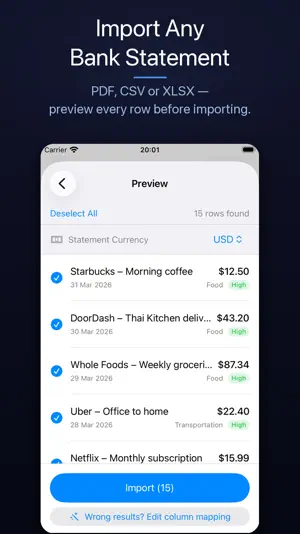
Know exactly where your money goes — without giving your data to anyone. No account. No internet connection required. No tracking. Just a fast, private expense tracker that lives entirely on your device. TRACK IN SECONDS Add an expense with three taps. The description field auto-suggests a category as you type, and the app remembers your choices for recurring merchants — so future entries categorize themselves. IMPORT YOUR BANK STATEMENTS Skip the manual entry entirely. Import PDF, CSV, or XLSX bank statements directly from Files or email. Xpense Manager parses transactions automatically — including from password-protected PDFs — previews every row before you commit, and flags duplicates so your data stays clean. The Template Wizard guides you through mapping columns in three steps for PDFs that could not be automatically processed. UNDERSTAND YOUR SPENDING A dashboard built for clarity: • Monthly snapshot: total spend, transaction count, and top category vs your 12-month average • Category breakdown: pie, donut, vertical bar, or horizontal bar chart • Trend explorer: monthly totals with MoM delta labels, yearly grouped view, and category trend lines • Filter by any date range — today, this month, last 3 months, or a custom window MULTI-CURRENCY, NO HASSLE Log expenses in any currency and see everything converted to your home currency on the dashboard. Bundled reference rates cover 150+ currencies — no internet required. Currency rates can be updated manually. Every release provide average currency rates for the current year. BUILT FOR PRIVACY Your financial data never leaves your device. No account. No tracking. No analytics. No backend. Fully offline. GDPR-compliant: delete everything in one tap via Settings → Delete All Data. KEEP YOUR DATA SAFE Back up expenses, categories, learned patterns, and settings to iCloud Drive or local device storage. Restore seamlessly at any time. FACE ID / TOUCH ID Lock the app with biometrics. Locks automatically after 30 seconds in the background. ——— Xpense Manager is free to use for manual tracking and up to 2 CSV/XLSX imports per month. You will also get 5 PDF imports for free to try this feature. Upgrade to Pro or Lifetime for unlimited imports and smart categorization matching and pattern building. Terms of Use: https://www.apple.com/legal/internet-services/itunes/dev/stdeula/
What’s new
Version 1.0.1 · Updated April 14, 2026
Bug fixes and minor updates
App privacy
The developer, Dmitrii Semenov, reported these privacy practices to Apple.
Data Not Collected
The developer does not collect any data from this app.
Alternatives to Xpense Manager: smart and easy
Looking for apps like Xpense Manager: smart and easy? Here are 6 similar apps on the App Store. The highest rated is BalanceCast, Budget & Forecast (5.0/5), and all 6 are free to download.
-
 LEDGR: Finance & Budgeting
-
 FinanceToolkitt
-
 Budget Flux - Expense Manager
-
 Hisabi: AI Expense Tracker
-
 BalanceCast, Budget & Forecast
5.0
-
 Budget & Expense - SnapCents
5.0
| App | Rating | Price | Last updated | Compare |
|---|---|---|---|---|
| Xpense Manager: smart and easy | – | Free | April 14, 2026 | |
| LEDGR: Finance & Budgeting | – | Free | May 7, 2026 | Compare |
| FinanceToolkitt | – | Free | Aug 19, 2026 | Compare |
| Budget Flux - Expense Manager | – | Free | Apr 4, 2026 | Compare |
| Hisabi: AI Expense Tracker | – | Free | Jun 11, 2026 | Compare |
| BalanceCast, Budget & Forecast | 5.0 / 5 (1) | Free | Oct 5, 2026 | Compare |
| Budget & Expense - SnapCents | 5.0 / 5 (4) | Free | Aug 2, 2026 | Compare |