

Overtime Pay Pro: Wage Calc
Edry Garcia Finance iPhoneiPadiPod touch
Overtime Pay Pro: Wage Calc is a free Finance app for iPhone and iPad by Edry Garcia. Requires iOS 15.1. Updated May 29, 2026.
- Price
- Free
- on the App Store
- Size
- 18 MB
- Age 17+
- Updated
- May 29
- 2026 · v1.2
Screenshots


About Overtime Pay Pro: Wage Calc
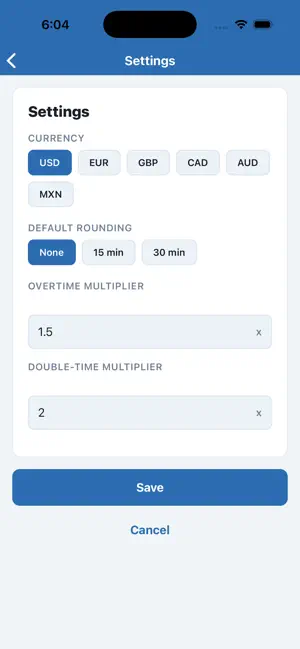
Overtime Pay Pro – Fast, Accurate, Professional Calculate your total earnings—including overtime, double-time, holiday pay, and shift differentials—in seconds. Designed for hourly employees, freelancers, shift workers, and contractors who need a fast, accurate pay breakdown without the spreadsheet. Try free for 7 days! After your trial, continue with Premium for just $4.99/month or $29.99/year. WHAT'S INCLUDED Wage Calculator: Enter your hourly rate and hours worked for an instant breakdown of regular, overtime, double-time, holiday, and shift differential pay—all displayed separately. Overtime & Double-Time: Built-in 1.5x and 2x support. Set your own custom overtime multipliers to match your company's exact rules. Daily OT Mode (California-Style): Automatically calculate overtime after 8 hours per day and double-time after 12 hours. Just enter hours per day and days worked—the app does the rest. Holiday Pay: Enter holiday hours with a configurable multiplier (default 1.5x) to include holiday earnings in your total. Shift Differential: Add a fixed extra dollar amount per hour for night shifts, weekend shifts, or any premium rate your employer pays. Annual Earnings Projection: See your estimated yearly income based on your current pay period and total earnings—instantly. Pay Breakdown Chart: Visual stacked bar chart showing exactly how your total pay is split between regular, overtime, double-time, holiday, and shift differential earnings. Flexible Pay Periods: Switch between weekly, biweekly, semi-monthly, and monthly cycles. Every calculation adjusts automatically. Hour Rounding: Automatically round to the nearest 15 or 30 minutes to match how your employer tracks time. Toggle on or off with a tap. Break Deduction: Effortlessly subtract unpaid break time. Enter your duration and the app removes it before calculating your total. Multi-Currency: Support for USD, EUR, GBP, CAD, AUD, and MXN. Switch currencies in one tap. Save & Review History: Store unlimited pay calculations and review them anytime. Compare shifts and track your earnings over time. Earnings Trend Chart: A visual chart of your last 8 saved calculations so you can see how your pay changes week to week. Export to CSV: Share your full pay history as a CSV file via email, Messages, or any app on your device. Search & Filter History: Quickly find any saved calculation by label. Share Results: Send your full pay summary—including annual projection—via Messages, email, or any sharing app on your device. WHO IT'S FOR Nurses, CNAs, and healthcare workers Retail and restaurant employees Construction workers and tradespeople Freelancers and contractors billing hourly Shift workers with variable schedules California workers subject to daily overtime rules Anyone who wants to verify their paycheck before payday SUBSCRIPTION INFORMATION Premium Monthly: $4.99/month Premium Yearly: $29.99/year 7-day free trial for new subscribers. Payment will be charged to your Apple ID after the trial ends. Subscriptions renew automatically unless canceled at least 24 hours before the end of the current period. Manage or cancel in your Apple ID account settings. Terms of Use: https://www.apple.com/legal/internet-services/itunes/dev/stdeula/ Privacy Policy: https://fennec-it.com/privacy
What’s new
Version 1.2 · Updated May 29, 2026
New in this update: • Daily OT Mode — enter hours per day and days worked; the app automatically applies overtime after 8 hrs/day (1.5x) and double-time after 12 hrs/day (2x), perfect for California workers and daily-rate jobs. • Holiday Pay — add holiday hours with a configurable multiplier, included in your total and saved to history. • Shift Differential — add a fixed extra $/hr for night, weekend, or premium shifts. • Semi-Monthly & Monthly Pay Periods — two new pay cycles in addition to weekly and biweekly. • Annual Earnings Projection — see your estimated yearly income on every result. • Pay Breakdown Chart — visual stacked bar showing how your total pay is split across all pay types. • Earnings Trend Chart — bar chart of your last 8 saved calculations in History. • Export to CSV — share your full pay history as a spreadsheet file. • Search History — filter saved calculations by label instantly. • Improved Share — the full pay summary now includes all pay types and your annual projection.
App privacy
The developer, Edry Garcia, reported these privacy practices to Apple.
Data Not Collected
The developer does not collect any data from this app.
Alternatives to Overtime Pay Pro: Wage Calc
Looking for apps like Overtime Pay Pro: Wage Calc? Here are 6 similar apps on the App Store. The highest rated is Plantilla Hub (5.0/5), and 5 of the 6 are free to download.
-
 Plantilla Hub
5.0
Plantilla Hub
5.0
-
 Punchcard: Hours & Pay
-
 Work Hours & Time Card
-
 PaycheckIQ Paycheck Calculator
5.0
PaycheckIQ Paycheck Calculator
5.0
-
 TakeHomeIQ Paycheck Calculator
5.0
TakeHomeIQ Paycheck Calculator
5.0
-
 Income Tax Calculator (AU&NZ)
5.0
Income Tax Calculator (AU&NZ)
5.0
| App | Rating | Price | Last updated | Compare |
|---|---|---|---|---|
| Overtime Pay Pro: Wage Calc | – | Free | May 29, 2026 | |
| Plantilla Hub | 5.0 / 5 (1) | Free | Sep 30, 2026 | Compare |
| Punchcard: Hours & Pay | – | Free | Oct 14, 2026 | Compare |
| Work Hours & Time Card | – | Free | Oct 7, 2026 | Compare |
| PaycheckIQ Paycheck Calculator | 5.0 / 5 (1) | Free | Jun 13, 2026 | Compare |
| TakeHomeIQ Paycheck Calculator | 5.0 / 5 (3) | Free | Oct 3, 2026 | Compare |
| Income Tax Calculator (AU&NZ) | 5.0 / 5 (1) | 0.99 USD | Mar 11, 2026 | Compare |