

Trigo Freelancer Tracker
Sellera GmbH Productivity iPhoneiPadiPod touch
Trigo Freelancer Tracker is a free Productivity app for iPhone and iPad by Sellera GmbH. Requires iOS 15.0. Updated October 15, 2026.
- Price
- Free
- on the App Store
- Size
- 42 MB
- Age 4+
- Updated
- Oct 15
- 2026 · v20261014
Screenshots

About Trigo Freelancer Tracker
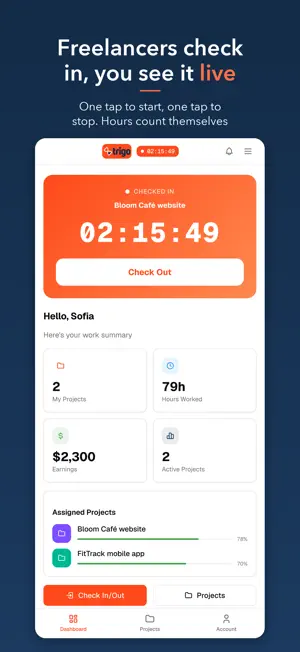
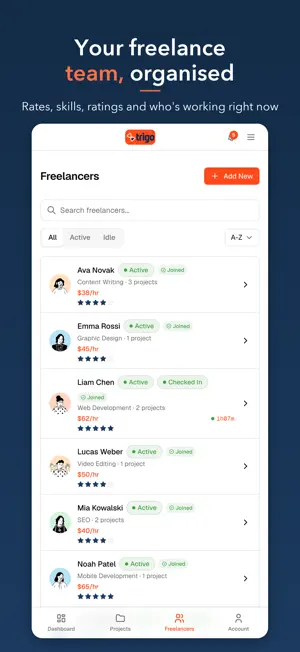
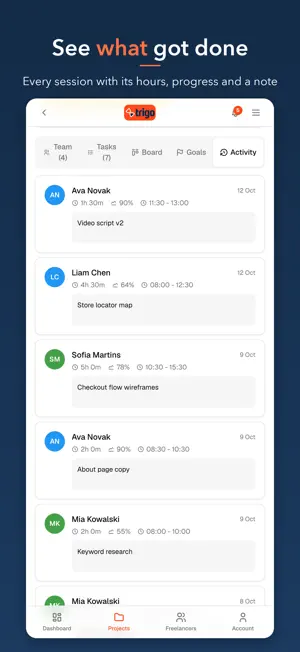
Trigo is the simple way to work with freelancers. One app for the project manager who hires them, and for the freelancers who do the work. ONE APP, TWO SIDES • For you: every project with its budget, timeline and team, every freelancer with their rate, live check-ins, invoices and reports. • For your freelancers: check in and out with one tap, log hours, and see their projects, tasks and progress. HOW IT WORKS 1. Create a project and set the budget and the dates. 2. Add freelancers with their hourly rate and invite them by email. 3. They check in when they start and check out with a note on what got done. You get notified. 4. Hours, progress and spending add up by themselves. Invoice in one tap. WHAT YOU GET • A live check-in timer, and a notification when work starts and ends • An activity log: every session with its hours, progress and a note • Budget and hours per project and per freelancer, with an alert before the limit • Tasks on a board (to do, in progress, review, done) and goal points with dates • Invoices and project reports built from the hours worked, ready to print • Freelancer profiles with skills, rates and ratings, and who is working right now • Optional GPS location on check-in • A dashboard across all projects: spending, logged hours and deadlines • 13 languages, on iPhone, iPad and the web (app.trigo.work) WHO USES TRIGO Agencies and studios working with designers, developers and writers. Startups with remote contractors. Small businesses that hire help by the hour. And freelancers who want a clean record of their own hours. FREE TO START Trigo is free for one project with up to two freelancers. Subscribe for unlimited projects and freelancers. Apple's standard Terms of Use (EULA): https://www.apple.com/legal/internet-services/itunes/dev/stdeula/ Account deletion: https://trigo.work/account-deletion Offering 1-Month / 3-Months / 6-Months Subscription options: Payment will be charged to your store account at confirmation of purchase. Subscription automatically renews unless auto-renew is turned off at least 24 hours before the end of the current period. Your account will be charged for renewal within 24 hours before the end of the current period. You can manage or turn off auto-renew in your Account settings anytime after purchase. No cancellation of the current subscription is allowed during the active period. Terms of use: https://trigo.work/terms-of-use Privacy policy: https://trigo.work/privacy-policy
What’s new
Version 20261014 · Updated October 15, 2026
Some new UI you will like
App privacy
The developer, Sellera GmbH, reported these privacy practices to Apple.
Data Linked to You
The following data, which may be collected and linked to your identity, may be used for the following purposes:
- Location: Precise Location
- Contact Info: Physical Address, Email Address, Name, Phone Number
- Contacts: Contacts
Used for: Analytics, Product Personalization, App Functionality
Alternatives to Trigo Freelancer Tracker
Looking for apps like Trigo Freelancer Tracker? Here are 6 similar apps on the App Store. The highest rated is Photo Gallery - Photo Recovery (5.0/5), and all 6 are free to download.
-
 Loqaly: Local AI Assistant
4.0
Loqaly: Local AI Assistant
4.0
-
 NoteX Ai Meeting Notes
-
 DWTC WorkHub
-
 SaveToList - Smart Bookmarks
4.1
SaveToList - Smart Bookmarks
4.1
-
 Hotdesk: Book Workspaces
4.1
Hotdesk: Book Workspaces
4.1
-
 Photo Gallery - Photo Recovery
5.0
Photo Gallery - Photo Recovery
5.0
| App | Rating | Price | Last updated | Compare |
|---|---|---|---|---|
| Trigo Freelancer Tracker | – | Free | October 15, 2026 | |
| Loqaly: Local AI Assistant | 4.0 / 5 (1) | Free | May 27, 2026 | Compare |
| NoteX Ai Meeting Notes | – | Free | May 22, 2026 | Compare |
| DWTC WorkHub | – | Free | Dec 18, 2025 | Compare |
| SaveToList - Smart Bookmarks | 4.1 / 5 (14) | Free | Oct 22, 2026 | Compare |
| Hotdesk: Book Workspaces | 4.1 / 5 (11) | Free | Sep 20, 2026 | Compare |
| Photo Gallery - Photo Recovery | 5.0 / 5 (2) | Free | Oct 16, 2026 | Compare |