

Easy Ringtone Maker: Song Cut
Kenichi Ando Music iPhoneiPadiPod touch
Easy Ringtone Maker: Song Cut is a free Music app for iPhone and iPad by Kenichi Ando. Requires iOS 15.0. Updated September 25, 2026.
- Price
- Free
- on the App Store
- Size
- 31 MB
- Age 4+
- Updated
- Sep 25
- 2026 · v2.0.0
Screenshots


About Easy Ringtone Maker: Song Cut
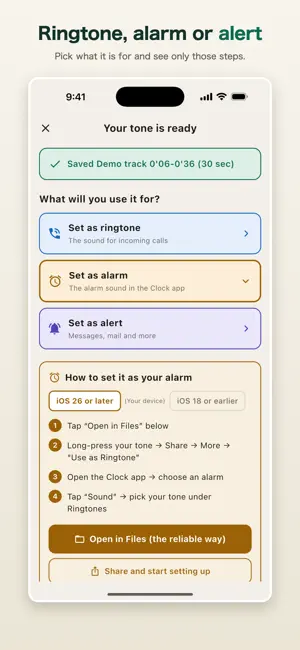
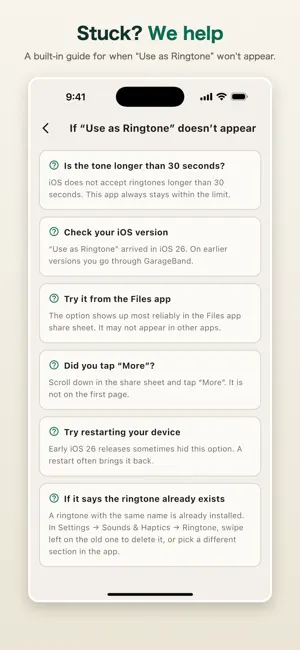
Works with songs you bought on Apple Music. Turn the best part of any song into a ringtone, an alarm, or an alert sound. No music knowledge needed. CAN I USE APPLE MUSIC SONGS? This is the question we get most, so here it is up front. - Songs you purchased: yes - Songs you listen to through a streaming subscription: no Streaming tracks are copy-protected, and Apple's rules do not allow them to become ringtones. Every ringtone app hits the same wall, including the ones that claim otherwise. Songs you purchased, music synced from a computer, your own recordings, and audio files in the Files app all work fine. The app says so on screen when you pick a song. CHANGING YOUR RINGTONE IS FINALLY EASY Setting a custom ringtone on iPhone used to be a chore: a long detour through a separate app (GarageBand), where a lot of people gave up. iOS 26 changed that. Share your tone, choose "Use as Ringtone", and it is done. This app exports in exactly the form that new route expects: an m4a of 30 seconds or less. Making a tone and actually hearing it ring are finally close together. On iOS 18 and earlier we still walk you through the old steps. The app checks your iOS version and shows only the steps that apply, so either way you are not left guessing. THREE STEPS 1. Choose a song 2. Drag both ends of the waveform to pick the part you want 3. Tap "Create this tone" and give it a name That is all. One path, top to bottom, with no branches. THE 30-SECOND LIMIT IS HANDLED FOR YOU iPhone ringtones have to be 30 seconds or shorter. This app simply will not let you select more than that. Drag the right handle further right and the left handle follows, so your selection always stays within the limit. WE WALK YOU THROUGH THE HARD PART: ACTUALLY SETTING IT Making the sound is easy. Getting it onto your phone as a real ringtone is where most people give up. After your tone is ready, this app asks what you want to use it for: - A ringtone, for incoming calls - An alarm, in the Clock app - An alert, for messages and notifications Then it shows only the steps for that one purpose. Alarms need two stages (set it as a ringtone first, then choose it in the Clock app), and we spell that out clearly. The app also checks which version of iOS your device is running and shows only the steps that apply. On iOS 26 and later it is a few taps from the share sheet. On earlier versions we walk you through GarageBand. You never have to work out which one you are on. WHEN IT DOES NOT WORK We know "Use as Ringtone" sometimes fails to appear. A troubleshooting guide is built into the app: is the tone under 30 seconds, which iOS are you on, did you try the Files app, did you tap "More". WHAT YOU CAN USE - Songs you purchased - Music files synced from a computer - Your own recordings - mp3, m4a, wav, aiff and other audio files in the Files app A DEMO TRACK IS INCLUDED No music on your device yet? A demo track is built in, so you can try the whole thing straight away. WORKS ON IPAD Same app, same steps. PREMIUM (ONE-TIME PURCHASE) The free version lets you load a song, cut it, export one tone, and use the full setup guide. Make one and see how it feels first. Premium is a one-time purchase. It is not a subscription. - Fade in and fade out - Volume adjustment (capped automatically so it never clips) - Keep as many tones as you like, and delete them from a list - No ads Buy it once and it stays yours. Restore it on any device using the same Apple Account. ABOUT Made by one independent developer in Japan. Requests and problems are welcome through "About this app" inside the app. Every message gets read. TERMS AND CONTACT Privacy Policy https://tenmais.jp/privacy.php?lang=en Support and contact https://tenmais.jp/ Terms of Use (Apple's standard EULA) https://www.apple.com/legal/internet-services/itunes/dev/stdeula/ You can reach all of these from the app's Settings screen at any time.
What’s new
Version 2.0.0 · Updated September 25, 2026
With version 2.0, this app has become a ringtone maker. Take the best part of a song you own and turn it into a ringtone, an alarm sound or an alert tone. No music knowledge needed. - Make ringtones from songs you bought on Apple Music. Streaming subscription tracks are copy-protected and Apple's rules do not allow them as ringtones; the app tells you this when you pick a song - Setting a ringtone got much easier in iOS 26, and this app exports in exactly the form that new route expects - Load a song and drag both ends of the waveform to pick the part you want - The 30-second ringtone limit is enforced automatically, so a tone is never too long to use - Choose ringtone, alarm or alert, and see only the steps for that purpose - The app detects your iOS version and shows only the steps that apply - A troubleshooting guide for when "Use as Ringtone" does not appear - A demo track is built in, so you can try it with no music of your own - iPad supported - Name each tone before you create it, so you know what it was for later - Delete tones you no longer need from the "Tones you made" list - Volume boost is capped per song, so tones never clip The previous ear-training features (slow playback, A-B repeat) are no longer part of this app. We are sorry for the inconvenience. Let us know what you think through "About this app" inside the app.
App privacy
The developer, Kenichi Ando, reported these privacy practices to Apple.
Data Used to Track You
The following data may be used to track you across apps and websites owned by other companies:
- Location: Coarse Location
- Identifiers: Device ID
- Usage Data: Advertising Data
Data Not Linked to You
The following data, which may be collected but is not linked to your identity, may be used for the following purposes:
- Location: Coarse Location
- Identifiers: Device ID
- Usage Data: Advertising Data
Used for: Third-Party Advertising, Analytics
Alternatives to Easy Ringtone Maker: Song Cut
Looking for apps like Easy Ringtone Maker: Song Cut? Here are 6 similar apps on the App Store. The highest rated is Phonoria (5.0/5), and all 6 are free to download.
-
 Musician's Looper
-
 Phonoria
5.0
Phonoria
5.0
-
 Loop Practice: Reprise
5.0
Loop Practice: Reprise
5.0
-
 PracTone - Fine-tune Your Play
5.0
PracTone - Fine-tune Your Play
5.0
-
 EarCopy - Music Practice
3.0
EarCopy - Music Practice
3.0
-
 Drums Extractor - for musician
3.9
Drums Extractor - for musician
3.9
| App | Rating | Price | Last updated | Compare |
|---|---|---|---|---|
| Easy Ringtone Maker: Song Cut | – | Free | September 25, 2026 | |
| Musician's Looper | – | Free | Sep 17, 2026 | Compare |
| Phonoria | 5.0 / 5 (1) | Free | Sep 21, 2026 | Compare |
| Loop Practice: Reprise | 5.0 / 5 (3) | Free | Sep 6, 2026 | Compare |
| PracTone - Fine-tune Your Play | 5.0 / 5 (2) | Free | Jul 18, 2026 | Compare |
| EarCopy - Music Practice | 3.0 / 5 (2) | Free | Mar 3, 2026 | Compare |
| Drums Extractor - for musician | 3.9 / 5 (27) | Free | Jan 7, 2026 | Compare |