

SpeakSmart: Voice to Text AI
AppMog Ltd Productivity iPhoneiPadiPod touch
SpeakSmart: Voice to Text AI is a free Productivity app for iPhone and iPad by AppMog Ltd. Requires iOS 17.0. Updated March 25, 2026.
- Price
- Free
- on the App Store
- Size
- 2 MB
- Age 4+
- Updated
- Mar 25
- 2026 · v1.1
Screenshots


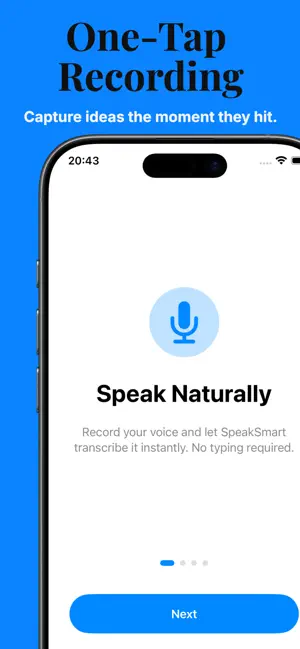
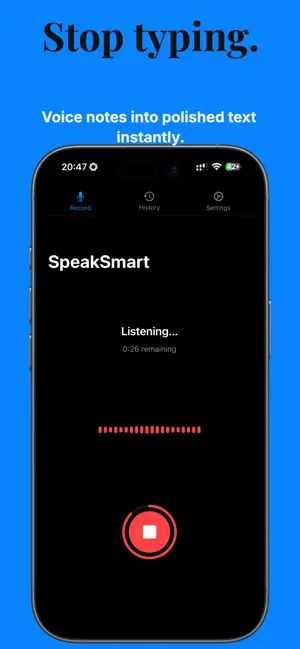
About SpeakSmart: Voice to Text AI
Stop typing. Start speaking. Record a rambling voice memo. Get a polished email, social post, or meeting note back in seconds. SpeakSmart rewrites your raw thoughts into clean, professional text — so you sound like a pro without the effort. No more staring at a blank screen. Just speak, and SpeakSmart does the writing. HOW IT WORKS 1. Record Your Thoughts Hit record and speak naturally. Ramble, pause, think out loud. You get up to 30 seconds per recording — more than enough to capture an idea, draft a message, or summarise a meeting. 2. Choose Your Style Pick a writing tone: Professional, Casual, Funny, Polite, Persuasive, Concise, Formal, Creative, and more. 3. Copy Perfect Text Publication-ready text in under 3 seconds. Paste anywhere — email, Slack, Twitter, LinkedIn, WhatsApp, Notes. Done. 4. Save to History Want to keep a rewrite for later? Save it to your history and come back to it any time. Your rewrites, on-device, private. COMPLETELY FREE — NO SUBSCRIPTIONS, NO PAYWALLS SpeakSmart is free. Unlimited recordings, unlimited rewrites, no hidden tiers. Download it and use it. On a modern iPhone with Apple Intelligence? Everything runs on-device at no cost whatsoever. Prefer to use OpenAI? Add your own API key in Settings and SpeakSmart will use it directly. You pay OpenAI for what you use — fractions of a penny per rewrite — and nothing goes through us. WORKS WITH SIRI Trigger SpeakSmart hands-free: • "Hey Siri, Create Smart Note" — record and rewrite without opening the app • "Hey Siri, Draft Email" — voice-to-email in seconds • Set up custom shortcuts for your favourite tones PRIVACY YOU CAN TRUST • On-device Apple Intelligence (iOS 26+) — AI runs locally, nothing uploaded • Bring your own OpenAI API key for older devices • Keychain-secured keys — industry-standard encryption • Zero data collection — we don't see, store, or sell your recordings • No account required. No tracking. PERFECT FOR • Professionals — emails, meeting notes, and proposals while commuting • Writers & Creators — turn voice notes into blog posts or captions • Students — record lectures, get clean notes instantly • Social Media Managers — engaging posts without typing • Accessibility Users — hands-free writing for dyslexia, motor impairments, or voice-first input FREQUENTLY ASKED QUESTIONS Is SpeakSmart really free? Yes. Unlimited recordings and rewrites, no subscription, no paywall. If you use Apple Intelligence it costs nothing at all. If you use your own OpenAI API key, you pay OpenAI directly — SpeakSmart never charges you. Which devices support Apple Intelligence? iPhone 15 Pro and later, and all iPhone 16 models, running iOS 26 or above. All other devices can use the OpenAI API key option. How do I add my OpenAI API key? Go to Settings in the app and paste your key. It's stored in your device's Keychain — SpeakSmart never sees it. Is my voice data stored or shared? No. With Apple Intelligence, nothing leaves your device. With OpenAI, audio is processed by OpenAI under their privacy policy. SpeakSmart collects nothing. Does it work offline? Yes — when using Apple Intelligence. The OpenAI option requires an internet connection. Can I access previous rewrites? Yes. Save any rewrite to your history and pull it up whenever you need it. Support: [email protected] | appmog.app/speaksmart
App privacy
The developer, AppMog Ltd, reported these privacy practices to Apple.
Data Not Linked to You
The following data, which may be collected but is not linked to your identity, may be used for the following purposes:
- User Content: Audio Data, Other User Content
Used for: App Functionality
Alternatives to SpeakSmart: Voice to Text AI
Looking for apps like SpeakSmart: Voice to Text AI? Here are 6 similar apps on the App Store. The highest rated is Flow: A Voice to Do Anything (5.0/5), and all 6 are free to download.
-
 SpeechKit Smart Voice to Text
-
 Flow: A Voice to Do Anything
5.0
Flow: A Voice to Do Anything
5.0
-
 NestTrack CRM
5.0
NestTrack CRM
5.0
-
 Decision - Speech-to-text
-
 Clak – Voice to Text
-
 HivemindOS Mobile
5.0
HivemindOS Mobile
5.0
| App | Rating | Price | Last updated | Compare |
|---|---|---|---|---|
| SpeakSmart: Voice to Text AI | – | Free | March 25, 2026 | |
| SpeechKit Smart Voice to Text | – | Free | Oct 13, 2025 | Compare |
| Flow: A Voice to Do Anything | 5.0 / 5 (2) | Free | Oct 22, 2026 | Compare |
| NestTrack CRM | 5.0 / 5 (2) | Free | Jul 31, 2026 | Compare |
| Decision - Speech-to-text | – | Free | Apr 24, 2025 | Compare |
| Clak – Voice to Text | – | Free | Oct 23, 2026 | Compare |
| HivemindOS Mobile | 5.0 / 5 (1) | Free | Oct 16, 2026 | Compare |