

TriAla - Flight Boarding Alarm
Kohei Omori Travel iPhoneiPadiPod touch
TriAla - Flight Boarding Alarm is a free Travel app for iPhone and iPad by Kohei Omori. Requires iOS 13.0. Updated May 19, 2026.
- Price
- Free
- on the App Store
- Size
- 30 MB
- Age 4+
- Updated
- May 19
- 2026 · v1.5.8
Screenshots

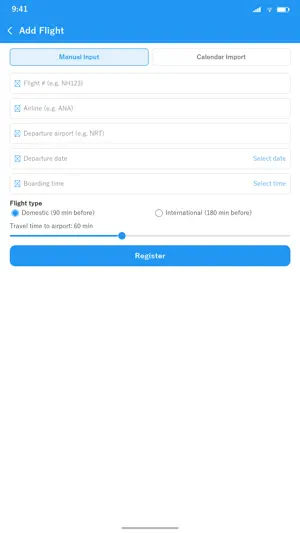


About TriAla - Flight Boarding Alarm
**Never miss a flight again** Triala calculates your preparation timeline from boarding time and sends step-by-step notifications. With 4 milestone alarms — wake up, leave home, arrive at airport, and boarding — you'll always make your flight. Import existing flight events from your iPhone Calendar with one tap — no duplicate entry needed (Premium). --- **Perfect For** - Travelers who want peace of mind - Those who lose track of time at airport shops and restaurants - Early morning or late night flyers worried about oversleeping - Passengers with connecting flights - Frequent flyers who manage trips in Calendar --- **Key Features** **4-Step Alarm System** - Wake Up: Start getting ready - Leave Home: Head to the airport now - Arrive at Airport: Time to check in - Boarding: Proceed to your gate **Calendar Import (Premium)** Pick existing flight events from your iPhone Calendar and import them in one tap. **Calendar Auto-Sync (Premium)** New flight events in your Calendar are imported automatically. **Auto-extract from Calendar (Premium)** Pull terminal, gate, arrival airport, and airline name from your calendar event automatically. One-tap Apple Wallet boarding pass. **Auto-detect canceled flights (Premium)** When your calendar marks a flight as canceled, Triala stops the alarm automatically. **Export Flight History (Premium)** Export your registered flights as CSV / JSON for expense reports. --- **Free vs Premium** **Free Plan** - 1 flight registration - All 4 step notifications - Manual entry **Premium Plan ($5.99 lifetime, one-time purchase)** - Unlimited flights - Calendar import (auto-fill flight info) - Calendar auto-sync - Auto-extract terminal / gate / arrival airport / airline name - Apple Wallet one-tap access - Cancelled flight auto-detection - PNR and seat number auto-extraction - Export flight history (CSV / JSON) --- **Pricing** - Premium (one-time): $5.99 — lifetime, no subscription Payment via App Store. Restore your purchase on a new device anytime. Local prices vary by region. Terms: https://www.apple.com/legal/internet-services/itunes/dev/stdeula/ Privacy: https://koheiomorijp.github.io/fright_alarm_application/privacy-policy.html --- **Privacy First** - Flight data encrypted on device (never sent to external servers) - Calendar access is read-only and used only during import - No location or contact access --- **Support** [email protected]
What’s new
Version 1.5.8 · Updated May 19, 2026
v1.5.8 Update: - Internal maintenance - Minor bug fixes $5.99 lifetime, no subscription — still here.
App privacy
The developer, Kohei Omori, reported these privacy practices to Apple.
Data Not Linked to You
The following data, which may be collected but is not linked to your identity, may be used for the following purposes:
- Purchases: Purchase History
- Usage Data: Other Usage Data
- Diagnostics: Crash Data, Performance Data
Used for: Analytics, App Functionality
Alternatives to TriAla - Flight Boarding Alarm
Looking for apps like TriAla - Flight Boarding Alarm? Here are 6 similar apps on the App Store. The highest rated is Sorom: Travel Planner & Guide (5.0/5), and all 6 are free to download.
-
 Sorom: Travel Planner & Guide
5.0
-
 Flight Information Global
4.7
-
 Spanish Word: Basic Vocabulary
4.5
-
 Flight Board - Plane Tracker
4.6
-
 QuickTicket by WeGO
4.7
-
 LOUIS VUITTON CITY GUIDE
3.6
| App | Rating | Price | Last updated | Compare |
|---|---|---|---|---|
| TriAla - Flight Boarding Alarm | – | Free | May 19, 2026 | |
| Sorom: Travel Planner & Guide | 5.0 / 5 (1) | Free | Sep 18, 2026 | Compare |
| Flight Information Global | 4.7 / 5 (1,122) | Free | Oct 17, 2026 | Compare |
| Spanish Word: Basic Vocabulary | 4.5 / 5 (41) | Free | Dec 19, 2025 | Compare |
| Flight Board - Plane Tracker | 4.6 / 5 (1,968) | Free | Jan 4, 2026 | Compare |
| QuickTicket by WeGO | 4.7 / 5 (1,940) | Free | Sep 21, 2026 | Compare |
| LOUIS VUITTON CITY GUIDE | 3.6 / 5 (111) | Free | Oct 16, 2026 | Compare |