

MetricPull
CURTIS LEE EVANS Health & Fitness iPhoneiPadiPod touch
MetricPull is a free Health & Fitness app for iPhone and iPad by CURTIS LEE EVANS. Requires iOS 17.6. Updated September 6, 2026.
- Price
- Free
- on the App Store
- Size
- 3 MB
- Age 4+
- Updated
- Sep 6
- 2026 · v2.0
Screenshots


About MetricPull
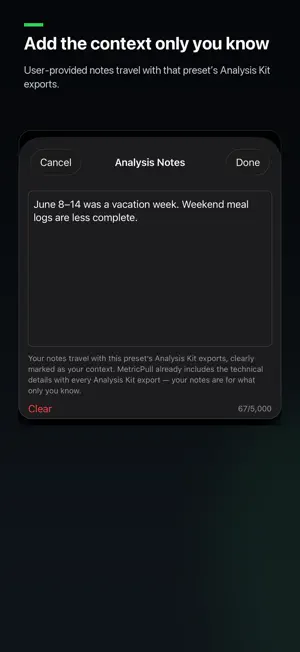
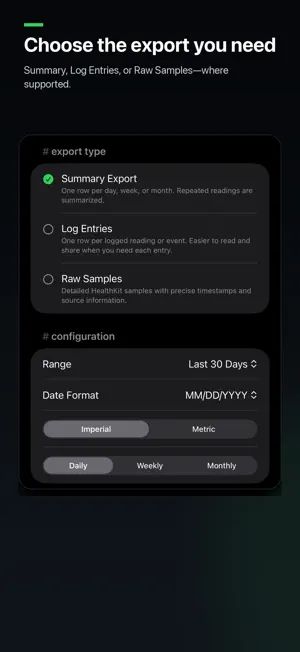
YOUR HEALTH DATA, YOUR CHOICE Your health data should be useful wherever you choose. Apple Health brings data from compatible apps and devices together. MetricPull turns it into portable, context-rich CSV files you can save, archive, share, analyze, or use with the tools you choose. Choose the metrics, date range, and level of detail. Processing stays on device. MetricPull requires no account or cloud backend and never uploads Health data automatically. CHOOSE THE RIGHT LEVEL OF DETAIL • Summary: Review daily, weekly, or monthly trends. • Log Entries: Export readable individual measurements, events, supported sleep records, and workouts. • Raw Samples: Preserve detailed Apple Health records with precise timestamps, provenance, and record identifiers where supported. HEART RATE AND WORKOUT RECORDS Resting Heart Rate, Walking Heart Rate Average, Cardio Fitness, and Heart Rate Variability support Log Entries and Raw Samples when selected individually. Ordinary Heart Rate supports Raw Samples when selected alone. Workouts support readable Log Entries and detailed Raw Samples when selected alone. Workout Raw preserves activity type, timestamps, stored duration, active energy, one supported distance total when available, available source and device details, and record identifier. MetricPull does not reconstruct pauses, routes, locations, or overlapping workouts. DETAILED SLEEP RECORDS Select Time Asleep on its own to export each sleep segment stored in Apple Health: • Log Entries: Readable records with sleep stage, start and end times, duration, and attributed night. • Raw Samples: Detailed records with original timestamps, stages, available source and device details, and record identifiers. Existing Sleep Summary exports remain available for daily, weekly, and monthly analysis. ANALYSIS KIT Optional Analysis Kits package your export with plain-language instructions. Log Entries and Raw Samples kits also include a separate structured metadata file. Together, the package contents explain: • Column meanings and units • Date and timestamp formats • Missing-data behavior • Source and measuring-device information • Record identity and deduplication guidance • Known Apple Health limitations Analysis Kits adapt to each export and reduce ambiguity when working with AI assistants, spreadsheets, scripts, or other analysis tools. MetricPull does not run an AI model or send your data to an AI service. TAKE YOUR FULL HISTORY WITH YOU Go beyond summaries and daily averages. Export large, record-level datasets—such as years of individual Heart Rate readings or your available Workout history—while preserving precise timestamps, available source and device details, and record identifiers. Keep the data as your own archive, analyze it in spreadsheets or scripts, or use it with the tools and services you choose. Supported full-record exports include progress and cancellation. 70 APPLE HEALTH METRICS Build exports from health data across: • Body measurements • Activity • Heart health • Sleep • Vitals • Nutrition REUSABLE PRESETS Start with one of ten built-in presets or save your own recurring workflow. Choose metrics and column order, then configure date range, aggregation, units, and formatting. QUICK METRICS Review charts, rolling averages, comparisons, minimum and maximum values, and recent trends without creating an export. PRIVACY BY DESIGN • Read-only Apple Health access • Processing happens on your device • No accounts • No MetricPull cloud backend • No analytics or tracking SDKs • No automatic uploads • You choose what to export and when and where to share it MetricPull helps you use your Apple Health data on your terms. It does not diagnose conditions, prescribe treatment, monitor emergencies, or provide medical advice.
What’s new
Version 2.0 · Updated September 6, 2026
MetricPull 2.0 gives you more control over your Apple Health data. • Export ordinary Heart Rate readings as Raw Samples. • Export Workouts as Raw Samples, including stored duration, active energy, a supported distance total, available source and device details, and record identifiers. • Export Resting Heart Rate, Walking Heart Rate Average, and Cardio Fitness as Log Entries or Raw Samples. • Create Analysis Kits for supported Log Entries and Raw Samples, not just Summary exports. • Track progress and cancel supported full-record exports. • Improved reliability and responsiveness for large exports. Summary exports, Quick Metrics, presets, and previously supported formats remain compatible. Processing remains on device.
App privacy
The developer, CURTIS LEE EVANS, reported these privacy practices to Apple.
Data Not Collected
The developer does not collect any data from this app.
Alternatives to MetricPull
Looking for apps like MetricPull? Here are 6 similar apps on the App Store. The highest rated is Health Trends & CSV Export (5.0/5), and all 6 are free to download.
-
 Health Data Bridge
-
 Health Trends & CSV Export
5.0
Health Trends & CSV Export
5.0
-
 Nave - Food Scanner & Tracker
4.5
Nave - Food Scanner & Tracker
4.5
-
 Health Data Export App
-
 Workout Exporter for AI
-
 Heart Rate Monitor: PulsePoint
| App | Rating | Price | Last updated | Compare |
|---|---|---|---|---|
| MetricPull | – | Free | September 6, 2026 | |
| Health Data Bridge | – | Free | Mar 12, 2025 | Compare |
| Health Trends & CSV Export | 5.0 / 5 (1) | Free | Oct 6, 2026 | Compare |
| Nave - Food Scanner & Tracker | 4.5 / 5 (2) | Free | Apr 5, 2026 | Compare |
| Health Data Export App | – | Free | Sep 23, 2026 | Compare |
| Workout Exporter for AI | – | Free | Sep 24, 2026 | Compare |
| Heart Rate Monitor: PulsePoint | – | Free | Jun 24, 2026 | Compare |
Compare MetricPull with the top alternatives: ratings, updates, ASO score and keyword gaps →