

SpendGuard: Expense Tracker
Ivan Hubar Finance iPhoneiPadiPod touch
SpendGuard: Expense Tracker is a free Finance app for iPhone and iPad by Ivan Hubar. Rated 5.0/5 from 1 ratings. Requires iOS 17.6. Updated October 23, 2026.
- Rating
- 5.0
- 1 ratings
- Price
- Free
- on the App Store
- Size
- 20 MB
- Age 4+
- Updated
- Oct 23
- 2026 · v2.0.1
Screenshots


About SpendGuard: Expense Tracker
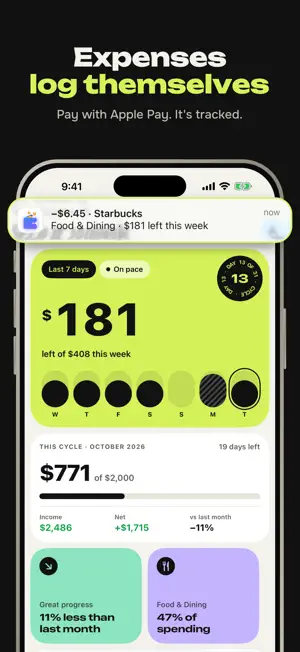
SpendGuard tracks your spending for you. Set it up once and every Apple Pay purchase is logged automatically. No typing, no bank login. EXPENSES LOG THEMSELVES Connect a simple Shortcuts automation in a minute. From then on, each Apple Pay payment appears in SpendGuard with amount, store and category. NEVER MISS A TRIAL END Add your subscriptions and free trials. SpendGuard reminds you before a trial turns into a charge and shows what you pay every month. ASK WHERE YOUR MONEY WENT Ask the built-in assistant simple questions like "How much did I spend on food this week?" and get a clear answer. YOUR WEEK AT A GLANCE The home screen shows today, this week and your budget left, so you always know where you stand. LOG ANYTHING IN SECONDS Paid in cash? Add an expense in a couple of taps with smart categories. YOUR WEEK, AS A STORY Every week SpendGuard turns your spending into a short story: top categories, biggest purchases and how you did against your budget. Private by design: no bank connection needed. Subscription terms: SpendGuard Premium is billed through your Apple ID. It renews automatically unless cancelled at least 24 hours before the end of the period. Manage or cancel in your App Store account settings.
What’s new
Version 2.0.1 · Updated October 23, 2026
Small fixes and stability improvements. Apple Pay purchases still log themselves, trials still get caught before they charge.
App privacy
The developer, Ivan Hubar, reported these privacy practices to Apple.
Data Linked to You
The following data, which may be collected and linked to your identity, may be used for the following purposes:
- Purchases: Purchase History
- User Content: Customer Support, Other User Content, Photos or Videos
- Financial Info: Other Financial Info
- Contact Info: Email Address, Name
- Identifiers: User ID, Device ID
Used for: Analytics, Product Personalization, App Functionality
Data Not Linked to You
The following data, which may be collected but is not linked to your identity, may be used for the following purposes:
- Usage Data: Product Interaction
- Diagnostics: Crash Data, Performance Data
Used for: App Functionality