

Gallerique
Lucas Young Photo & Video iPad
Gallerique is a free Photo & Video app for iPad by Lucas Young. Requires iOS 26.4. Updated April 23, 2026.
- Price
- Free
- on the App Store
- Size
- 13 MB
- Age 4+
- Updated
- Apr 23
- 2026 · v2.1
Screenshots

About Gallerique
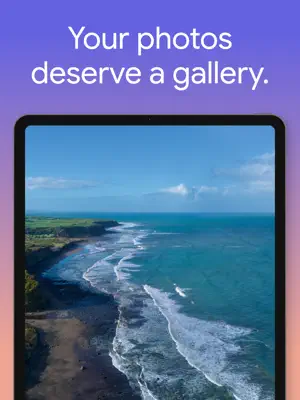
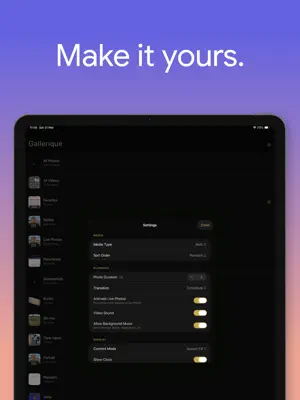
Gallerique turns your iPad into a fullscreen photo and video slideshow. Pick an album, choose your settings, and tap "Begin Slideshow". Your photos fill the entire screen with smooth transitions between them. Videos play with sound. Live Photos animate. Everything stays out of the way so you can actually enjoy what you're looking at. It started because every slideshow app I tried was either broken, bloated, or forgot that the whole point is to look at your photos. HOW IT WORKS Browse your albums in a clean grid. Select one (or use All Photos). Tap a button. The slideshow starts. Photos display for as long as you want - from 2 to 30 seconds each. Videos always play to the end, so you never miss anything. Live Photos can animate or stay still, your call. TRANSITIONS Seven transition styles to pick from: crossfade, slide, zoom, blur dissolve, or Ken Burns (the slow cinematic pan-and-zoom you see in documentaries). You can also turn transitions off entirely if you prefer a clean cut. BACKGROUND MUSIC Gallerique respects whatever you're already listening to. If Spotify or Apple Music is playing, it keeps going. When a video with sound comes up, the music ducks down and comes back after. No fighting over the audio session. AMBIENT DISPLAY Turn on the clock overlay and your iPad becomes a bedside or desk display. The time floats in a small translucent pill - choose which corner it sits in. Enable auto-dim and the screen gradually lowers its brightness after a set number of minutes. Tap anywhere to wake it back up. YOUR PHOTOS, YOUR RULES - Show photos, videos, or both - Pick any album or all of them - Sort randomly, or by date added - Choose aspect fill or aspect fit - Animate Live Photos or keep them still - Control video sound independently DESIGNED FOR IPAD Gallerique is built specifically for iPad and iPadOS 26. It supports both portrait and landscape, works in any window size, and keeps the screen awake during playback. The interface is dark by design - because the focus should be on your photos, not on chrome. No ads. No subscription. No account. Just your photos on your screen.
What’s new
Version 2.1 · Updated April 23, 2026
- Added Previous and Next buttons to the slideshow overlay so you can skip between photos and videos without waiting. - Fixed a bug where an all-video slideshow would stop after the first video instead of advancing. - Fixed a bug where tapping to hide the overlay left the slideshow paused with no way to resume. - The slideshow now handles rapid Previous/Next taps correctly, so the slide you land on always matches the counter. - Your last-selected album is now remembered across launches. - The clock overlay now attaches to the correct window when using Stage Manager or multiple windows. - Performance and stability improvements to slide loading and audio handling.
App privacy
The developer, Lucas Young, reported these privacy practices to Apple.
Data Not Collected
The developer does not collect any data from this app.
Alternatives to Gallerique
Looking for apps like Gallerique? Here are 6 similar apps on the App Store. The highest rated is Pixette – Slideshow for NAS (4.8/5), and all 6 are free to download.
-
 Crumbly Photos
-
 Mantlebox
-
 PicDock: Digital Photo Frame
4.0
PicDock: Digital Photo Frame
4.0
-
 Video Player - FOCA
4.0
Video Player - FOCA
4.0
-
 Real Ink Tattoo Photo Editor
-
 Pixette – Slideshow for NAS
4.8
Pixette – Slideshow for NAS
4.8
| App | Rating | Price | Last updated | Compare |
|---|---|---|---|---|
| Gallerique | – | Free | April 23, 2026 | |
| Crumbly Photos | – | Free | Mar 3, 2026 | Compare |
| Mantlebox | – | Free | Apr 7, 2026 | Compare |
| PicDock: Digital Photo Frame | 4.0 / 5 (1) | Free | Oct 28, 2026 | Compare |
| Video Player - FOCA | 4.0 / 5 (1) | Free | Oct 22, 2026 | Compare |
| Real Ink Tattoo Photo Editor | – | Free | Jul 17, 2026 | Compare |
| Pixette – Slideshow for NAS | 4.8 / 5 (43) | Free | Oct 30, 2026 | Compare |
Compare Gallerique with the top alternatives: ratings, updates, ASO score and keyword gaps →