

Speed-O-Meter Pro
ALEX ALEKSEYEV Navigation iPhoneiPadiPod touchApple Watch
Speed-O-Meter Pro is a free Navigation app for iPhone and iPad by ALEX ALEKSEYEV. Rated 5.0/5 from 2 ratings. Requires iOS 17.6. Updated September 24, 2026.
- Rating
- 5.0
- 2 ratings
- Price
- Free
- on the App Store
- Size
- 8 MB
- Age 4+
- Updated
- Sep 24
- 2026 · v1.0.6
Screenshots

About Speed-O-Meter Pro
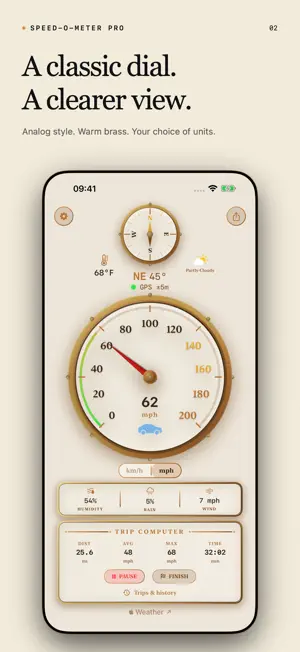
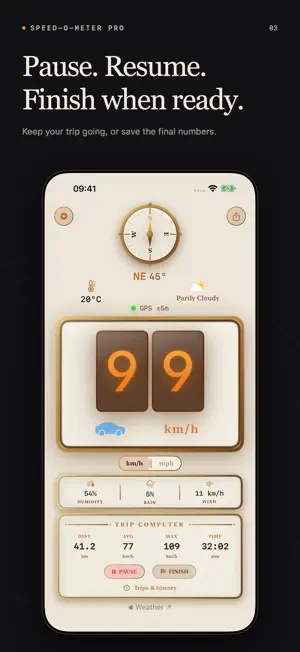
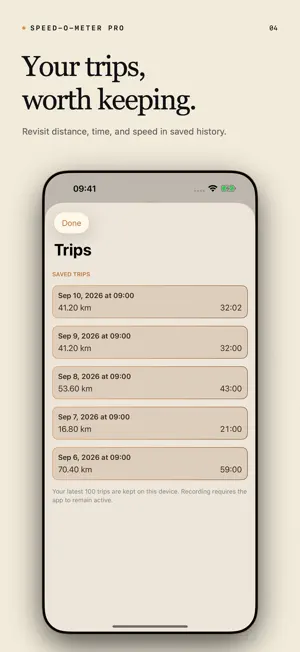
Your speed, with character. Speed-O-Meter Pro brings glowing Nixie-style digits and a brass-trimmed analog dial to a GPS speedometer for iPhone and Apple Watch. See your speed at a glance, follow your trip statistics, and keep the final numbers when you finish. CHOOSE YOUR DASHBOARD Switch between digital and analog displays, choose mph or km/h, and use light, dark, or system appearance on iPhone. Portrait and landscape layouts keep the dashboard readable in either orientation. KEEP YOUR TRIPS Start a trip, pause when you need a break, and resume later. Finish while recording or paused to save a summary of distance, recorded time, average speed, and maximum speed. Browse up to 100 saved trips on each device and share completed summaries from iPhone. BRING IT TO APPLE WATCH Choose an analog dial or a digital dashboard with speed, trip distance, recorded time, temperature, and humidity. Record with Watch GPS and synchronize trip state and recent completed summaries with your paired iPhone when connectivity is available. TRIP CONTROLS ON APPLE WATCH Start: switch to the digital dashboard using the style button at the bottom right. Tap either the trip distance or elapsed-time tile to start a new trip when none is in progress. You can then switch back to the analog dial while recording. Pause and resume: in digital mode, tap either trip tile to pause the current trip. Tap again to resume the same trip with its existing statistics. Trip details: on either dashboard, tap the clock with a circular arrow near the top left to open Trips, then select your current trip. Scroll down for Pause trip or Resume trip and Finish and save. In digital mode, you can also press and hold either trip tile to open the current trip's details directly. Finish: tap Finish and save in the trip details to end the trip and keep its summary. You can finish while recording or paused. To review it later, open Trips and select it under Saved Trips. Start your next trip from the digital dashboard. MORE AT A GLANCE The iPhone dashboard includes a compass, GPS status, temperature, conditions, humidity, rain chance, and wind. Choose Celsius or Fahrenheit separately from speed units. Weather is provided by Apple Weather when a location and network connection are available. PICK UP WHERE YOU LEFT OFF An interrupted locally recorded trip can reopen paused with its saved statistics. Trip summaries are stored on your devices; they do not include a recorded GPS route. Trips started on Apple Watch can record in the background. Pause stops recorded time and distance but keeps Location ready for remote Resume, using some battery. Finish ends background Location. After an app restart, open the Watch app once to restore Location before resuming the recovered paused trip. iPhone trip recording requires the iPhone app to remain active. GPS accuracy depends on your device and reception. The digital display shows zero without valid GPS speed; check the GPS status indicator. All three tubes stay visible. The device where you start a trip remains its recorder. Keep both apps updated to control it from the other device. Buttons show progress while waiting for confirmation, including when the Watch is in the background. Delivery may be delayed; unprocessed requests expire after 30 seconds. If confirmation fails, check the recording app before retrying, and open it if prompted. The Apple Watch label beside the iPhone's speed-unit selector identifies the trip recorder; a muted dot means its latest update is delayed. A temporary disconnection does not transfer recording to the other device. The app is free with ads. No ads appear on the Apple Watch dashboard.
What’s new
Version 1.0.6 · Updated September 24, 2026
- Fixed Apple Watch trip recording stopping when the app became inactive. - Watch-started trips can continue recording in the background until you pause or finish. - Improved iPhone and Apple Watch trip controls so the device recording your trip keeps its full measurements when you finish from the other device. - Added background delivery and visible progress for remote Pause, Resume and Finish, with clearer confirmation errors. - A backgrounded Watch is no longer labeled Offline merely because its latest update is delayed. - Improved trip-save error handling and added clearer messages when recording or GPS is unavailable. - Restored the compact trip computer and classic Nixie display, with all three tubes staying visible. - Moved the Apple Watch trip source indicator beside the speed-unit selector for a cleaner dashboard. - Update both the iPhone and Apple Watch apps to use the improved trip synchronization.
App privacy
The developer, ALEX ALEKSEYEV, reported these privacy practices to Apple.
Data Not Linked to You
The following data, which may be collected but is not linked to your identity, may be used for the following purposes:
- Identifiers: Device ID
- Usage Data: Product Interaction, Advertising Data
Used for: Third-Party Advertising
Alternatives to Speed-O-Meter Pro
Looking for apps like Speed-O-Meter Pro? Here are 6 similar apps on the App Store. The highest rated is Cloud Driving (5.0/5), and 4 of the 6 are free to download.
-
 Patent by k-A.i
-
 MapReel
-
 RE Precision Kit Pro
-
 Cloud Driving
5.0
Cloud Driving
5.0
-
 Roads Eye
-
 Detour - Explore Your City
5.0
Detour - Explore Your City
5.0
| App | Rating | Price | Last updated | Compare |
|---|---|---|---|---|
| Speed-O-Meter Pro | 5.0 / 5 (2 ratings) | Free | September 24, 2026 | |
| Patent by k-A.i | – | Free | Apr 14, 2026 | Compare |
| MapReel | – | Free | May 2, 2026 | Compare |
| RE Precision Kit Pro | – | 0.99 USD | Jun 17, 2026 | Compare |
| Cloud Driving | 5.0 / 5 (5) | Free | Apr 21, 2026 | Compare |
| Roads Eye | – | 5.99 USD | Apr 21, 2026 | Compare |
| Detour - Explore Your City | 5.0 / 5 (1) | Free | Jul 21, 2026 | Compare |
Compare Speed-O-Meter Pro with the top alternatives: ratings, updates, ASO score and keyword gaps →