

ReceiptDrop - Scan to PDF
Wander Ventures S.L. Business iPhoneiPadiPod touch
ReceiptDrop - Scan to PDF is a free Business app for iPhone and iPad by Wander Ventures S.L. Requires iOS 15.1. Updated April 23, 2026.
- Price
- Free
- on the App Store
- Size
- 65 MB
- Age 4+
- Updated
- Apr 23
- 2026 · v1.0.1
Screenshots


About ReceiptDrop - Scan to PDF
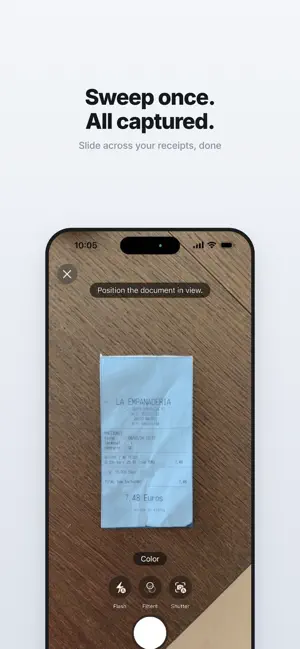
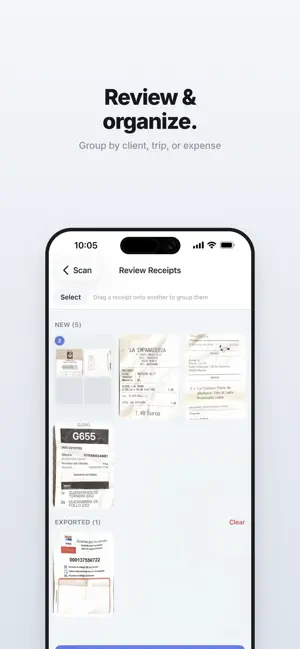
Stop scanning receipts one by one in your bookkeeping app. ReceiptDrop lets you scan receipt after receipt in one smooth movement. Just slide across your receipts and they're all captured automatically. What used to take 15 minutes now takes under 60 seconds. Built for freelancers, founders, and business owners who use EXACT, AFAS, Xero, QuickBooks, DATEV, or any other bookkeeping tool and are tired of the slow, tedious built-in scanners. ReceiptDrop is a scanning companion for your accounting software, not a replacement. It captures and organizes your receipts into clean PDFs. Your bookkeeping tool handles the data extraction and categorization. No cloud uploads. No account. Just scan and export. SCAN A WHOLE PILE IN ONE GO Lay out your receipts and sweep your camera across them. ReceiptDrop captures each one as you go. No tapping, no waiting between pages. ORGANIZE INTO GROUPS Drag and drop receipts into groups - per expense, per client, per month, or per trip. Whatever makes sense for your bookkeeping. EXPORT AS PDF Generate clean PDFs grouped exactly how your accountant needs them. One PDF per group, or one per receipt. Your choice. EMAIL TO YOUR ACCOUNTANT Send PDFs directly from the app. Set a default email address and export with two taps. Works with any bookkeeping workflow EXACT, AFAS, Xero, QuickBooks, DATEV, or your own system. BUILT FOR PRIVACY All scanning, text recognition, and PDF generation happens entirely on your iPhone. Your financial documents never touch a server. No analytics, no tracking, no third-party access. IMPORT FROM PHOTOS Already have receipt photos in your camera roll? Import them directly into ReceiptDrop and organize them alongside your scanned receipts. FREE TO START Scan up to 50 receipts for free. Upgrade to ReceiptDrop Pro for unlimited scanning. Monthly, yearly, or lifetime. Built in Madrid by Wander Ventures S.L. Privacy Policy: https://wanderventures.studio/receiptdrop/privacy-policy/ Terms of Use: https://wanderventures.studio/receiptdrop/terms/
What’s new
Version 1.0.1 · Updated April 23, 2026
You can now select and save multiple email addresses (up to 3)
App privacy
The developer, Wander Ventures S.L., reported these privacy practices to Apple.
Data Not Linked to You
The following data, which may be collected but is not linked to your identity, may be used for the following purposes:
- Purchases: Purchase History
Used for: App Functionality
Alternatives to ReceiptDrop - Scan to PDF
Looking for apps like ReceiptDrop - Scan to PDF? Here are 6 similar apps on the App Store. The highest rated is ReceiptNow: Smart Scanner (5.0/5), and all 6 are free to download.
-
 Promitto
-
 Soroma Fresh
-
 Smart Saver: Receipt Tracker
-
 Receipt Vault: Private Scanner
-
 ReceiptNow: Smart Scanner
5.0
ReceiptNow: Smart Scanner
5.0
-
 ReceiptGenie
| App | Rating | Price | Last updated | Compare |
|---|---|---|---|---|
| ReceiptDrop - Scan to PDF | – | Free | April 23, 2026 | |
| Promitto | – | Free | Feb 20, 2026 | Compare |
| Soroma Fresh | – | Free | Sep 21, 2026 | Compare |
| Smart Saver: Receipt Tracker | – | Free | Jul 2, 2026 | Compare |
| Receipt Vault: Private Scanner | – | Free | Aug 7, 2026 | Compare |
| ReceiptNow: Smart Scanner | 5.0 / 5 (5) | Free | Sep 8, 2026 | Compare |
| ReceiptGenie | – | Free | Apr 28, 2026 | Compare |