

4ToDo
Robert Poetzsch Productivity iPhoneiPadiPod touch
4ToDo is a paid Productivity app for iPhone and iPad by Robert Poetzsch. Requires iOS 26.0. Updated October 28, 2026.
- Price
- 1.99 USD
- on the App Store
- Size
- 6 MB
- Age 4+
- Updated
- Oct 28
- 2026 · v1.2
Screenshots
Save to Pinterest


About 4ToDo
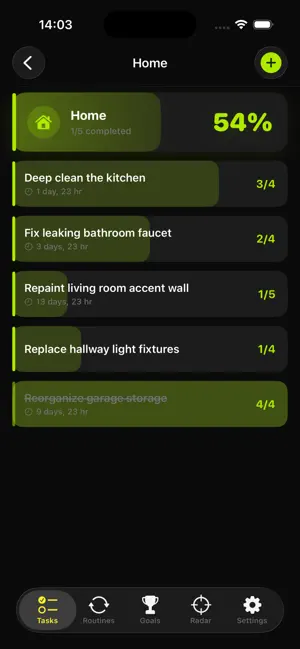
4ToDo rethinks how you manage your life. Instead of boring checklists, every task, routine, and goal is a visual progress bar — you see exactly where you stand at a glance. TASKS — ORGANIZED BY CATEGORY Create categories like Home, Work, Tech, or Travel. Each category shows a bold progress card with a colored accent bar and a live percentage. Tap into a category to see all tasks sorted by due date. Add subtasks to break down complex projects — the progress bar fills as you check them off. ROUTINES — NEVER FORGET RECURRING TASKS Track recurring maintenance tasks like reading the electricity meter, changing filters, backing up photos, or rotating tires. Set intervals from daily to yearly, or define a custom cycle (every X days). Each routine has its own color and icon. The urgency fill shifts from calm to amber to red as the deadline approaches. One tap to mark it done and reset the timer. GOALS — THREE WAYS TO TRACK Set personal goals with the tracking mode that fits: - Counter — Big +/- buttons for step-by-step tracking (books read, recipes cooked, trails hiked) - Value — Enter custom amounts (kilometers run, hours practiced) - Slider — Drag to set your progress visually Add milestones to goals and tap to mark them as reached. The app automatically updates your progress when you hit a milestone. RADAR — YOUR COMMAND CENTER The Radar page answers one question: What should I do next? It shows your closest goal at the top, overdue items that need attention, and a unified timeline of everything coming up over the next 14 days — grouped by day. Tap any item to open it. Hit the checkmark to complete it instantly. This Week shows how many things you finished on each day of the week. MADE FOR IPHONE DUO Fully open, your overview and your list sit side by side. Closed and turned sideways, the same two halves stand next to each other. Half open, a golden light bar fills with your progress, and nothing you read or tap lies in the fold. Folding keeps your place: the tab, open sheets, what you typed and where you scrolled. TEXT THAT FITS YOUR EYES Every screen follows your text size, up to the largest accessibility sizes. BUILT FOR RELIABILITY - Automatic backups every 7 days, plus manual backup on demand - Import and export your data as JSON - Restore from any of your last 7 backups - Local notifications with reminders for tasks, routines, and goals — tap one to open it right away - All data stored locally on your device — nothing leaves your phone DESIGN PHILOSOPHY 4ToDo uses a striking dark theme with yellow accents and 8 category colors. Every element communicates status visually through progress bars. No clutter, no complexity — just a clear view of what matters. Built by robspace.
What’s new
Version 1.2 · Updated October 28, 2026
4ToDo 1.2 • Made for iPhone Duo: fully open, your overview and your list sit side by side. Half open, a golden light bar fills with your progress and nothing lies in the fold. • Text follows your text size, up to the largest accessibility sizes. • Tapping a reminder now opens its task or goal right away. A routine's reminder opens the routine. • On Sundays, This Week on the Radar shows the current week and marks today. All your tasks, routines, goals, streaks and backups carry over unchanged.
App privacy
The developer, Robert Poetzsch, reported these privacy practices to Apple.
Data Not Collected
The developer does not collect any data from this app.
Alternatives to 4ToDo
Looking for apps like 4ToDo? Here are 6 similar apps on the App Store. The highest rated is Mini Project - Task Progress (5.0/5), and 3 of the 6 are free to download.
-
 SpendQ Buddy
-
 Whisper Notes: AI Transcribe
-
 TaskBox - Task Manager
-
 Mini Project - Task Progress
5.0
-
 Drafty Story
-
 Gört - Lists & Tasks
| App | Rating | Price | Last updated | Compare |
|---|---|---|---|---|
| 4ToDo | – | 1.99 USD | October 28, 2026 | |
| SpendQ Buddy | – | Free | May 14, 2026 | Compare |
| Whisper Notes: AI Transcribe | – | 3.99 USD | Nov 7, 2026 | Compare |
| TaskBox - Task Manager | – | Free | Feb 25, 2024 | Compare |
| Mini Project - Task Progress | 5.0 / 5 (1) | 0.69 USD | Feb 26, 2026 | Compare |
| Drafty Story | – | 3.99 USD | Oct 18, 2026 | Compare |
| Gört - Lists & Tasks | – | Free | Oct 24, 2024 | Compare |
Compare 4ToDo with the top alternatives: ratings, updates, ASO score and keyword gaps →