

CloudDrive2 - Cloud Manager
坦 喻 Utilities iPhoneiPadiPod touchMac
CloudDrive2 - Cloud Manager is a free Utilities app for iPhone and iPad by 坦 喻. Rated 4.0/5 from 4 ratings. Requires iOS 16.0. Updated October 18, 2026.
- Rating
- 4.0
- 4 ratings
- Price
- Free
- on the App Store
- Size
- 129 MB
- Age 4+
- Updated
- Oct 18
- 2026 · v1.1.3
Screenshots
About CloudDrive2 - Cloud Manager
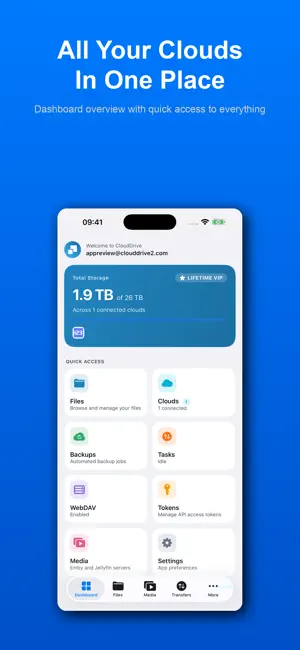
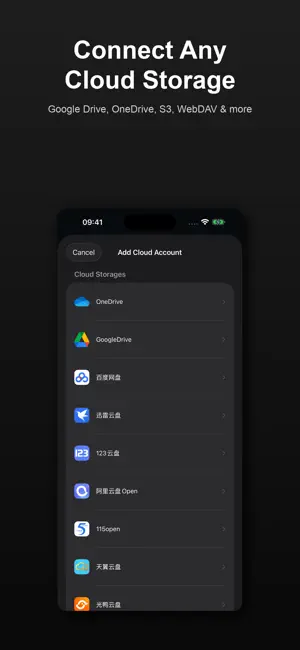
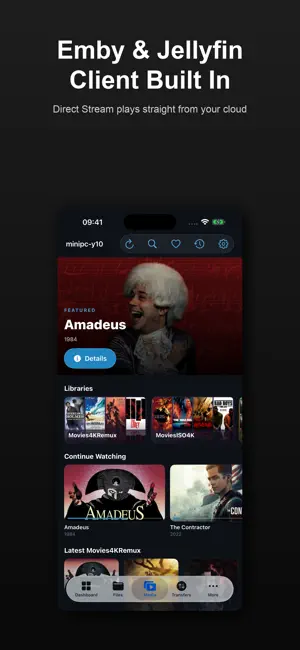
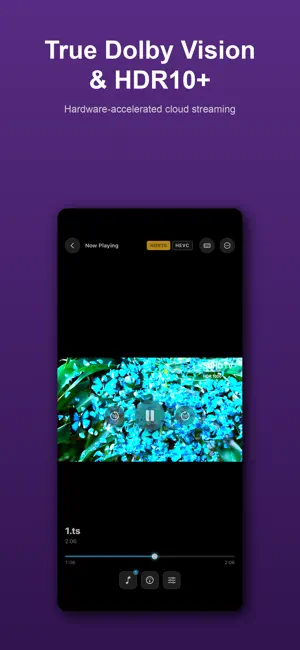
CloudDrive2 brings all your cloud storage together in one powerful app. Access, manage, and stream files across multiple cloud services — no switching between apps. UNIFIED CLOUD MANAGEMENT Connect all your cloud accounts in one place: Google Drive, OneDrive, Aliyun Drive, Baidu Pan, 115, S3, WebDAV, and more. Browse, search, copy, move, rename, and organize files across clouds with a clean, intuitive interface. On iPad, a Finder-style Columns view and a file inspector panel make large libraries easy to navigate. EMBY & JELLYFIN CLIENT WITH DIRECT STREAM Connect your own Emby or Jellyfin servers and browse your libraries with posters, cast, and Continue Watching. When your CloudDrive can reach the same file, Direct Stream plays it straight from the cloud — bypassing the server transcoder for full-quality playback of formats servers can't transcode, while your watch history stays in sync. AI SUBTITLE TRANSLATION Generate translated subtitles for any video: CloudDrive2 translates the existing subtitle track (including PGS bitmap subtitles via on-device OCR) or falls back to speech recognition when there is none. Uses Apple's on-device translation models — free and private — or your own API. Generated subtitles are saved next to the video, ready to reuse on all your devices. POWERFUL MEDIA PLAYER Built-in video player with hardware-accelerated decoding supports H.264, H.265/HEVC, AV1, HDR10, HDR10+, and Dolby Vision — including true Dolby Vision playback of Profile 7 Blu-ray content. Stream directly from the cloud without downloading. Picture-in-Picture, per-track audio/subtitle delay, subtitle styling, and HDR subtitle brightness control included. BLU-RAY ISO PLAYBACK WITH DISC MENUS Play Blu-ray ISO images directly from your cloud storage — now with native disc menu navigation: scene selection, colored shortcut keys, in-menu audio/subtitle setup, even 2D+3D combo discs. Disc menus cover HDMV discs; BD-J (Java) discs play the main feature directly. MULTICHANNEL & DOLBY ATMOS Dolby Atmos (Dolby Digital Plus) bitstreams to your AVR over HDMI. TrueHD, DTS-HD Master Audio and DTS decode in full and reach multichannel USB DACs, HDMI adapters and AirPlay 2 as 5.1 or 7.1 — never folded to stereo. AirPods Pro/Max get head-tracked spatial audio instead. AUDIOPHILE-GRADE DSD & SACD DSD files (.dsf, .dff) and SACD ISO images stream straight from the cloud — including multichannel DSD in true 5.1. DoP output feeds compatible DACs bit-perfectly, and background playback keeps the music going. PDF READER Read PDFs streamed from the cloud — no full download needed. Zoom, page thumbnails, bookmarks, and reading-position memory. MOVIE LIBRARY METADATA Reads your local .nfo files and poster/fanart/logo artwork (Plex/Jellyfin/Emby naming) for rich movie info — no online scraping, your library stays private. CROSS-CLOUD TRANSFERS Copy or move files between cloud providers. Transfer manager with pause, resume, retry, throttling, and concurrency control. Upload folders recursively. BACKUP & SYNC Automated backup tasks with scheduling, plus photo library backup. FILES APP INTEGRATION Full File Provider extension — access your cloud files from the iOS/iPadOS Files app and any app using the document picker. CloudDrive2 can also act as an external player for other apps via the clouddrive:// URL scheme. SECURITY Two-factor authentication, encrypted folders, and session monitoring. A built-in WebDAV server shares your cloud files with your other devices, and API tokens grant scoped, expiring access. ADVANCED FEATURES • Disk cache with configurable eviction • Multiple view modes: list, grid, gallery, columns • Open in third-party players (Infuse, VLC, nPlayer) • Dark and light themes Some advanced playback features (Emby/Jellyfin client, AI subtitles, Blu-ray disc playback, DSD/SACD) require the optional App Pro upgrade, available as an in-app purchase. Terms of Use (EULA): https://www.apple.com/legal/internet-services/itunes/dev/stdeula/
What’s new
Version 1.1.3 · Updated October 18, 2026
CloudDrive2 1.1.3 highlights: • Media library (App Pro): make libraries of movies, shows, mixed, music or books from any folders CloudDrive2 can list, organised on each device with no server. NFO files and pictures in the folders come first; TMDB, Bangumi, MusicBrainz and Open Library fill in the rest once switched on, and an optional AI model suggests search terms for titles the rules cannot identify. Home has a featured carousel, Continue watching, Next up, Continue listening, Continue reading and a Latest row per library; search finds titles, people and songs; hearts mark favourites. Titles that cannot be matched wait under Needs review, where Identify shows each candidate in detail. • Pages show media info read from the files, BD and DVD badges, a show's status, people, box sets and an episode's own cast, and details can be edited by hand. Skip intro and ending is set per season and syncs. A library can be private behind a PIN, and parental control limits the highest rating and locks again by itself. • Libraries, hearts, matches and scanned data sync between your devices through your cloud storage, so a new device needs no new scan. Libraries can be imported from an Emby or Jellyfin server, and the Emby-compatible API lets MoviePilot and similar tools write names and photos. • Music: a mini player stays on screen while music plays with its player hidden (iPhone, iPad and Apple TV), and a seek in a song or a tap on a lyric line plays at once. • Settings are in the same eight groups on every platform, with Interface, Appearance and Language on one page. • Built-in engine 1.1.3: an SMB storage can be added without a share name and shows every share as a folder (#630); reads from some NAS no longer stop at 0 B (#619); a copy or upload stuck on "preprocessing" is retried (#634); WebDAV download links are renewed (#627); S3 keeps "don't sync to the cloud" and works through HTTP/2 proxies (#629); a CloudDrive storage with TLS verification skipped connects to more servers (#631); Aliyun Drive Open stops refreshing its token in a loop; security update. Full guide to the media library: https://www.clouddrive2.com/en/media-library.html
App privacy
The developer, 坦 喻, reported these privacy practices to Apple.
Data Linked to You
The following data, which may be collected and linked to your identity, may be used for the following purposes:
- Contact Info: Email Address
Used for: App Functionality
Alternatives to CloudDrive2 - Cloud Manager
Looking for apps like CloudDrive2 - Cloud Manager? Here are 6 similar apps on the App Store. The highest rated is Nubox (5.0/5), and all 6 are free to download.
-
 Filmix - AI Renamer & Library
3.2
Filmix - AI Renamer & Library
3.2
-
 AGC - Video Player
4.1
AGC - Video Player
4.1
-
 DS One-Video Library&Player
4.7
DS One-Video Library&Player
4.7
-
 Nubox
5.0
Nubox
5.0
-
 ScreenSpot(暮色)
5.0
ScreenSpot(暮色)
5.0
-
 Zwind - WebDAV Server & Player
3.8
Zwind - WebDAV Server & Player
3.8
| App | Rating | Price | Last updated | Compare |
|---|---|---|---|---|
| CloudDrive2 - Cloud Manager | 4.0 / 5 (4 ratings) | Free | October 18, 2026 | |
| Filmix - AI Renamer & Library | 3.2 / 5 (42) | Free | Sep 22, 2026 | Compare |
| AGC - Video Player | 4.1 / 5 (57) | Free | Oct 18, 2026 | Compare |
| DS One-Video Library&Player | 4.7 / 5 (78) | Free | Sep 19, 2026 | Compare |
| Nubox | 5.0 / 5 (1) | Free | Oct 23, 2026 | Compare |
| ScreenSpot(暮色) | 5.0 / 5 (1) | Free | Oct 21, 2026 | Compare |
| Zwind - WebDAV Server & Player | 3.8 / 5 (12) | Free | Oct 22, 2026 | Compare |