

Timers & Alarms
Detlev Voss Utilities iPhoneiPadiPod touch
Timers & Alarms is a free Utilities app for iPhone and iPad by Detlev Voss. Requires iOS 26.2. Updated September 17, 2026.
- Price
- Free
- on the App Store
- Size
- 13 MB
- Age 4+
- Updated
- Sep 17
- 2026 · v1.4.0
Screenshots
About Timers & Alarms
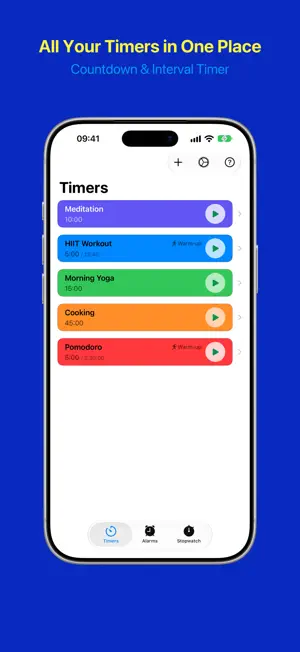
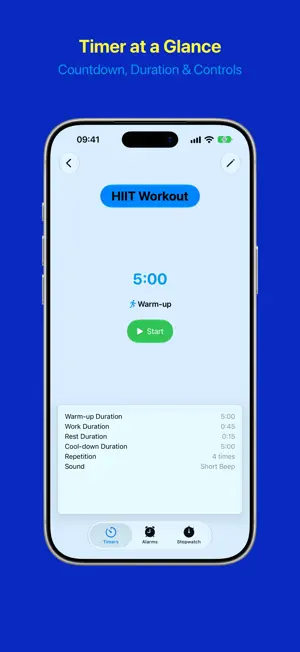
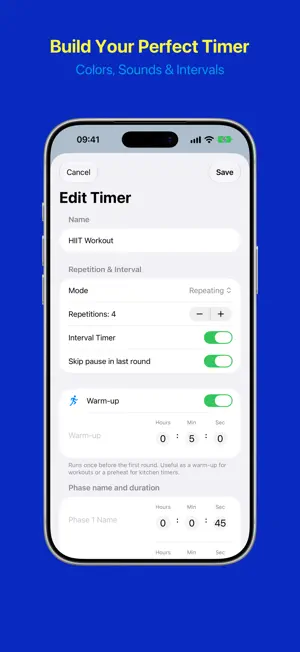
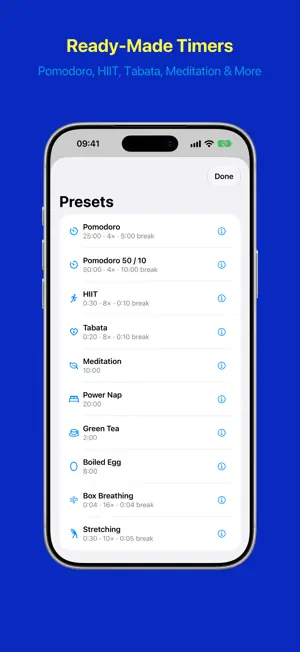
The timer and alarm app you need — designed to keep you on track, whether you're cooking, working out, or managing your daily schedule. QUICK TIMERS & PRESETS Get a countdown running in seconds. Tap + and pick a Quick Timer: one tap on 1, 3, 5, 10, 15 or 25 minutes — or dial any duration — and it starts immediately, then clears itself from the list once you're done with it. Or start from one of ten ready-made presets: Pomodoro, Pomodoro 50 / 10, HIIT, Tabata, Meditation, Power Nap, Green Tea, Boiled Egg, Box Breathing and Stretching. Each one explains what it's for, and you can edit it like any other timer. COUNTDOWN TIMERS Create multiple named timers with custom durations. Personalize each timer with its own color and alarm sound. Start, pause, resume, and stop timers independently. INTERVAL TIMERS Set up two alternating phases — perfect for HIIT workouts, Pomodoro sessions, or any activity with work and rest periods. Customize the name, duration, and alarm sound for each phase. Add an optional warm-up before the first round and a cool-down after the last — or rename the cool-down to "Long Break" for full Pomodoro sessions. REPEATING TIMERS Let timers repeat — a fixed number of rounds or endlessly until you stop them. Track your progress round by round. ALARMS Schedule alarms for specific times with flexible weekday recurrence. One-time alarms disable automatically after firing. Snooze with configurable durations. STOPWATCH A third tab counts up from zero — no duration, no alert, it simply measures how long something took. Take a lap with one tap and compare the laps in the list. A running stopwatch keeps going when you switch tabs, leave the app or restart your iPhone, and it costs no battery: it remembers when it started instead of counting. While it runs or holds, it appears on the Lock Screen, in the Dynamic Island and on the Smart Stack of your Apple Watch, with Pause and Lap right there. The Stopwatch control starts it from Control Center, the Lock Screen or the Action button. WIDGETS & LIVE ACTIVITIES Control your timers directly from the Home Screen and Lock Screen. Small and medium widgets show your timers and alarms at a glance — start, pause, or stop without opening the app. The Quick Timer widget starts a countdown with a single tap and shows the ones already running. The Tomato Timer widget (small, medium, large) brings a classic kitchen-timer tomato to your Home Screen. Live Activities keep your countdown visible on the Lock Screen and Dynamic Island. SHORTCUTS & SPOTLIGHT Start a saved timer, set a quick one, stop a timer, ask how much time is left, move to the next round, or turn an alarm on or off — from Spotlight or as a step in your own shortcuts. You pick the timer from a list of your own. Two further actions are there for building automations: one hands you every saved timer, the other reports a timer's round, phase and durations. 25 ALARM SOUNDS Choose from 25 distinct sounds — from gentle chimes to clear bells, plus four short ticks that suit fast interval work — and preview each one before you decide. FULLY CUSTOMIZABLE • Custom colors for visual distinction • Multiple sort options (name, duration) • Group active timers at the top of your list • Light, dark, or automatic appearance • Grid layout and a two-column detail view in landscape • VoiceOver support and Dynamic Type up to accessibility sizes PRIVACY FIRST All your data stays on your device. No analytics, no tracking, no accounts. Your timers are yours alone. Timers & Alarms is free to use. Love the app? Leave a tip to support independent development.
What’s new
Version 1.4.0 · Updated September 17, 2026
Version 1.4.0 contains the following changes: New: Stopwatch • A third tab offers a stopwatch with laps. • A running stopwatch keeps going even when you leave the app. • It appears on the Lock Screen, in the Dynamic Island and in the Smart Stack of your Apple Watch. • You can set up Control Center, the Lock Screen or the Action button so that you can start the stopwatch from there. New: Shortcuts • In your own shortcuts you can start a saved timer or a quick timer, stop a timer, ask for the remaining time, move to the next round, or turn an alarm on or off. • You can ask for all of your saved timers, as well as the round, the phase and each configured duration of one timer. • Your timers appear in Spotlight search — findable by the names you gave them. Improvements: • In landscape, timers and alarms lay out as a grid of cards, and a timer's detail view uses two columns. • Timers and alarms can now also be deleted from the card's context menu, not just by swiping. • Onboarding and the in-app help cover the stopwatch as well. Fixes: • An interval timer started from a widget ignored the configured sounds of its individual phases and always played the same sound. • On the last round of an interval timer with a cool-down, "Continue" on the Lock Screen did nothing and left the alert standing. It now starts the cool-down phase.
App privacy
The developer, Detlev Voss, reported these privacy practices to Apple.
Data Not Collected
The developer does not collect any data from this app.
Alternatives to Timers & Alarms
Looking for apps like Timers & Alarms? Here are 6 similar apps on the App Store. The highest rated is Timer (4.8/5), and 5 of the 6 are free to download.



| App | Rating | Price | Last updated | Compare |
|---|---|---|---|---|
| Timers & Alarms | – | Free | September 17, 2026 | |
| Timer tick | – | Free | Oct 3, 2026 | Compare |
| Beoltteok Alarm | – | Free | Sep 24, 2026 | Compare |
| Samir's Awesome Timer | – | Free | Mar 11, 2026 | Compare |
| Custom Visual Timer | – | Free | Jul 17, 2026 | Compare |
| Multistage Timers | – | Free | Jul 17, 2025 | Compare |
| Timer | 4.8 / 5 (221) | 3.99 USD | Sep 29, 2026 | Compare |
Compare Timers & Alarms with the top alternatives: ratings, updates, ASO score and keyword gaps →