

Bling AI: Jewelry Photo Studio
chaymae rahmani Photo & Video iPhoneiPadiPod touch
Bling AI: Jewelry Photo Studio is a free Photo & Video app for iPhone and iPad by chaymae rahmani. Rated 4.4/5 from 7 ratings. Requires iOS 15.1.
- Rating
- 4.4
- 7 ratings
- Price
- Free
- on the App Store
- Size
- 72 MB
- Age 4+
- Updated
- Jul 15
- 2026 · v2.2
Screenshots


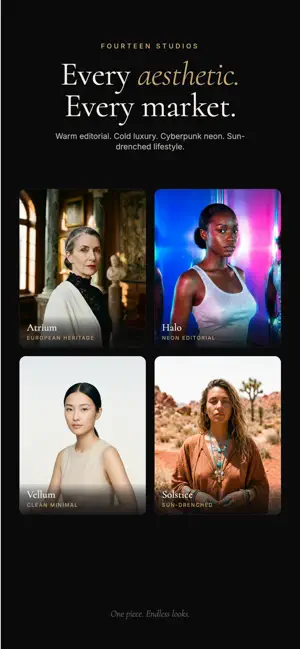

About Bling AI: Jewelry Photo Studio
Studio-quality photos and ad videos for your jewelry — in seconds. Bling AI is built for jewelers. Whether you sell custom rings online, run a boutique brand, or post daily on social, you know how much time and money product shoots take. Bling AI gives you a full photo and video studio for your jewelry — straight from your phone, no booking required. Bling AI uses generative AI: you upload a photo of your real piece, and we photograph it on a cast of AI models. The models and scenes are AI generated; your jewelry is yours. — BUILT FOR JEWELERS — • Independent jewelers and small brands • Custom and bespoke jewelry makers • Online and DTC sellers • Designers building a portfolio • Anyone managing social content for a jewelry business — WHAT YOU CAN CREATE — • Hero product shots for your storefront and website • Lifestyle imagery for ads and collection drops • Short-form videos for social content • Full campaign bundles, a cohesive set of shots in one tap • Concept variations to test new designs before you produce them • On-brand visuals that match your aesthetic, every time — HOW IT WORKS — 1. Pick a studio — each one shoots with its own light, mood, and creative direction 2. Upload a photo of your piece 3. Pick a model from our in-house cast — or use one you've designed yourself 4. Tap generate — your shoot is ready in under a minute 5. Refine, reroll, or animate any output without re-shooting — FEATURES — • 14 editorial studios — warm portraiture, cold luxury, neon nightlife, sun-drenched lifestyle, and more • 17 in-house models — a diverse cast, and you can mix any two on a single shot • Custom models — design a face nobody else can use, then put her in every shoot • Refine — iterate on any output with a single line of feedback (e.g. "warmer light", "side angle") • Campaign bundles — one tap for a full IG, Etsy, or brand-story drop • Multi-model shoots — put two models on a single piece • Video animate — turn any shoot into a reel • Edit tools — remove background, change background, upscale • Commercial-use license included — use everything you create in your storefront, ads, and social • Library — every shoot organized by project, plus a vault for your reusable pieces — PLANS — Start free — every user gets credits to create at no cost, no card required. When you're ready for more, two paid plans unlock additional monthly credits: • Bling AI Pro — for jewelers and creators producing regular content • Bling AI Studio — for high-volume brands, agencies, and design teams Subscriptions auto-renew until cancelled. Cancel anytime in Settings > Apple ID > Subscriptions. — PRIVACY & SUPPORT — Your photos and creations stay private to your account. We don't sell your data. Questions? Tap "Contact Support" inside the app. Stop waiting on product shoots. Start creating with Bling AI today. Privacy Policy: https://www.blingai.app/privacy Terms of Use (EULA): https://www.apple.com/legal/internet-services/itunes/dev/stdeula/
Ratings & reviews
4.4
7 ratings
What’s new
Version 2.2 · Updated July 15, 2026
• Faster onboarding — we trimmed the setup so you get to your first shoot in less time, with a cleaner, tap-to-continue flow. • Push notifications — get a heads-up the moment your photos and videos are ready, so you never wait on a loading screen. • Smoother chat — clearer prompts and a tidied-up creation flow while you generate. Thanks for using Bling. Keep the feedback coming — it shapes every update.
App privacy
The developer, chaymae rahmani, reported these privacy practices to Apple.
Data Used to Track You
The following data may be used to track you across apps and websites owned by other companies:
- Purchases: Purchase History
- Identifiers: User ID, Device ID
- Usage Data: Product Interaction
Data Linked to You
The following data, which may be collected and linked to your identity, may be used for the following purposes:
- Purchases: Purchase History
- Contact Info: Email Address, Name
- User Content: Photos or Videos, Other User Content
- Identifiers: User ID, Device ID
- Usage Data: Product Interaction
Used for: App Functionality
Data Not Linked to You
The following data, which may be collected but is not linked to your identity, may be used for the following purposes:
- Purchases: Purchase History
- Identifiers: User ID, Device ID
- Usage Data: Product Interaction
- Diagnostics: Performance Data, Crash Data
Used for: Analytics, App Functionality
Alternatives to Bling AI: Jewelry Photo Studio
Looking for apps like Bling AI: Jewelry Photo Studio? Here are 6 similar apps on the App Store. The highest rated is JewelAI (5.0/5), and all 6 are free to download.
-
 JewelAI
5.0
JewelAI
5.0
-
 Jewelry AI: Photo Editor
4.5
Jewelry AI: Photo Editor
4.5
-
 SHYNEL - Jewelry Photo AI
-
 Luxify: Jewelry Photo App
5.0
Luxify: Jewelry Photo App
5.0
-
 Gemzy
4.4
Gemzy
4.4
-
 JewelryAI: Try on any jewelry
| App | Rating | Price | Last updated | Compare |
|---|---|---|---|---|
| Bling AI: Jewelry Photo Studio | 4.4 / 5 (7 ratings) | Free | July 15, 2026 | |
| JewelAI | 5.0 / 5 (1) | Free | Jul 1, 2026 | Compare |
| Jewelry AI: Photo Editor | 4.5 / 5 (22) | Free | Sep 30, 2026 | Compare |
| SHYNEL - Jewelry Photo AI | – | Free | Jun 7, 2026 | Compare |
| Luxify: Jewelry Photo App | 5.0 / 5 (1) | Free | Aug 21, 2026 | Compare |
| Gemzy | 4.4 / 5 (20) | Free | Sep 8, 2026 | Compare |
| JewelryAI: Try on any jewelry | – | Free | Jan 13, 2026 | Compare |