

Auxfeed
Payette Forward Music iPhoneiPadiPod touch
Auxfeed is a free Music app for iPhone and iPad by Payette Forward. Rated 3.6/5 from 5 ratings. Requires iOS 16.0. Updated October 21, 2026.
- Rating
- 3.6
- 5 ratings
- Price
- Free
- on the App Store
- Size
- 29 MB
- Age 4+
- Updated
- Oct 21
- 2026 · v1.0.14
Screenshots


About Auxfeed
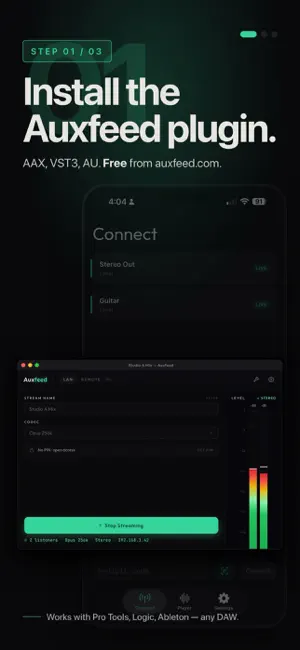
Stream your live mix from any DAW to your phone — and for anyone you send a link to. Real-time. Free. Auxfeed turns your iPhone or iPad into a real-time studio monitor. Works with any DAW. Open the free plugin, press play, and hear your mix through your phone speakers, Bluetooth headphones, AirPlay devices — if your phone can connect to it, you can mix through it. Other tools simulate what your mix will sound like on a phone. Auxfeed just plays it there. Stop paying hundreds a year to check your own mix. Auxfeed streams real-time audio from your DAW to your iPhone or iPad — free over Wi-Fi, no account required. FREE FEATURES - Lossless PCM, Opus, and AAC codecs — up to 96 kHz, mono through 7.1.4 - Bonjour auto-discovery — streams appear without entering IP addresses - Per-channel level meters with peak hold at 60fps - Momentary and short-term LUFS metering (EBU R128) - Landscape mode with true stereo from both iPhone speakers - AirPlay output to HomePod, Apple TV, or any AirPlay speaker - Multiple simultaneous listeners — share a stream with your whole team - QR code pairing for instant connection - Listen from anywhere — tap any shared link to hear the mix (no Pro subscription required for listeners) - Dim and mute transport controls Free for local streaming — no account, no time limit. Works for any audio workflow — music, podcasts, live events, broadcast. AUXFEED PRO Upgrade to unlock advanced monitoring and remote access. 7-day free trial on annual plan. - Remote broadcasting — share your mix with clients anywhere via a 6-digit code from your DAW plugin - Integrated LUFS with tap-to-reset - True Peak dBTP with clip warning - Loudness Range (LRA) - Streaming platform presets — Spotify, Apple Music, YouTube pass/fail - Mid / Side / Mono / L solo / R solo monitoring - 3-band swept parametric EQ on the receiver - Record streams to WAV on your phone $9.99/month or $79/year. Auto-renews until canceled. Manage in Settings > Subscriptions. HOW IT WORKS 1. Download the free Auxfeed plugin at auxfeed.com (macOS and Windows). 2. Insert Auxfeed on your monitor bus or any track. Start streaming. 3. Open Auxfeed on your phone — your stream appears automatically over Wi-Fi. 4. Tap to connect. Live audio with real-time LUFS metering, instantly. WORKS WITH EVERY MAJOR DAW — MAC AND WINDOWS - Pro Tools (AAX) — Mac & Windows - Logic Pro (AU) — Mac - Ableton Live (VST3) — Mac & Windows - REAPER (VST3) — Mac & Windows - Cubase / Nuendo (VST3) — Mac & Windows - Studio One (VST3/AU) — Mac & Windows - FL Studio (VST3) — Mac & Windows - Any DAW supporting AU, VST3, or AAX Download the free plugin for Mac and Windows at auxfeed.com Privacy Policy: https://auxfeed.com/privacy Terms of Use (EULA): https://www.apple.com/legal/internet-services/itunes/dev/stdeula/
Ratings & reviews
3.6
5 ratings
What’s new
Version 1.0.14 · Updated October 21, 2026
• Fixed: the app no longer crashes when you connect to a Reaper track or any other multichannel or surround stream. Every channel count from 1 to 12 now plays, even if it changes mid-session. The App Clip folds surround to stereo. • Fixed crashes when playing mono files and when file meters start. File meters and loudness now measure the recording itself, not the dimmed or muted mix. • The App Clip now reconnects on its own after a dropped connection, and plays PCM (lossless) streams. • Pro: the 3-band swept EQ is back in the player, in portrait and landscape. • Level meters now catch every peak, and CLIP lights when a signal reaches 0 dBFS. • The playback latency readout in Settings is now measured on your device instead of a fixed number. • Your screen stays awake while you listen (on by default). • Better landscape layout, and smoother recovery after calls, Siri and headphone or speaker changes.
App privacy
The developer, Payette Forward, reported these privacy practices to Apple.
Data Not Collected
The developer does not collect any data from this app.