

SonarRoom Audio Analysis Tool
Craig Cowden Music iPhoneiPadiPod touch
SonarRoom Audio Analysis Tool is a free Music app for iPhone and iPad by Craig Cowden. Rated 4.2/5 from 5 ratings. Requires iOS 17.0.
- Rating
- 4.2
- 5 ratings
- Price
- Free
- on the App Store
- Size
- 14 MB
- Age 4+
- Updated
- Oct 31
- 2026 · v1.8
Screenshots

About SonarRoom Audio Analysis Tool
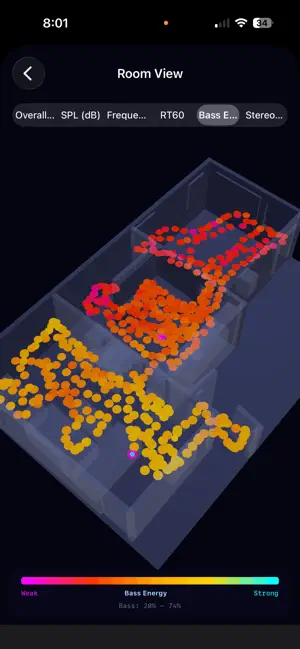
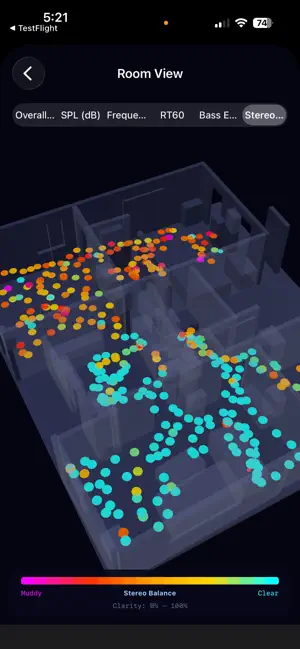
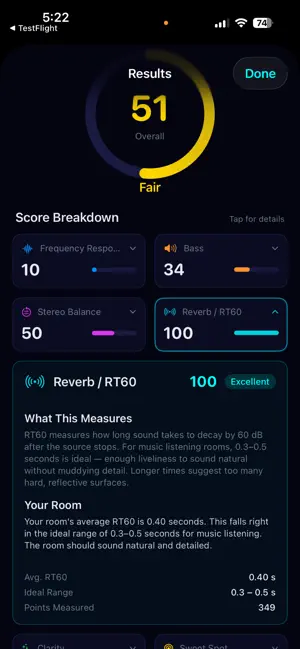
Your room is changing the way your speakers sound — and you can't see it happening. Bass doubles in one corner and disappears in another. Echoes smear the stereo image. The couch might be in the worst possible spot. SonarRoom makes all of it visible. ONE WALK. COMPLETE PICTURE. Connect your iPhone to your speakers, tap Start, and walk around the room for 3–4 minutes. SonarRoom simultaneously scans your room with AR, plays test tones through your speakers, records the response, and tracks your position — capturing hundreds of measurement points in a single pass. SEE YOUR SOUND IN 3D When you stop, the app builds an interactive 3D acoustic map of your room. Switch between overall quality, bass energy, stereo balance, reverb time, and more. Tap any point to inspect its full acoustic profile. Rotate, zoom, and explore how sound changes from position to position. FIND THE SWEET SPOT SonarRoom evaluates every measured position and ranks the top listening spots — gold, silver, and bronze — scored on frequency balance, stereo imaging, reverb, and bass consistency. Stop guessing where to sit. KNOW EXACTLY WHAT'S WRONG The app automatically detects standing waves, null zones, flutter echoes, comb filtering, speaker-boundary interference, and stereo asymmetry. Each problem is named, explained in plain English, rated by severity, and shown in 3D — so you understand both what it is and where it is. KNOW EXACTLY WHAT TO FIX Every problem comes with prioritized, actionable recommendations: move speakers, add bass traps, apply EQ, reposition your listening spot. Each suggestion includes a predicted improvement percentage so you can focus on what matters most. PROFESSIONAL-GRADE ANALYSIS, NO EXPERTISE REQUIRED SonarRoom uses the same impulse response techniques as professional acoustic measurement systems — adaptive Wiener deconvolution, Schroeder RT60, ISO clarity indices — but presents everything through scores, heatmaps, and plain-language explanations. Temperature and humidity compensation adjusts for how air itself absorbs high-frequency sound, giving you accurate RT60 and reflection data regardless of room conditions. No acoustics degree needed. FEATURES + Unified AR scan + acoustic measurement in one walk + 3D acoustic heatmap with 6 switchable metrics + Sweet spot detection with ranked positions + Automatic problem detection with plain-English explanations + Full 20 Hz – 20 kHz frequency response at every point + Multi-sweep averaging with coherence analysis + Frequency response confidence bands showing measurement reliability + Auto-generated coherence-weighted parametric EQ profiles + Spectral decay (waterfall) plots with group delay analysis + Before/after session comparison + Built-in microphone correction (iPhone XS – iPhone 17 Pro Max) + Import external mic calibration files (.cal, .frd) + Ambient noise gating for reliable measurements + Temperature-compensated RT60 with air absorption correction + Export: CSV data, JSON analysis, WAV impulse responses, PDF reports SPEAKER LAYOUTS Stereo · 2.1 · 5.1 · 7.1 · Dolby Atmos · Custom COMPATIBILITY Best: iPhone 14 Pro+ with LiDAR (centimeter-accurate room scanning) Great: iPhone 12+ (monocular depth, full measurement capability) Supported: Any iOS 17 device (manual 2D room editor) Connect via Bluetooth, AirPlay, aux cable, USB, or HDMI. WHO IT'S FOR Home theater owners optimizing subwoofer placement and seating · Music producers finding the flattest monitoring position · Audiophiles quantifying room impact on their system · Podcast producers finding the driest recording spot · Anyone curious about how their room shapes their sound Free to scan. Unlock results for $4.99 (single session) or go unlimited for $9.99/month. No accounts. Your data stays on your device. LICENSED APPLICATION END USER LICENSE AGREEMENT: https://www.apple.com/legal/internet-services/itunes/dev/stdeula/
Ratings & reviews
4.2
5 ratings
What’s new
Version 1.8 · Updated October 31, 2026
MORE ACCURATE RESULTS • Room dimensions now follow the walls instead of the direction you were facing when the scan started, so room-mode and speaker-placement advice lines up with the real room. • Fixed the speaker-boundary (SBIR) null frequency, high-frequency roll-off in every measurement, reflection levels, and per-band reverb times. Expect treble to read flatter and bass problems to land at the right frequencies. • Each speaker is analysed separately. A subwoofer no longer drags down the flatness map or the EQ. • Room modes are only reported when the measurement actually shows them at more than one spot. A STEADIER WALK • The screen stays on during the walk, and a "Slow down" banner appears if you move too fast for a sweep. • Sweeps taken while tracking was lost, while the phone moved too far, or while the mic clipped are skipped and counted instead of becoming bad points. • If your speaker or AirPlay output changes mid-walk, measurement pauses with a warning until it comes back. CLEARER RESULTS • One 0 dB reference across every chart and export; levels are labelled dBFS. • "How is this scored?" explains the overall score and its weights. • The decay plot is labelled as modeled, heatmaps use fixed scales with real units, and the EQ exports in REW / Equalizer APO text format. • Reverb is judged against a target for your room's size, and a new reverb check tells you when the room is too live. • Metric or imperial units, Dynamic Type and VoiceOver support on the Results screens. If you hit a problem, please reach out at [email protected] — it helps more than a review.
App privacy
The developer, Craig Cowden, reported these privacy practices to Apple.
Data Not Collected
The developer does not collect any data from this app.
Alternatives to SonarRoom Audio Analysis Tool
Looking for apps like SonarRoom Audio Analysis Tool? Here are 6 similar apps on the App Store. The highest rated is HiFi Setup: Bass & Speakers (5.0/5), and all 6 are free to download.
-
 BetterAudio: Room Acustics
-
 HiFi Setup: Bass & Speakers
5.0
-
 BeatRepeat
5.0
-
 YOKA INSTRUMENTS
4.8
-
 GranSample - Granular Sampler
4.6
-
 AudioPipeline
4.5
| App | Rating | Price | Last updated | Compare |
|---|---|---|---|---|
| SonarRoom Audio Analysis Tool | 4.2 / 5 (5 ratings) | Free | October 31, 2026 | |
| BetterAudio: Room Acustics | – | Free | Apr 30, 2026 | Compare |
| HiFi Setup: Bass & Speakers | 5.0 / 5 (1) | Free | Mar 25, 2026 | Compare |
| BeatRepeat | 5.0 / 5 (5) | Free | Apr 24, 2026 | Compare |
| YOKA INSTRUMENTS | 4.8 / 5 (6) | Free | Apr 15, 2026 | Compare |
| GranSample - Granular Sampler | 4.6 / 5 (16) | Free | Oct 27, 2026 | Compare |
| AudioPipeline | 4.5 / 5 (17) | Free | Oct 12, 2026 | Compare |