

TurboScanner - AI Scan to PDF
Olaasoft MMC Productivity iPhoneiPadiPod touch
TurboScanner - AI Scan to PDF is a free Productivity app for iPhone and iPad by Olaasoft MMC. Requires iOS 16.0. Updated April 2, 2026.
- Price
- Free
- on the App Store
- Size
- 82 MB
- Age 4+
- Updated
- Apr 2
- 2026 · v1.0.1
Screenshots
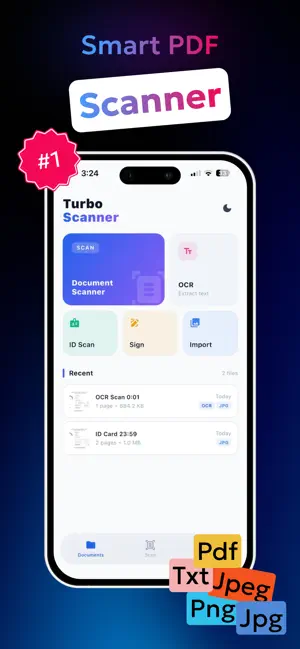


About TurboScanner - AI Scan to PDF
TurboScanner — The Fastest Way to Scan, Sign & Share Turn your iPhone into a powerful document scanner. TurboScanner captures receipts, contracts, notes, books, and IDs in seconds — with stunning clarity and automatic edge detection. SCAN ANYTHING, INSTANTLY • Auto edge detection crops and flattens documents perfectly • Scan multi-page documents into a single PDF in one session • Smart filters: Black & White, Grayscale, Color, and Photo modes • Works in low light — no extra equipment needed OCR TEXT RECOGNITION Extract text from any scanned document with one tap. Copy, search, and share the recognized text instantly. Perfect for receipts, business cards, contracts, and handwritten notes. TurboScanner's OCR engine supports printed and typed text with high accuracy. SIGN DOCUMENTS Sign PDFs directly on your screen — no printing required. Add your signature with your finger or Apple Pencil, place it anywhere on the page, and send signed documents back in seconds. Ideal for contracts, forms, and agreements. EXPORT EVERYWHERE • Save as PDF or high-resolution JPEG • Share instantly via Mail, Messages, WhatsApp, Dropbox, Google Drive, and more • AirDrop to Mac or other Apple devices in one tap • Print directly from the app ORGANIZE YOUR DOCUMENTS • Create folders and subfolders to keep everything tidy • Rename, merge, reorder, and delete pages with ease • Search across all your documents instantly • iCloud sync keeps your files available on all your Apple devices PRIVACY FIRST Your documents never leave your device unless you choose to share them. No mandatory account required. No hidden subscriptions to unlock basic features. PERFECT FOR: - Students scanning notes, textbooks, and assignments - Professionals handling contracts, invoices, and reports - Freelancers and small businesses going paperless - Anyone who needs a fast, reliable PDF scanner on the go Whether you're archiving receipts for tax season, signing a rental agreement, extracting text from a photo, or turning a whiteboard snapshot into a shareable PDF — TurboScanner handles it all. Download TurboScanner today and go paperless in minutes. Privacy Policy: https://olaasoft.github.io/legal/turboscanner/privacy.html Terms of Use: https://www.apple.com/legal/internet-services/itunes/dev/stdeula/
What’s new
Version 1.0.1 · Updated April 2, 2026
• Smoother performance and faster scanning • Enhanced image quality and auto-crop • Improved touch responsiveness • Bug fixes and stability improvements
App privacy
The developer, Olaasoft MMC, reported these privacy practices to Apple.
Data Not Linked to You
The following data, which may be collected but is not linked to your identity, may be used for the following purposes:
- Identifiers: Device ID
- Diagnostics: Crash Data, Performance Data
- Purchases: Purchase History
Used for: Analytics, App Functionality
Alternatives to TurboScanner - AI Scan to PDF
Looking for apps like TurboScanner - AI Scan to PDF? Here are 6 similar apps on the App Store. The highest rated is Islamic App Lock: Dua Lock (5.0/5), and all 6 are free to download.
-
 Islamic App Lock: Dua Lock
5.0
-
 4invoice
-
 Scan2Clipboard
5.0
-
 Quixy
5.0
-
 FoxScanner Mini
4.6
-
 Doc Scanner
| App | Rating | Price | Last updated | Compare |
|---|---|---|---|---|
| TurboScanner - AI Scan to PDF | – | Free | April 2, 2026 | |
| Islamic App Lock: Dua Lock | 5.0 / 5 (2) | Free | Mar 2, 2026 | Compare |
| 4invoice | – | Free | Sep 24, 2026 | Compare |
| Scan2Clipboard | 5.0 / 5 (1) | Free | Sep 29, 2025 | Compare |
| Quixy | 5.0 / 5 (1) | Free | Oct 15, 2026 | Compare |
| FoxScanner Mini | 4.6 / 5 (368) | Free | Apr 2, 2026 | Compare |
| Doc Scanner | – | Free | Aug 12, 2026 | Compare |