

Limit Screen Time: Focus
Dilshodi Kahori Productivity iPhoneiPadiPod touch
Limit Screen Time: Focus is a free Productivity app for iPhone and iPad by Dilshodi Kahori. Requires iOS 26.0. Updated October 21, 2026.
- Price
- Free
- on the App Store
- Size
- 56 MB
- Age 12+
- Updated
- Oct 21
- 2026 · v1.4.4
Screenshots



About Limit Screen Time: Focus
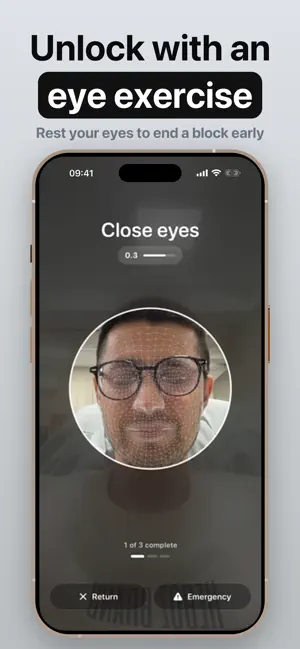
Limit screen time on the apps you overuse and get your hours back. Focus is a calm app blocker for iPhone. Pick the apps and websites that pull you in, start a block, and they stay locked until the time is up. NO "IGNORE LIMIT" BUTTON To end a block early, you close your eyes and open them three times in front of the camera. This short eye exercise rests your eyes and gives you a moment to decide if you really need that app. Camera frames never leave your iPhone. HOW IT WORKS 1. Pick the apps, websites and categories you want to block. 2. Set how long the block lasts, or schedule it for every day. 3. Start the block. It stays on even when Focus is closed. WHAT YOU GET • Less mindless scrolling on social media, video and games. • A website blocker that works in Safari too. • Scheduled downtime that starts on its own every day, overnight included. • Today's most used apps and the minutes you protect, block after block. • Live progress on the Lock Screen and in the Dynamic Island. • A reminder to come back at the same time tomorrow. MADE FOR Deep work. Studying for exams. A digital detox before bed. Days when you want your phone to feel more like a dumb phone. No shame, and no streaks to keep. PRIVATE BY DESIGN Your app usage and camera frames stay on your device. Terms of Use (EULA): https://www.apple.com/legal/internet-services/itunes/dev/stdeula/
What’s new
Version 1.4.4 · Updated October 21, 2026
• Usability improvements and bug fixes.
App privacy
The developer, Dilshodi Kahori, reported these privacy practices to Apple.
Data Used to Track You
The following data may be used to track you across apps and websites owned by other companies:
- Purchases: Purchase History
- Identifiers: Device ID
- Usage Data: Product Interaction, Advertising Data
- Other Data: Other Data Types
Data Linked to You
The following data, which may be collected and linked to your identity, may be used for the following purposes:
- Usage Data: Advertising Data, Other Usage Data, Product Interaction
- Purchases: Purchase History
- Identifiers: Device ID
- Other Data: Other Data Types
Used for: Third-Party Advertising, Developer’s Advertising or Marketing, Analytics, App Functionality
Data Not Linked to You
The following data, which may be collected but is not linked to your identity, may be used for the following purposes:
- Purchases: Purchase History
- Identifiers: Device ID
- Usage Data: Product Interaction
- Other Data: Other Data Types
Used for: Third-Party Advertising, Developer’s Advertising or Marketing
Alternatives to Limit Screen Time: Focus
Looking for apps like Limit Screen Time: Focus? Here are 6 similar apps on the App Store. The highest rated is Cozy Pom (5.0/5), and all 6 are free to download.
-
 SPENT: Screen Time Receipt
-
 Cozy Pom
5.0
Cozy Pom
5.0
-
 MyChorito: House Chores
-
 JustWait - Before You Scroll
-
 NeuroNook
-
 Legal Lens
5.0
Legal Lens
5.0
| App | Rating | Price | Last updated | Compare |
|---|---|---|---|---|
| Limit Screen Time: Focus | – | Free | October 21, 2026 | |
| SPENT: Screen Time Receipt | – | Free | Aug 2, 2026 | Compare |
| Cozy Pom | 5.0 / 5 (1) | Free | Jul 30, 2026 | Compare |
| MyChorito: House Chores | – | Free | Oct 21, 2026 | Compare |
| JustWait - Before You Scroll | – | Free | Aug 7, 2026 | Compare |
| NeuroNook | – | Free | May 8, 2025 | Compare |
| Legal Lens | 5.0 / 5 (2) | Free | Oct 20, 2026 | Compare |