

MoosePad: AI Meeting Notes
Dennis Laube Productivity iPhoneiPadiPod touchMac
MoosePad: AI Meeting Notes is a free Productivity app for iPhone and iPad by Dennis Laube. Rated 5.0/5 from 6 ratings. Requires iOS 26.0.
- Rating
- 5.0
- 6 ratings
- Price
- Free
- on the App Store
- Size
- 35 MB
- Age 4+
- Updated
- Oct 5
- 2026 · v1.9.21
Screenshots


About MoosePad: AI Meeting Notes
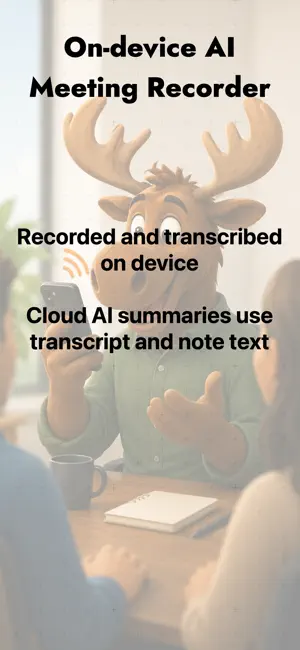
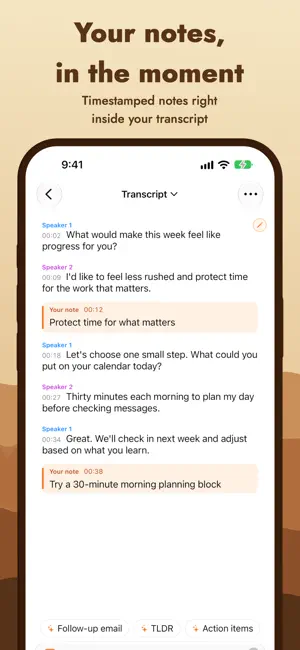
Whether you're meeting in person or on a video call, MoosePad captures every point and action item so you can put your pen down and stay in the conversation. Transcription runs on your device. Your audio is never sent to our AI service. It turns your meetings into organized, searchable notes on iPhone, iPad, and Mac. On Mac, it can capture system audio from Zoom, Teams, and your browser, not just your microphone. Hit record for a real-time transcript, then one tap generates a structured AI summary with key points, action items, and takeaways. Only text from the transcript and your notes is sent to our AI service for that summary. You can also import audio you recorded somewhere else (podcasts, lectures, voice memos) and run it through the same transcription and summary flow. PERFECT FOR • Business meetings and team standups • Church services and Bible studies • University lectures and seminars • Interviews and consultations • Podcasts and voice memos KEY FEATURES • Real-time, on-device transcription using Apple's Speech framework • AI summaries with sections, action items, and key takeaways • Ask this meeting: chat with your notes • Disable emojis in AI summaries from Settings • Automatic, on-device speaker labels while recording, with names you can edit • Detect speakers in saved notes when their audio is available • Capture more than your microphone. On Mac, MoosePad records system audio directly from Zoom, Teams, browsers, and other apps. On iPhone and iPad, put a video call on speakerphone and MoosePad captures both sides through the mic. For direct Zoom or Teams system-audio capture, record on your Mac. (iOS doesn't let any app capture another app's call audio, or regular phone and FaceTime calls.) • Personal notes with timestamps inside the transcript, including existing notes; adjustable transcript size while recording • Import M4A, WAV, and MP3 files for transcription and summarization • Select and copy any text from summaries, transcripts, and notes • Edit transcripts, summaries, and notes after the fact, and find text within a note • Organize meetings into folders and search by title or content • iCloud sync across iPhone, iPad, and Mac • Light and dark mode • Live Activity and Dynamic Island support on iPhone • Up to 8 hours of continuous recording • 15+ languages for live transcription, 25+ for AI summaries PRIVACY Transcription and speaker detection run on your device. AI summaries send only text from your transcript and notes to our cloud AI service, never audio. Optional iCloud sync stores recordings and notes in your iCloud account. On iPhone and iPad you can also start a system screen broadcast so MoosePad can transcribe audio that other apps make available, such as media playing back. iOS does not share live call audio (Zoom, Teams, Meet, phone, or FaceTime) with any app, so to capture a call put it on speakerphone or use MoosePad on Mac, which captures that system audio directly. iOS shows a standard screen-broadcast warning about screen content and notifications, but MoosePad only uses the audio. Screen content, notifications, and video are never captured or stored. The audio is written to a local container on your device, transcribed on device, and discarded when the broadcast ends. LANGUAGES Live transcription is available in English (US and UK), Spanish (Spain and Mexico), French, German, Italian, Portuguese (Brazil), Russian, Japanese, Korean, Chinese (Simplified and Cantonese), Arabic, and Turkish. AI summaries are also available in Portuguese (Portugal), Dutch, Hindi, Polish, Swedish, Norwegian, Danish, Finnish, Thai, and Indonesian. ACROSS YOUR APPLE DEVICES One subscription covers iPhone, iPad, and Mac. Your meetings sync through iCloud, so you can record on your phone and review on your Mac. PRICING • 7-day free trial • $4.99/month or $49.99/year • Family Sharing supported
Ratings & reviews
5.0
6 ratings
What’s new
Version 1.9.21 · Updated October 5, 2026
If you cancel your free trial, you can now share an optional reason and comments with MoosePad support. Your feedback helps us improve the app. Sharing feedback does not change your remaining trial access, and recordings and transcripts are never attached automatically.
App privacy
The developer, Dennis Laube, reported these privacy practices to Apple.
Data Linked to You
The following data, which may be collected and linked to your identity, may be used for the following purposes:
- Contact Info: Email Address
- Identifiers: User ID, Device ID
- Diagnostics: Crash Data
Used for: App Functionality
Data Not Linked to You
The following data, which may be collected but is not linked to your identity, may be used for the following purposes:
- Contact Info: Name
Used for: App Functionality
Alternatives to MoosePad: AI Meeting Notes
Looking for apps like MoosePad: AI Meeting Notes? Here are 6 similar apps on the App Store. The highest rated is VoiceZero: AI Note Taker (5.0/5), and all 6 are free to download.
-
 TalkTidy - Voice to Notes
-
 VoiceZero: AI Note Taker
5.0
VoiceZero: AI Note Taker
5.0
-
 Eat Frog
5.0
Eat Frog
5.0
-
 Transcribe audio to text: Oryn
-
 Echosy
-
 InscribeAI: Voice to Text
| App | Rating | Price | Last updated | Compare |
|---|---|---|---|---|
| MoosePad: AI Meeting Notes | 5.0 / 5 (6 ratings) | Free | October 5, 2026 | |
| TalkTidy - Voice to Notes | – | Free | Mar 25, 2026 | Compare |
| VoiceZero: AI Note Taker | 5.0 / 5 (1) | Free | May 8, 2026 | Compare |
| Eat Frog | 5.0 / 5 (1) | Free | Apr 28, 2026 | Compare |
| Transcribe audio to text: Oryn | – | Free | Feb 23, 2026 | Compare |
| Echosy | – | Free | Apr 23, 2026 | Compare |
| InscribeAI: Voice to Text | – | Free | Jun 17, 2025 | Compare |