

Water Tracker WaterDrop
Dt nova Health & Fitness iPhoneiPadiPod touchApple Watch
Water Tracker WaterDrop is a free Health & Fitness app for iPhone and iPad by Dt nova. Rated 2.0/5 from 1 ratings. Requires iOS 17.0.
- Rating
- 2.0
- 1 ratings
- Price
- Free
- on the App Store
- Size
- 13 MB
- Age 4+
- Updated
- Sep 24
- 2026 · v1.2
Screenshots


About Water Tracker WaterDrop
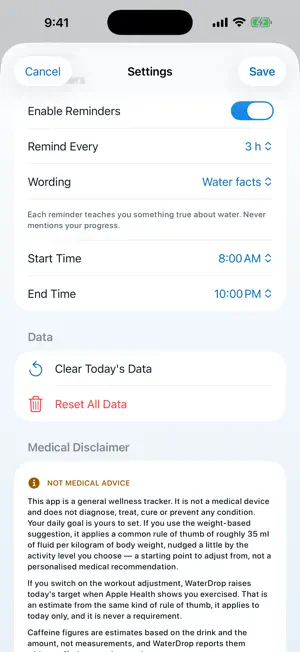
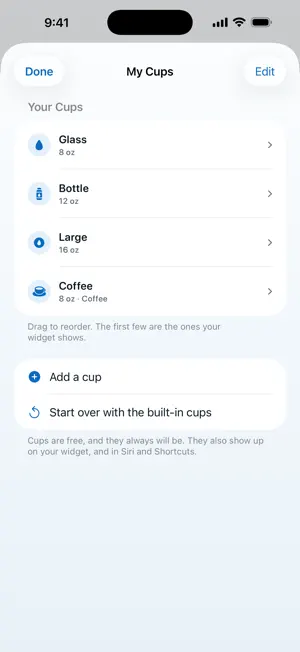
Log a glass of water in one tap. Set a daily goal in ounces or milliliters. Get a reminder when it has been a while, and none at all once you hit your goal. That is the whole app. No account, no sign-up, no setup wizard. ONE TAP TO LOG, YOUR WAY Four ready-made cups sit on the home screen and one tap logs them, or type any amount. With Premium, add the glass, bottle or mug you actually drink from, with its own name, size and mark. They show up on your widget, and in Siri and Shortcuts. OUNCES OR MILLILITERS, PROPERLY Pick your units once and the whole app follows: your goal, your total, your cups, your history, your reminders and your widgets. US and UK fluid ounces are both here, and they are not the same size, so a British reader is not quietly shown American numbers. LOG FROM WHEREVER YOU ARE A Home Screen widget with buttons on it. A Lock Screen and Control Center control. An Apple Watch app with a goal ring and a watch face complication. Ask Siri, or use a Shortcut. All free. REMINDERS THAT PAY ATTENTION Choose your waking hours and how often you want a nudge, with a separate weekend schedule and quiet hours. Log a drink and the timer resets, so you are never pinged a minute after you already drank. Reach your goal and reminders stop for the day. No guilt, no streak threats, never a marketing notification. NOT JUST WATER Coffee, tea, juice, milk, soda and yes, alcohol. Each counts toward your goal at its own rate, and your history still shows what you actually drank. Every drink type is free. APPLE HEALTH Turn it on and each drink is saved to Apple Health, and water logged in another app is counted here too, once, with a badge showing where it came from. Off by default, and the app works fully without it. STREAKS, IF YOU WANT THEM Every day you reach your goal adds to your streak, and your current and best streaks both sit on the home screen. A missed day is forgiven rather than counted, your best is never taken away, and one switch turns the whole thing off. YOUR HISTORY, AND YOU CAN EDIT IT Every day you have logged, going back well over a year. Fix a wrong amount, correct a time, add a drink you forgot, or delete one, on any day. Undo is one tap and works on anything logged anywhere. None of that is behind a paywall. Weekly and monthly trends are part of Premium. A GOAL THAT FITS YOU Set a target anywhere from 1 L to 4 L, or 34 oz to 135 oz. Not sure where to start? Enter your weight in kg or lb and WaterDrop suggests a starting point you can change any time. If your day does not start at midnight, move the rollover to any hour up to 11 and every total, streak and chart follows. FREE, AND STAYING THAT WAY Logging, reminders, streaks, every day of your history, editing or deleting any entry, widgets, the Watch app and Apple Health are free, and they are staying free. No ads, ever. Your entries live on your device, and the only place they are ever copied to is Apple Health, which is your own private store and only if you switch it on. WATERDROP PREMIUM, IF YOU WANT IT An optional subscription adds your own custom cups, weekly and monthly trends with a monthly recap, an export of your whole history as a CSV file, and four alternate app icons. If you used WaterDrop before version 1.2, your custom cups and trends stay free. $2.99 a month or $19.99 a year, with 14 days free on the yearly plan. Renews automatically unless cancelled at least 24 hours before the period ends. NOT MEDICAL ADVICE WaterDrop is a habit tracker, not a health product. It does not diagnose, treat or monitor any condition, and any goal it suggests is a rough starting point, not a personal recommendation. How much you should drink depends on your body, your medication, your activity and your climate. Ask a doctor, not an app. Terms of Use: https://www.apple.com/legal/internet-services/itunes/dev/stdeula/
What’s new
Version 1.2 · Updated September 24, 2026
A clearer Premium page: what you get is on one screen, no swiping. Fixes for Settings, custom amounts and editing your cups, which could fail to open. Undo Last is easier to tap. You can now rate WaterDrop from Settings. Logging, reminders, history and editing any entry stay free.
App privacy
The developer, Dt nova, reported these privacy practices to Apple.
Data Not Collected
The developer does not collect any data from this app.
Alternatives to Water Tracker WaterDrop
Looking for apps like Water Tracker WaterDrop? Here are 6 similar apps on the App Store. The highest rated is Biru: Water Intake Tracker (5.0/5), and all 6 are free to download.
-
 WaterDrop: Drink Water Tracker
-
 Waterd
4.0
Waterd
4.0
-
 Trinki: Water Reminder Tracker
-
 Hydrate: Water Reminder & Log
-
 Biru: Water Intake Tracker
5.0
Biru: Water Intake Tracker
5.0
-
 Waterfy: Water Tracker
| App | Rating | Price | Last updated | Compare |
|---|---|---|---|---|
| Water Tracker WaterDrop | 2.0 / 5 (1 rating) | Free | September 24, 2026 | |
| WaterDrop: Drink Water Tracker | – | Free | Jul 28, 2026 | Compare |
| Waterd | 4.0 / 5 (1) | Free | May 25, 2026 | Compare |
| Trinki: Water Reminder Tracker | – | Free | Sep 21, 2026 | Compare |
| Hydrate: Water Reminder & Log | – | Free | Apr 1, 2026 | Compare |
| Biru: Water Intake Tracker | 5.0 / 5 (1) | Free | Sep 10, 2026 | Compare |
| Waterfy: Water Tracker | – | Free | May 25, 2026 | Compare |