

Ctrl V: Paste the Right Path.
Ya Nan Zhang Health & Fitness iPhoneiPadiPod touch
Ctrl V: Paste the Right Path. is a free Health & Fitness app for iPhone and iPad by Ya Nan Zhang. Rated 5.0/5 from 2 ratings. Requires iOS 16.6.
- Rating
- 5.0
- 2 ratings
- Price
- Free
- on the App Store
- Size
- 287 MB
- Age 12+
- Updated
- Sep 12
- 2026 · v1.0.7
Screenshots



About Ctrl V: Paste the Right Path.
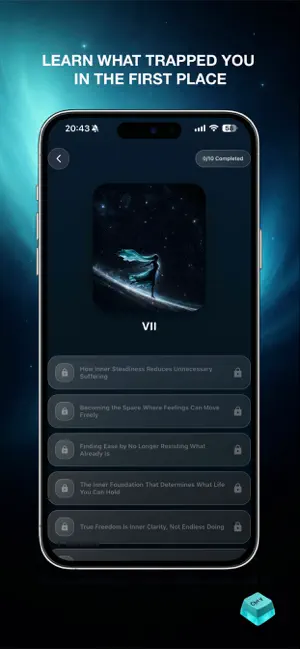
Ctrl V is a self-growth, habit-change, and emotional support app designed to help you reflect, reset old patterns, and build steadier daily habits. Inside Ctrl V, you can explore a guided 90-day growth journey, daily prayer, daily mood check-ins, Reparent Your Inner Child with July, short learning reflections, journaling, breathing exercises, meditation, community support, dopamine detox, and an AI companion called Heaver. Ctrl V is designed for people working on unwanted habits, digital overuse, emotional loops, self-reflection, accountability, and personal behavior-change goals. The app provides supportive tools for reflection and daily growth, not medical treatment. Key features: • 90-Day Journey Follow a structured growth path with weekly story content, reflection moments, and progress-based unlocks. • Daily Prayer Take a quiet moment with God each day through guided prayer and calming audio — helping you bring your struggles to Him, reflect, reset, and keep moving forward with faith. • Mood Check-ins Record your daily mood, build self-awareness, and track emotional patterns over time. • Reparent Your Inner Child with July Build a bond with July across your 90-day journey. Show up for her, care for her, make small choices together, and watch her grow — while learning to give your younger self the safety, patience, and care you may have needed growing up. • Dopamine Detox Take part in a guided Dopamine Detox journey, choose from built-in habit challenges, or create a personal challenge based on your own goals. Record completed actions and build greater consistency through small daily steps. • Streaks and Progress Celebrate daily check-ins, track your consistency, and stay connected to your growth journey. • Learning Archive Read short guided lessons designed for reflection, clarity, and steady growth. • Journal Write private reflections, reasons for change, and personal notes. • Breathing, Meditation, and Manifestation Use calming tools and audio experiences to support daily regulation, focus, and reflection. • Community Share posts, comment, like, boost, and connect with others through safety-aware community features. • Heaver AI Companion Chat with a supportive AI companion designed to help you reflect, organize your thoughts, and explore gentle next steps. • Emergency Numbers Quickly access emergency and support numbers by country, with optional location-based country suggestion. Important: Ctrl V is not a medical provider, therapist, psychiatrist, crisis service, emergency service, or substitute for professional care. Heaver and other app features are supportive self-reflection tools only. If you are in immediate danger or need urgent help, contact local emergency services or a qualified professional. Subscription: Ctrl V may offer Premium membership plans for access to the full app experience. Payment is handled through the App Store. Subscription availability and pricing may vary by region. Privacy Policy: https://thectrlv.app/privacy Terms of Use: https://thectrlv.app/terms Apple Standard EULA: https://www.apple.com/legal/internet-services/itunes/dev/stdeula/
What’s new
Version 1.0.7 · Updated September 12, 2026
A smoother onboarding experience, a refreshed membership screen, faster loading, and notification improvements.
App privacy
The developer, Ya Nan Zhang, reported these privacy practices to Apple.
Data Linked to You
The following data, which may be collected and linked to your identity, may be used for the following purposes:
- Identifiers: Device ID, User ID
- Usage Data: Product Interaction, Other Usage Data
- Diagnostics: Crash Data, Performance Data, Other Diagnostic Data
- Health & Fitness: Health
- Purchases: Purchase History
- Location: Coarse Location
- Contact Info: Email Address, Name
- User Content: Photos or Videos, Audio Data, Customer Support, Other User Content
- Sensitive Info: Sensitive Info
Used for: Analytics, App Functionality
Alternatives to Ctrl V: Paste the Right Path.
Looking for apps like Ctrl V: Paste the Right Path.? Here are 6 similar apps on the App Store. The highest rated is Shift Stories (5.0/5), and 5 of the 6 are free to download.
-
 Shift Stories
5.0
Shift Stories
5.0
-
 AI Food Scanner: BiteNavi
5.0
AI Food Scanner: BiteNavi
5.0
-
 Brain-Shift
5.0
Brain-Shift
5.0
-
 FORM Training
-
 Binate: AI Reflective Journal
-
 Norii
4.0
Norii
4.0
| App | Rating | Price | Last updated | Compare |
|---|---|---|---|---|
| Ctrl V: Paste the Right Path. | 5.0 / 5 (2 ratings) | Free | September 12, 2026 | |
| Shift Stories | 5.0 / 5 (2) | Free | May 26, 2026 | Compare |
| AI Food Scanner: BiteNavi | 5.0 / 5 (6) | Free | Jun 23, 2026 | Compare |
| Brain-Shift | 5.0 / 5 (1) | 39.99 USD | Sep 16, 2026 | Compare |
| FORM Training | – | Free | Jul 22, 2026 | Compare |
| Binate: AI Reflective Journal | – | Free | Sep 27, 2026 | Compare |
| Norii | 4.0 / 5 (4) | Free | Jul 22, 2026 | Compare |