

Voice Changer - Voxify
Bernardo Nunes Pinheiro Utilities iPhoneiPadiPod touch
Voice Changer - Voxify is a free Utilities app for iPhone and iPad by Bernardo Nunes Pinheiro. Rated 5.0/5 from 2 ratings. Requires iOS 15.0.
- Rating
- 5.0
- 2 ratings
- Price
- Free
- on the App Store
- Size
- 50 MB
- Age 4+
- Updated
- Oct 8
- 2026 · v2.0.1
Screenshots



About Voice Changer - Voxify
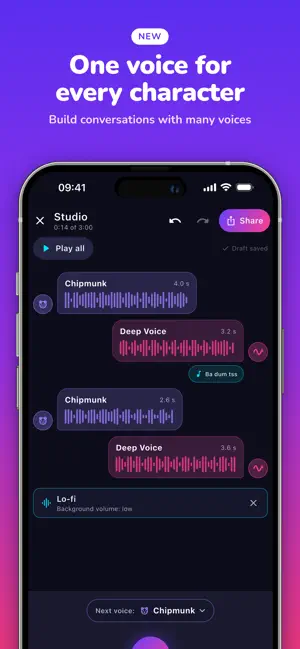
Change your voice in one tap, then build whole conversations with it. Voxify is a fast, simple voice changer. Record, pick an effect and your voice is unrecognizable. Effects keep your natural pace: it's your voice, transformed. Only Slowed + Reverb and Nightcore change the speed, on purpose. NEW: STUDIO Turn one recording into a scene. • Another voice: answer yourself in a different voice. Each line can be a different character. • Sound after a line: a rimshot after the joke, a sad trombone when it goes wrong, a boom for the plot twist. 18 effects to pick from. • Background sound: lo-fi, trap, funk, suspense, rain and more. It dips on its own when someone talks. • Make your own beat: start from funk, trap, lo-fi, pop, reggaeton or 8-bit, change the drums, bass, chords and melody step by step, and use it as background sound. Every note fits, so it sounds good even if you never played music. • Trim the silence at the start and end, change a voice, set the volume, re-record or reorder lines. Undo is always there and your draft saves itself. • Combine recordings you already saved, in the order you want. • Share the whole conversation as one video or audio file. 12 VOICE EFFECTS • Reverse: your voice backwards • Chipmunk: squeaky and high • Deep Voice: movie-trailer narrator • Robot: metallic and futuristic • Echo: cavernous repeats • Alien: otherworldly wobble • Demon: dark and low • Whisper: soft and airy • Slowed + Reverb: the dreamy TikTok sound (Pro) • Nightcore: fast and bright (Pro) • Monster: huge, growling creature (Pro) • Radio: crackly walkie-talkie (Pro) SHARE AS VIDEO • Post to TikTok, Reels, Stories and Shorts • Animated waveform with the voice name as the title • Or send the audio file on WhatsApp, Telegram or iMessage FREE • 3 effects always free, 5 more with a short video • Studio conversations of 2 lines for free. One short video unlocks a whole conversation: up to 12 lines, background sounds, effects and video voices • The music maker is free: make, hear and save as many beats as you like VOXIFY PRO, ONE PAYMENT • No ads, ever, and no videos to watch • 4 exclusive voices: Slowed + Reverb, Nightcore, Monster, Radio • Full Studio: up to 12 lines, every sound and effect • Record up to 3 minutes instead of 1 • Import audio files (Voice Memos, MP3, M4A) • Pay once and keep it forever. No subscription. PRIVATE BY DESIGN • No account, no sign-up • Everything is processed on your iPhone and works offline • English, Portuguese, Spanish, German and Japanese
What’s new
Version 2.0.1 · Updated October 8, 2026
New: Studio • Another voice: answer yourself in a different voice and build a conversation, one character per line • Sound after a line: a rimshot after the joke, a boom for the plot twist, 18 effects • Background sound: lo-fi, trap, funk, suspense, rain and more. It dips on its own when someone talks • Music: make your own beat with drums, bass and melody, and use it as background sound • Trim: cut the silence and the button tap at the start and end • Combine: join your saved recordings in any order • Share the whole conversation as a video or audio Also: • Saved recordings stay in My Recordings after updating • Better sound when recording with AirPods • A call or Siri no longer ruins a recording • Fewer interruptions: no ads between picking an effect and hearing it • Reminders: if a conversation is left halfway, one nudge the next day (you can turn it off) • Pro's price shows right where you choose between a short video and Pro
App privacy
The developer, Bernardo Nunes Pinheiro, reported these privacy practices to Apple.
Data Used to Track You
The following data may be used to track you across apps and websites owned by other companies:
- Identifiers: Device ID
Data Not Linked to You
The following data, which may be collected but is not linked to your identity, may be used for the following purposes:
- Identifiers: Device ID, User ID
- Usage Data: Product Interaction, Advertising Data
- Diagnostics: Crash Data, Performance Data, Other Diagnostic Data
- Purchases: Purchase History
Used for: Third-Party Advertising, Developer’s Advertising or Marketing, Analytics, App Functionality
Alternatives to Voice Changer - Voxify
Looking for apps like Voice Changer - Voxify? Here are 6 similar apps on the App Store. The highest rated is Bot Creator Studio (5.0/5), and all 6 are free to download.
-
 Simple Voice Changer App
-
 Bot Creator Studio
5.0
Bot Creator Studio
5.0
-
 VoiceX - AI voice changer
4.0
VoiceX - AI voice changer
4.0
-
 VoiceFX - Change Your Voice+
-
 Voicy: Live Voice Changer
3.7
Voicy: Live Voice Changer
3.7
-
 AI Voice Changer | Microphone
1.0
AI Voice Changer | Microphone
1.0
| App | Rating | Price | Last updated | Compare |
|---|---|---|---|---|
| Voice Changer - Voxify | 5.0 / 5 (2 ratings) | Free | October 8, 2026 | |
| Simple Voice Changer App | – | Free | Sep 2, 2026 | Compare |
| Bot Creator Studio | 5.0 / 5 (1) | Free | Oct 29, 2026 | Compare |
| VoiceX - AI voice changer | 4.0 / 5 (2) | Free | Dec 19, 2024 | Compare |
| VoiceFX - Change Your Voice+ | – | Free | May 25, 2026 | Compare |
| Voicy: Live Voice Changer | 3.7 / 5 (6) | Free | Oct 6, 2026 | Compare |
| AI Voice Changer | Microphone | 1.0 / 5 (1) | Free | Jan 16, 2025 | Compare |