

Halora - Daily Devotional
Lawrence Murdoch Reference iPhoneiPadiPod touch
Halora - Daily Devotional is a free Reference app for iPhone and iPad by Lawrence Murdoch. Requires iOS 18.6. Updated June 29, 2026.
- Price
- Free
- on the App Store
- Size
- 15 MB
- Age 4+
- Updated
- Jun 29
- 2026 · v1.2
Screenshots



About Halora - Daily Devotional
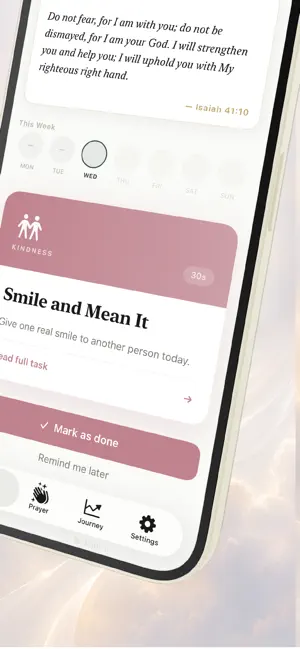
Faith shouldn't feel complicated. Halora is a daily devotional app built for people who want to grow closer to God — without the overwhelm. One small task a day. Five minutes or less. A practice that actually sticks. One task. Every day. Each morning, Halora gives you a single, meaningful faith task — a prayer, a scripture reading, a moment of reflection, or an act of kindness. Designed for your schedule. Rooted in real practice. No long commitments. No guilt. Just one step. Built to last, not just start Most faith apps are easy to open and easy to forget. Halora is different. - Watch your streak grow — and feel it when you hit 7, 14, 30, or 100 days - Track your faith journey in a personal history of reflections and saved verses - Receive beautifully crafted morning reminders that feel worth reading - A home screen widget keeps your streak and daily task visible all day Prayer made accessible Not sure how to pray? Halora helps. - Ten ready-made prayers for Peace, Anxiety, Strength, Forgiveness, and more - A personal prayer builder that turns what's on your heart into words - A prayer timer for quiet, undistracted time with God Go deeper when you're ready Three guided reading plans — First Steps in Faith, Peace in the Psalms, and The Words of Jesus — take you through scripture day by day, with context and reflection prompts. Available in 9 languages. Select your language in the first step of onboarding. Every screen, every prayer, every notification — in the language you think in. Your data stays with you Halora is local-first. Your reflections, streaks, saved verses, and progress live on your device. No account required. No data sold. Start today. Your streak starts at zero. Tomorrow it's one. In thirty days it's a practice. In a year it's a part of who you are. "Draw near to God and he will draw near to you." — James 4:8 EULA: http://www.apple.com/legal/itunes/appstore/dev/stdeula
What’s new
Version 1.2 · Updated June 29, 2026
UI & Visual - Dark mode— Full adaptive colour support throughout the app. Every screen responds correctly to the system appearance setting. - Category colours — Each task type (Prayer, Gratitude, Scripture, Reflection, Kindness, Discipline, Worship) now has its own distinct accent colour, carried through the task card, badge, completion screen, and button. - Redesigned task card — The daily task now opens with a full gradient header in the category's colour, with the category icon and time estimate. Cleaner, more premium feel. - Redesigned scripture card — A new layout with a decorative serif quotation mark, italic verse text, and a fine gold border. - Completion screen overhaul — Completing a task now triggers a particle burst animation, a prominent streak counter, and a curated completion scripture. Each task has a consistent verse tied to it. - Streak week row — Enlarged day circles, flame icon on active streak days, a dash for missed days. Much easier to read at a glance. New Features - Milestone celebrations — Reaching a streak of 7, 14, 30, 60, 100, or 365 days triggers a full-screen celebration with a personalised message, relevant scripture, and its own emoji. Feels earned. - Reflection prompt— When you mark a task as done, Halora now asks "what stayed with you?" before completing. You can skip it or write a note. That note is saved to your history. - Reflection history — Your past reflections are now visible in the Journey tab, with the task name, date, and expandable text. A record of your actual faith journey. - Task swap — If today's task doesn't feel right, a new "I need something different today" option lets you swap it once per day. No guilt. Just a better fit. - Bookmark verses — A bookmark button on the Daily Verse section saves any verse to your library. Your saved verses live in the Journey tab. - Guided reading plans — Three multi-day reading plans are now available: First Steps in Faith (7 days), Peace in the Psalms (10 days), and The Words of Jesus (7 days). Each day has a passage, context, and a mark-complete button. Progress is saved automatically. - Quick prayers— Ten ready-made prayers (Peace, Wisdom, Anxiety, Strength, Direction, and more) live in the Prayer tab as scrollable chips. Tap to expand and read, or copy to share. - Prayer timer — Set aside 1, 3, 5, 10, or 15 minutes of quiet time. A countdown ring fills as time passes; a gentle haptic signals when you're done. Languages Halora is now available in 9 languages, with every screen, onboarding step, and notification translated. Language is selected as the first step in onboarding — before anything else — with each option shown in its native script alongside a country flag. It can be changed at any time in Settings. Widget A native iOS home screen widget in three sizes.
App privacy
The developer, Lawrence Murdoch, reported these privacy practices to Apple.
Data Not Collected
The developer does not collect any data from this app.