

DayWallet
Mudric Lab Finance iPhoneiPadiPod touch
DayWallet is a free Finance app for iPhone and iPad by Mudric Lab. Requires iOS 15.1. Updated July 29, 2026.
- Price
- Free
- on the App Store
- Size
- 47 MB
- Age 4+
- Updated
- Jul 29
- 2026 · v1.2.0
Screenshots


About DayWallet
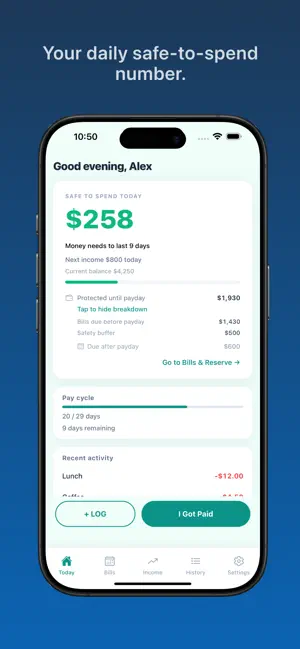
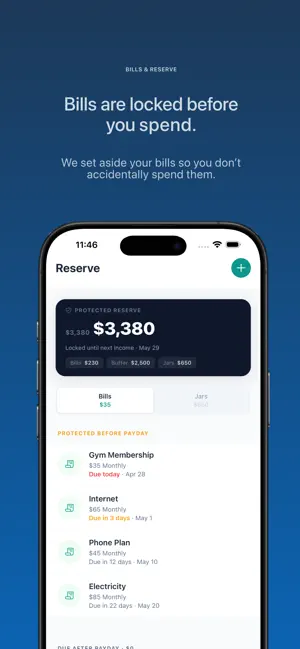
Your bank balance doesn’t tell you what you can spend. DayWallet does. Know exactly what you can safely spend today — after your bills, protected money, your next payday, and a safety buffer you control. One number. Updated daily. No bank link required. HOW IT WORKS DayWallet calculates your Safe to Spend number based on your balance, upcoming bills, protected Saving Jars, safety buffer, and days until payday. No complex budgeting. No spreadsheets. No guesswork. Just a clear number that tells you if you can afford that coffee, dinner, or impulse buy — without hurting next week. WHAT MAKES IT DIFFERENT Protected Bills Bills due before payday are automatically set aside so you don’t accidentally spend them. Saving Jars Create jars for holidays, emergencies, gifts, or personal goals. Money added to protected jars stays out of your daily Safe to Spend. Protection is on by default, and you can turn it off anytime. Pay Cycle Aware Your spending adjusts based on when your next income arrives. Runway See how many days your money will last. Teal = comfortable Amber = watch it Red = act now Safety Buffer Keep money aside for emergencies or unexpected expenses. Smarter Categories Track spending with improved categories and understand where your money goes. Business Expense Tracking Mark personal or business expenses and track them separately. Multiple Income Sources Track salary, freelance work, or side income separately. Insights See your net cash flow for any period, where your money went by category, and how personal and business spending compare. Works Offline No account. No bank connection. Your data stays on your device. TRACK WHAT MATTERS • Log expenses and income in seconds • Categorise spending • Mark expenses as personal or business • Create Saving Jars for goals • Choose whether each jar is protected • Recurring and one-off bills • Mark bills as paid, paid outside DayWallet, waived or skipped • See and resolve overdue bills • Filter your history by type, purpose or category • Edit or delete with a swipe • Daily and bill reminders PREMIUM Try free, upgrade anytime. DayWallet Premium: • Monthly and yearly plans, pricing varies by region • Unlimited Saving Jars, free includes 2 • Longer Insights: 90 days, 6 months and 1 year — free includes today, 7 days and this month • Full category breakdown and personal vs business in Insights Upgrade for: • Unlimited bills, free includes 10 • Unlimited income sources, free includes 2 • Full history, free includes 90 days • Insights beyond 30 days • Export to CSV • No ads Subscriptions automatically renew unless cancelled at least 24 hours before the end of the current period. Subscriptions can be managed and cancelled anytime in your Apple ID account settings. PRIVACY FIRST Everything stays on your device. No account. No cloud. No bank connection. Your data is yours. DayWallet is for anyone who wants a simple answer to one question: Can I afford this today? Privacy Policy: https://daywallet.mudriclab.com/privacy Terms of Use: https://www.apple.com/legal/internet-services/itunes/dev/stdeula/
What’s new
Version 1.2.0 · Updated July 29, 2026
Overdue bills, finally handled properly. DayWallet now follows every due date on its own. A bill that slips past its date stays visible until you deal with it — and you can pay it, mark it as paid outside DayWallet, waive it, or skip it. Every action can be undone. NEW: INSIGHTS A new screen that answers one question — where did my money actually go? • Net cash flow for the period, with money in and money out • Where it went, ranked by category • Personal vs business spending, side by side • A cash flow trend you can tap for exact amounts • Plain-English observations, shown only when the data supports them Free includes today, the last 7 days, and this month. Premium adds 90 days, 6 months, a full year, and the complete category breakdown. HISTORY FILTERS Filter your history by type, purpose, or category. DayWallet remembers what you chose. NUMBERS THAT AGREE Safe to Spend, your protected reserve, and runway now all come from the same due-date data, so the figures match wherever you look. ALSO IN THIS RELEASE • Overdue bills grouped by cycle, so a long backlog stays readable • Choose whether an edit applies to one due date or the whole schedule • Reschedule or skip a single bill without touching the rest • Panic mode reachable straight from your runway card • Clearer categories and improved spending breakdowns • Accessibility improvements throughout, including full VoiceOver support on Insights Your data stays on your device, as always. No account, no cloud, no bank connection. Thanks for using DayWallet. If something doesn't look right, get in touch — we read everything.
App privacy
The developer, Mudric Lab, reported these privacy practices to Apple.
Data Used to Track You
The following data may be used to track you across apps and websites owned by other companies:
- Identifiers: Device ID
- Usage Data: Product Interaction, Advertising Data
Data Not Linked to You
The following data, which may be collected but is not linked to your identity, may be used for the following purposes:
- Purchases: Purchase History
- Identifiers: Device ID
- Usage Data: Product Interaction, Advertising Data
Used for: Third-Party Advertising, Analytics, App Functionality
Alternatives to DayWallet
Looking for apps like DayWallet? Here are 6 similar apps on the App Store. The highest rated is Palmo: Paycheck Budget Tracker (5.0/5), and all 6 are free to download.
-
 Swiss Fund - Daily Budget App
-
 Paycheck Pet
-
 Cushion — Safe to Spend
-
 Palmo: Paycheck Budget Tracker
5.0
Palmo: Paycheck Budget Tracker
5.0
-
 Budget Tracker: Safe to Spend
-
 FutureFund: Safe To Spend
5.0
FutureFund: Safe To Spend
5.0
| App | Rating | Price | Last updated | Compare |
|---|---|---|---|---|
| DayWallet | – | Free | July 29, 2026 | |
| Swiss Fund - Daily Budget App | – | Free | Oct 18, 2026 | Compare |
| Paycheck Pet | – | Free | Aug 11, 2026 | Compare |
| Cushion — Safe to Spend | – | Free | Sep 2, 2026 | Compare |
| Palmo: Paycheck Budget Tracker | 5.0 / 5 (2) | Free | Jul 15, 2026 | Compare |
| Budget Tracker: Safe to Spend | – | Free | Oct 2, 2026 | Compare |
| FutureFund: Safe To Spend | 5.0 / 5 (1) | Free | Jan 3, 2026 | Compare |
Compare DayWallet with the top alternatives: ratings, updates, ASO score and keyword gaps →