

Document Scanner: DocMind
Nataliya Tkachova Productivity iPhoneiPadiPod touch
Document Scanner: DocMind is a free Productivity app for iPhone and iPad by Nataliya Tkachova. Requires iOS 17.0. Updated October 10, 2026.
- Price
- Free
- on the App Store
- Size
- 16 MB
- Age 4+
- Updated
- Oct 10
- 2026 · v1.1
Screenshots


About Document Scanner: DocMind
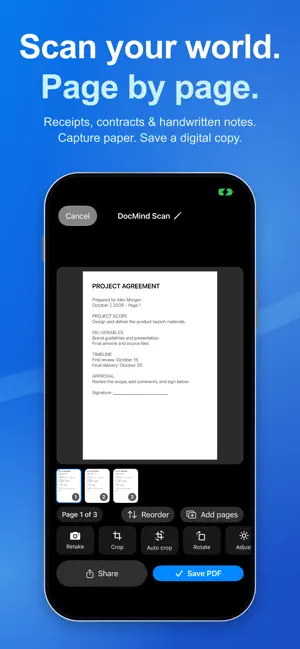
Paperwork, ready to send. DocMind turns your iPhone into a document scanner and a practical PDF workspace. Capture pages, add a signature, and protect the finished copy before you share. SCAN PAPER INTO PDFs Scan agreements, receipts, notes, and multi-page documents with your camera. Review pages, crop or rotate them, adjust their appearance, reorder the scan, and save a PDF. Import photos and supported files into your Library. SIGN WITHOUT PRINTING Create a reusable handwritten signature and place it on PDF pages. Adjust its size and position, preview the result, and save a signed copy. PROTECT BEFORE YOU SHARE Create a password-protected PDF copy from supported source files. Choose the password yourself and keep the original available. EDIT AND ANNOTATE Highlight or underline text, add notes, stamps, checkboxes, and form fields. Save your markup as a new copy. Merge, split, compress, or flatten PDFs with the supported tools. EXTRACT TEXT AND TRANSCRIBE AUDIO OCR extracts text from supported images and scans. Audio Transcriber turns supported audio and video recordings into editable text. Voice Reader reads supported document text aloud and can export spoken audio. CONVERT SUPPORTED FORMATS Convert compatible documents, images, and text into PDF, TXT, RTF, Markdown, HTML, JSON, CSV, PNG, or JPEG. Available conversions depend on the source file. REMOVE SENSITIVE DETAILS Review detected personal information in searchable PDFs, then save a permanently redacted copy. Compare document versions to find text changes. ORGANIZE AND UNDERSTAND Find, preview, and share files from your Library. On compatible devices with iOS 26 or later and Apple Intelligence enabled, Document Assistant offers on-device summaries, action items, and key dates. Table and receipt extraction can export structured data to CSV on supported systems. Availability varies by device, language, operating system, and document type. PREMIUM Some advanced tools require a DocMind Premium subscription. Available plans, prices, and any eligible trial are shown before purchase. Subscriptions renew automatically unless cancelled at least 24 hours before the current period ends. Manage or cancel your subscription in your Apple Account settings. Privacy Policy: https://www.optimaai.pl/projects/legal/docmind-privacy.html Terms of Use: https://www.optimaai.pl/projects/legal/docmind-terms.html
What’s new
Version 1.1 · Updated October 10, 2026
Your document workflow, from paper to a protected file. • Scan and organize multiple pages. • Add a reusable signature to PDFs. • Create password-protected copies before sharing. • Mark up pages, convert supported files, and redact sensitive text. Explore document, voice, and audio tools in one workspace. Availability depends on your device, language, and file type.
App privacy
The developer, Nataliya Tkachova, reported these privacy practices to Apple.
Data Not Linked to You
The following data, which may be collected but is not linked to your identity, may be used for the following purposes:
- Identifiers: Device ID
- Usage Data: Advertising Data
- Diagnostics: Crash Data
Used for: Third-Party Advertising, Analytics
Alternatives to Document Scanner: DocMind
Looking for apps like Document Scanner: DocMind? Here are 6 similar apps on the App Store.
-
 Docmind: Document Expiry
-
 Docunivo - Document Editor
-
 ChamaGo
-
 Markmatic - AI to Word & PDF
-
 PDF Lock – Password Protect
-
 AI Legal Letter Generator
| App | Rating | Price | Last updated | Compare |
|---|---|---|---|---|
| Document Scanner: DocMind | – | Free | October 10, 2026 | |
| Docmind: Document Expiry | – | Free | Oct 12, 2026 | Compare |
| Docunivo - Document Editor | – | Free | Sep 21, 2026 | Compare |
| ChamaGo | – | Free | Aug 26, 2026 | Compare |
| Markmatic - AI to Word & PDF | – | Free | May 6, 2026 | Compare |
| PDF Lock – Password Protect | – | Free | Jan 27, 2026 | Compare |
| AI Legal Letter Generator | – | Free | Oct 22, 2026 | Compare |