

BackToLife Parent
BackToLife Productivity iPhoneiPadiPod touch
BackToLife Parent is a free Productivity app for iPhone and iPad by BackToLife. Requires iOS 16.0. Updated October 9, 2026.
- Price
- Free
- on the App Store
- Size
- 71 MB
- Age 4+
- Updated
- Oct 9
- 2026 · v1.2.4
Screenshots

About BackToLife Parent
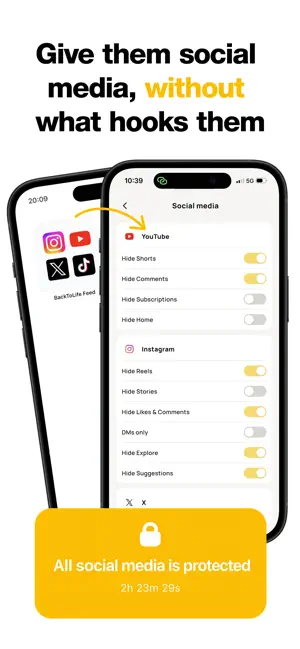
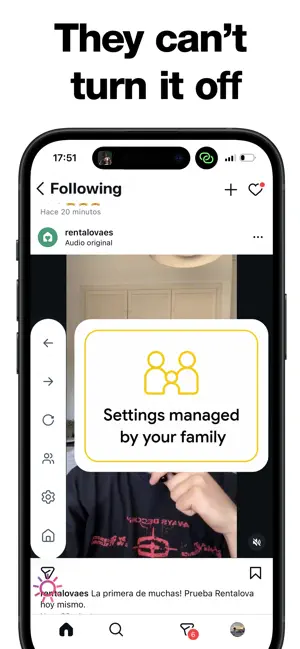
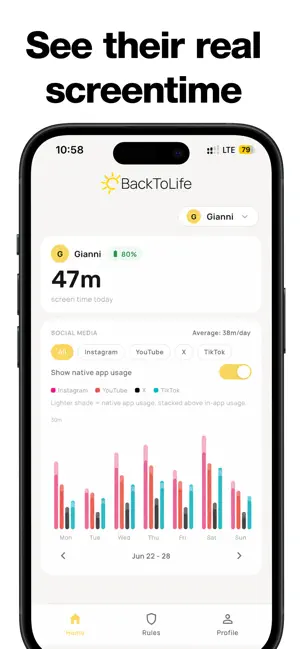
BackToLife Parent is a parental control for your child's social media: it removes what hooks them (Reels, Shorts and infinite scroll) and helps you protect them from what's dangerous, like strangers and content that isn't right for their age. Looking for a way to remove Instagram Reels, YouTube Shorts or TikTok's For You feed from your child's phone without banning social media? BackToLife Parent is built for exactly that. WHY IT'S DIFFERENT Instagram has no button to turn off Reels. Blocking the whole app causes fights at home, and counting minutes doesn't change what happens inside. What hooks teenagers isn't social media itself: it's the endless videos and the recommendations designed to keep them there. BackToLife removes exactly that and keeps the rest: talking to friends, searching and learning. WHAT IT REMOVES The Reels tab, Shorts and TikTok's For You feed, always Explore, suggestions and AI-generated posts Reels in the feed, autoplay, stories, likes and comments, if you want Ads on Instagram and YouTube WHAT IT KEEPS Their chats and messages with friends The accounts they choose to follow What they search for on purpose SAFER By removing Explore, For You and suggestions, your child only sees what the accounts they follow post and what they search for, not what the algorithm pushes at them. When you set up the app, we also guide you to turn on Instagram's official protections for minors: private account, messages from strangers and age-appropriate content. WHAT YOU CAN DO FROM YOUR PHONE Choose which social networks they get: Instagram, YouTube, TikTok and X Different filters for each network: you choose what is removed, network by network Different schedules for school days and weekends Block apps on their phone when needed See how much time they spend, when and on which network Several children on the same account Your child can't turn the filters off. On their phone they'll see: "Filters are managed by your parents". NO SPYING BackToLife doesn't read their messages or conversations. You see usage, not content. No ads and no selling data. Parenting isn't surveillance. GETTING STARTED TAKES 2 MINUTES 1. Download BackToLife on your child's phone and BackToLife Parent on yours. 2. Link them with a QR code. 3. It comes with the recommended filters already on. Adjust them if you want. WHO IT'S FOR For parents who are about to give their child a first phone or first social media accounts and want to get it right from the start. Also for families where the phone is already a daily battle. BackToLife was born in Madrid, made by a young team that grew up with these platforms and knows exactly what makes them addictive. BackToLife Parent requires a subscription. Questions? Write to [email protected] or visit backtolife.site Privacy Policy: https://backtolife.site/privacy Terms of Use (EULA): https://backtolife.site/terms
What’s new
Version 1.2.4 · Updated October 9, 2026
What's new in 1.2.4 • Invite other parents: share your code from Settings. A parent who signs up with it gets a free month of Premium right away, and when they link their first child you get yours, up to three months. • Have an invite code? Enter it when you sign up and your first month of Premium starts at once. • Hide AI Posts for Instagram and TikTok: the posts those apps label as made with AI disappear from your child's feed. The recommended setup turns it on. • How the app works now explains what happens if your child tries to remove the app. • A new Privacy screen in Settings lets you switch product analytics off for your account. • When something could not load, the app says so and offers Retry instead of showing an empty list, and a rule editor never saves over a rule it did not load. • Your children's photos and your own show without a connection, and the app makes fewer background requests.
App privacy
The developer, BackToLife, reported these privacy practices to Apple.
Data Linked to You
The following data, which may be collected and linked to your identity, may be used for the following purposes:
- Contact Info: Email Address, Name
- Identifiers: User ID, Device ID
- Usage Data: Product Interaction
- Diagnostics: Crash Data, Performance Data
Used for: App Functionality
Alternatives to BackToLife Parent
Looking for apps like BackToLife Parent? Here are 6 similar apps on the App Store.


| App | Rating | Price | Last updated | Compare |
|---|---|---|---|---|
| BackToLife Parent | – | Free | October 9, 2026 | |
| CleverTalk – AI Recorder | – | Free | Oct 17, 2026 | Compare |
| FocusQuest - Focus RPG | – | Free | Oct 7, 2026 | Compare |
| Agrovrain – AI Agri Advisor | – | Free | Sep 25, 2026 | Compare |
| cnu2025 | – | Free | May 27, 2025 | Compare |
| Shush | – | Free | Feb 10, 2026 | Compare |
| Taclia | – | Free | Oct 13, 2026 | Compare |
Compare BackToLife Parent with the top alternatives: ratings, updates, ASO score and keyword gaps →