

VanishShot: Screenshot Editor
Infodesk AS Photo & Video iPhoneiPadiPod touchMac
VanishShot: Screenshot Editor is a free Photo & Video app for iPhone and iPad by Infodesk AS. Requires iOS 17.0. Updated August 23, 2026.
- Price
- Free
- on the App Store
- Size
- 6 MB
- Age 4+
- Updated
- Aug 23
- 2026 · v1.0
Screenshots


About VanishShot: Screenshot Editor
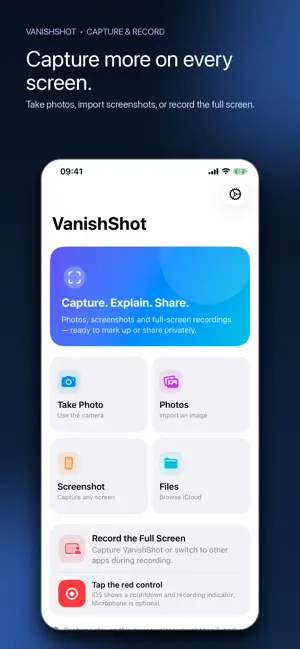
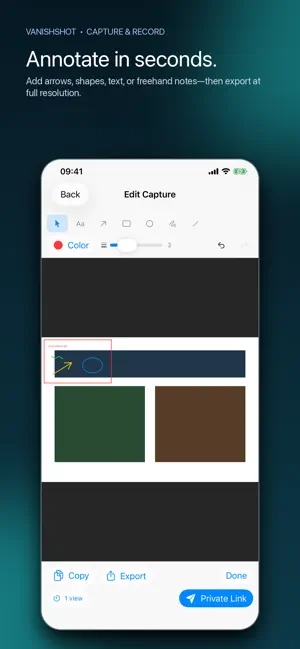
Capture, explain and share what is happening on your iPhone or iPad. VanishShot combines camera capture, screenshot markup and full-screen recording in one privacy-first workspace. Take a photo, import from Photos or Files, or start an Apple-confirmed screen recording and switch between supported apps. Nothing is uploaded unless you explicitly create a Private Link. CAPTURE WHAT MATTERS • Take a photo with the camera and open it directly in the editor • Import screenshots and images from Apple’s private photo picker • Browse images in Files and iCloud Drive • Follow the built-in guide to take an iPhone or iPad screenshot • Record the full display with Apple’s system broadcast control • Include microphone audio when you enable it in the system recording sheet ANNOTATE WITH PRECISION • Add arrows, rectangles, circles, lines, text and freehand notes • Choose colors and line widths • Select, move and remove annotations • Undo and redo up to 50 changes PREVIEW, EXPORT OR SHARE • Preview screen recordings inside VanishShot • Export images and MP4 recordings through the native share sheet • Create a private expiring link only when you choose • Expire links after one or five views, or after a timer PRIVACY BY DEFAULT Photos, screenshots and recordings stay on your device until you choose Export or Private Link. Camera access is requested only after Take Photo. Full-screen recording starts only through Apple’s visible countdown and recording indicator. There is no account, subscription, advertising, analytics or tracking. Some apps and protected video may restrict screen capture. VanishShot respects those system protections.
App privacy
The developer, Infodesk AS, reported these privacy practices to Apple.
Data Not Linked to You
The following data, which may be collected but is not linked to your identity, may be used for the following purposes:
- User Content: Photos or Videos
- Identifiers: Device ID
Used for: App Functionality
Alternatives to VanishShot: Screenshot Editor
Looking for apps like VanishShot: Screenshot Editor? Here are 6 similar apps on the App Store. The highest rated is Tapify - Show Taps on Video (5.0/5), and all 6 are free to download.
-
 Veritake AI Video Teleprompter
-
 Capzo: Screenshot & Recorder
-
 Long Screenshot: Scroll & Web
-
 CatCompressor
4.0
-
 Long Screenshot: Stitch
-
 Tapify - Show Taps on Video
5.0
| App | Rating | Price | Last updated | Compare |
|---|---|---|---|---|
| VanishShot: Screenshot Editor | – | Free | August 23, 2026 | |
| Veritake AI Video Teleprompter | – | Free | Oct 14, 2026 | Compare |
| Capzo: Screenshot & Recorder | – | Free | Sep 15, 2026 | Compare |
| Long Screenshot: Scroll & Web | – | Free | Aug 24, 2026 | Compare |
| CatCompressor | 4.0 / 5 (2) | Free | Jan 19, 2026 | Compare |
| Long Screenshot: Stitch | – | Free | Oct 7, 2026 | Compare |
| Tapify - Show Taps on Video | 5.0 / 5 (2) | Free | Oct 10, 2026 | Compare |