

ClockWork Pro Workforce
ClockWork Pro LLC Business iPhoneiPadiPod touch
ClockWork Pro Workforce is a free Business app for iPhone and iPad by ClockWork Pro LLC. Rated 5.0/5 from 3 ratings. Requires iOS 15.1.
- Rating
- 5.0
- 3 ratings
- Price
- Free
- on the App Store
- Size
- 26 MB
- Age 4+
- Updated
- Oct 18
- 2026 · v2.0.7
Screenshots


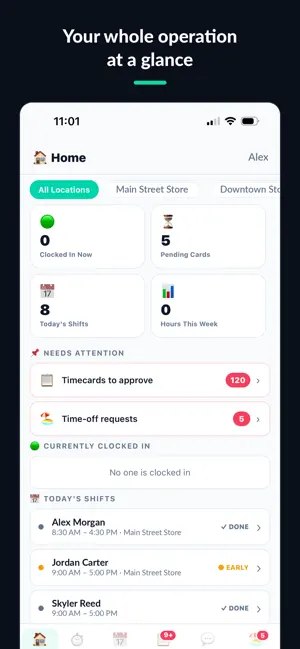

About ClockWork Pro Workforce
The GPS time clock and employee scheduling app built for small businesses — restaurants, retail, cleaning crews, salons, and construction. One flat price for your whole business. Never per employee. Free for up to 10 employees. Business owners sign up at clockworkpro.app, then invite their team to download this app. GPS-VERIFIED TIME CLOCK Employees clock in and out with GPS verification. Geofence enforcement prevents off-site clock-ins. Automatic overtime calculation at 40 hours. Kiosk mode with PIN entry for shared tablets at your location. SCHEDULING MADE SIMPLE Create and publish weekly schedules in minutes. Employees see their schedule instantly on their phone. Shift swap, cover, and take requests keep you in control. TEAM COMMUNICATION Announcements, direct messages, group and location messaging with photo attachments. Push notifications for schedule changes, approvals, and reminders. TIME OFF, DONE RIGHT PTO and sick leave requests with balances, accrual policies, and blackout dates. Approve or deny with one tap. BUILT FOR GROWING BUSINESSES Multi-location support included in every plan. Role-based access for Admin, Manager, and Employee. Paid and unpaid break tracking with compliance alerts. Payroll export (CSV, PDF, QuickBooks, Gusto formats). Complete audit log. PLANS (billed to the business, never per employee) Free — up to 10 employees, 1 location Starter ($29/mo) — 25 employees, 5 locations, payroll export, time off Business ($79/mo) — 50 employees, 10 locations, kiosk mode, full analytics Our Fair Pricing Pledge: no per-user fees, ever. No surprise price increases on existing customers. Cancel anytime.
What’s new
Version 2.0.7 · Updated October 18, 2026
This is a required update. Older versions of ClockWork Pro will stop working later this year, so please install it now. NEW MENU Clock, Schedule and Messages sit on the bottom bar. Everything else is one tap away under Menu, grouped into sections you can open and close. Badges on the menu, on each section and on each item show what needs your attention. On every other screen, the Clock button at the top takes you straight back to clock in or out, and shows how long you've been clocked in. LOCATION Before ClockWork Pro uses your location, a new screen explains what it collects, when, and who can see it. Location is used only while the app is open, never when the app is closed or in the background. NOTIFICATIONS Tapping a notification opens the screen it's about, even when the app was closed. Your recent notifications are under Menu → Account → Notifications. FOR MANAGERS Payroll estimates are worked out on our servers, using the same calculation as the website, including overtime for staff who work at more than one location. Approval badges count only the locations you manage. ALSO Kiosk PIN: type your new PIN twice, with a clearer message when a PIN can't be used. Security and reliability improvements.
App privacy
The developer, ClockWork Pro LLC, reported these privacy practices to Apple.
Data Linked to You
The following data, which may be collected and linked to your identity, may be used for the following purposes:
- Financial Info: Other Financial Info
- Location: Precise Location
- Contact Info: Email Address, Name, Phone Number
- User Content: Emails or Text Messages, Photos or Videos, Other User Content
- Identifiers: User ID, Device ID
- Diagnostics: Other Diagnostic Data
Used for: App Functionality
Alternatives to ClockWork Pro Workforce
Looking for apps like ClockWork Pro Workforce? Here are 6 similar apps on the App Store. The highest rated is QuickClockin (5.0/5), and all 6 are free to download.
-
 Navik Kiosk
-
 QuickClockin
5.0
QuickClockin
5.0
-
 Incentify Kiosk
-
 Ponchi: Time Clock & Schedule
5.0
Ponchi: Time Clock & Schedule
5.0
-
 Clock In & Out: Hours Tracker
5.0
Clock In & Out: Hours Tracker
5.0
-
 Hours Tracker For Work: Valio
5.0
Hours Tracker For Work: Valio
5.0
| App | Rating | Price | Last updated | Compare |
|---|---|---|---|---|
| ClockWork Pro Workforce | 5.0 / 5 (3 ratings) | Free | October 18, 2026 | |
| Navik Kiosk | – | Free | Sep 3, 2026 | Compare |
| QuickClockin | 5.0 / 5 (2) | Free | Jun 14, 2026 | Compare |
| Incentify Kiosk | – | Free | Aug 26, 2026 | Compare |
| Ponchi: Time Clock & Schedule | 5.0 / 5 (1) | Free | Jun 17, 2026 | Compare |
| Clock In & Out: Hours Tracker | 5.0 / 5 (2) | Free | Feb 26, 2026 | Compare |
| Hours Tracker For Work: Valio | 5.0 / 5 (6) | Free | Oct 28, 2026 | Compare |