

notetime: Timestamp Notes
Zohar Weinstein Productivity iPhoneiPadiPod touchMac
notetime: Timestamp Notes is a free Productivity app for iPhone and iPad by Zohar Weinstein. Rated 4.8/5 from 23 ratings. Requires iOS 18.0.
- Rating
- 4.8
- 23 ratings
- Price
- Free
- on the App Store
- Size
- 20 MB
- Age 4+
- Updated
- Oct 6
- 2026 · v1.5.0
Screenshots



About notetime: Timestamp Notes
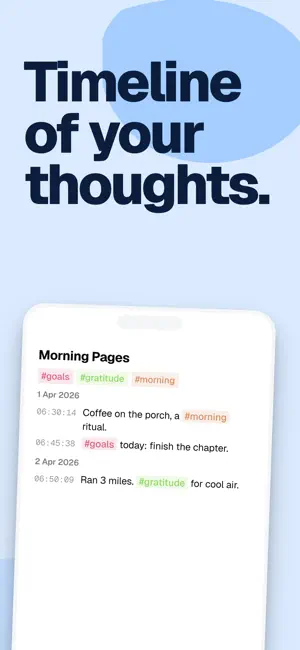
notetime timestamps every line you write automatically. No buttons, no formatting menus, no setup. Just open the app and start typing. Every thought gets a time. Whether you're logging a meeting, journaling your day, or tracking an interview — notetime turns your notes into a timeline you can scroll back through and actually make sense of. WHAT PEOPLE USE IT FOR — Meeting notes: capture decisions, action items, and who said what — with exact timing — Daily journals: build a chronological record of your thoughts, one line at a time — Interstitial Journaling: document your thoughts in between tasks, helps people with ADHD being more productive — Interviews: log candidate responses with precise timestamps for easy review — Standups and retros: track discussion points and follow-ups as they happen — Debugging sessions: timestamp every observation so you can reconstruct what went wrong — Medical visits: note symptoms, questions, and doctor's answers in real time — Lectures and talks: jot down key points with the exact minute they were mentioned FEATURES Automatic timestamps — every line is tagged with the time the moment you write it. No extra taps, no manual entry. Inline tags — type #hashtags naturally in your notes. Tap any tag to filter across all your notes and find exactly what you need. Search — full-text search across everything you've written. Export and share: save notes as PDFs that preserve your theme and note layout, or share text, images and links. Choose whether to include timestamps in text, images and PDFs. Date headings remain in images and PDFs. Themes — light and dark modes. Works offline — your notes are stored locally on your device. No account needed. No internet required. PRO — SYNC ACROSS DEVICES upgrade to notetime PRO to unlock: — Cloud backup and sync across iOS and web (more platforms coming) — Additional themes — Support futher development notetime is free to use with no signup required. Privacy Policy: https://www.notetimeapp.com/privacy Terms of Use (EULA): https://www.notetimeapp.com/terms
Ratings & reviews
4.8
23 ratings
What’s new
Version 1.5.0 · Updated October 6, 2026
- A new editor on iPhone and iPad: your whole note is now one continuous page. Select and copy across entries, timestamps included, and every keystroke is saved as you type. - Edit faster: press Delete at the start of an entry to merge it into the one above, or select several entries and delete them together. - Images stay attached when you merge entries, including after sync.
App privacy
The developer, Zohar Weinstein, reported these privacy practices to Apple.
Data Not Linked to You
The following data, which may be collected but is not linked to your identity, may be used for the following purposes:
- Identifiers: User ID, Device ID
- Usage Data: Product Interaction
Used for: Analytics, App Functionality
Alternatives to notetime: Timestamp Notes
Looking for apps like notetime: Timestamp Notes? Here are 6 similar apps on the App Store. The highest rated is Notestream: Fast Notes to Self (5.0/5), and all 6 are free to download.
-
 Lognote: Notes & Notepad
4.6
Lognote: Notes & Notepad
4.6
-
 Jotline – Timestamped Notes
-
 Loominote: Smart AI Note Taker
4.9
Loominote: Smart AI Note Taker
4.9
-
 Notestream: Fast Notes to Self
5.0
Notestream: Fast Notes to Self
5.0
-
 Prism Notes
4.9
Prism Notes
4.9
-
 F·NOTES
| App | Rating | Price | Last updated | Compare |
|---|---|---|---|---|
| notetime: Timestamp Notes | 4.8 / 5 (23 ratings) | Free | October 6, 2026 | |
| Lognote: Notes & Notepad | 4.6 / 5 (54) | Free | Oct 25, 2026 | Compare |
| Jotline – Timestamped Notes | – | Free | Sep 7, 2026 | Compare |
| Loominote: Smart AI Note Taker | 4.9 / 5 (35) | Free | Oct 25, 2026 | Compare |
| Notestream: Fast Notes to Self | 5.0 / 5 (4) | Free | Feb 19, 2026 | Compare |
| Prism Notes | 4.9 / 5 (38) | Free | Oct 24, 2026 | Compare |
| F·NOTES | – | Free | May 3, 2026 | Compare |