

EvidCapture: Evidence Camera
杭州微煊科技有限公司 Photo & Video iPhoneiPadiPod touch
EvidCapture: Evidence Camera is a free Photo & Video app for iPhone and iPad by 杭州微煊科技有限公司. Requires iOS 17. Updated October 17, 2026.
- Price
- Free
- on the App Store
- Size
- 14 MB
- Age 17+
- Updated
- Oct 17
- 2026 · v1.5.1
Screenshots


About EvidCapture: Evidence Camera
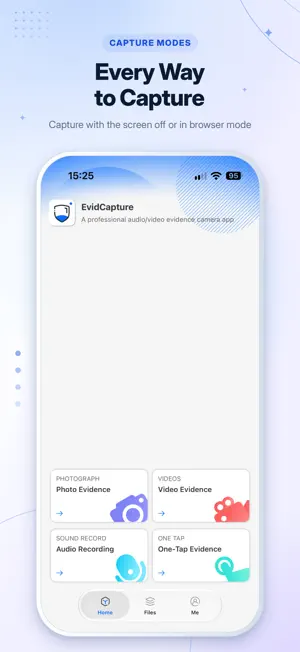
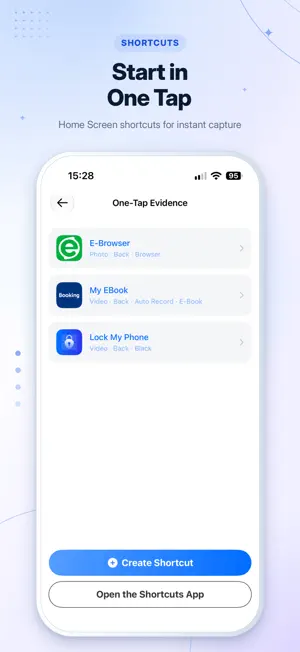
EvidCapture is an all‑in‑one documentation camera app with photo, audio and video recording. Perfect for on‑site documentation, meeting notes, field research and incident recording. Custom digital watermarks help you keep reliable, verifiable records. 【Photo Capture】 High‑resolution lossless photos with timed burst shooting to capture every critical moment. Add watermarks with timestamp and location info. Adjustable image quality and parameters for clearer, authentic records. 【Video Capture】 4K video recording with built‑in flashlight for low‑light scenarios. Dual camera simultaneous recording: capture scene and subject at the same time. Dynamic watermark for timestamp, coordinates and location. Switch cameras freely during recording. 【Audio Recording】 Lossless high‑clarity audio for trustworthy records. Background recording supported; you may switch to other apps while recording (lockscreen recording not recommended). 【Dual-Camera 360° Seamless Recording】 Record with both front and rear cameras simultaneously for full 360° coverage of the scene. Capture the on-site environment and the subject in a single recording, delivering complete, uninterrupted documentation of every critical moment. 【Encrypted Storage】 Hide your recorded files to avoid access or tampering by third‑party apps. Face ID protection keeps your photos and videos private from unauthorized access. 【Quick Capture Shortcut】 Create custom shortcuts and add them to your home screen. Tap to launch your preset camera instantly. 【Action Button Support】 Bind shortcuts to iPhone Action Button. Long press to start capture rapidly. 【Screen‑Off Capture】 Take photos or record videos with the screen turned off. Trigger capture via volume keys or tap the center of the screen. 【Recycle Bin】 Deleted files move to the recycle bin and auto‑clean after your set time. Protect against accidental deletion of important records. Additional features: • Trigger photo/video via volume buttons or AirPods • Haptic feedback when capture starts • Browser / e‑book disguise mode, flashlight Note: Please use this app legally for documentation, meeting recording and field research. Comply with all local laws and regulations. EvidCapture VIP Unlock all features, unlimited usage and ad‑free experience. Subscription options: Monthly / Quarterly / Annual auto‑renewable subscriptions. Prices shown in‑app. Payment: Charged to your iTunes account after purchase confirmation. Renewal: Subscription auto‑renews unless auto‑renew is turned off at least 24 hours before the end of the current period. Your account will be charged within 24 hours prior to subscription expiry. Cancel subscription: Go to iPhone Settings → Apple ID → Subscriptions → EvidCapture to cancel. Free trial: If you cancel during the free trial period, you can still enjoy all trial benefits until the trial ends. Terms of Use: https://www.wotoken.com/common/protocol/oecamera_g_terms.html Privacy Policy: https://www.wotoken.com/common/protocol/oecamera_g_privacy.html Support: Contact us inside the app or email: [email protected]
What’s new
Version 1.5.1 · Updated October 17, 2026
Add a one-click forensic feature and set up various personalized quick launch methods based on actual needs. After creating it, open the "Shortcuts" app, long-press this shortcut, choose "Add to Home Screen," and then you'll see the icon on your phone's home screen. Just tap it to quickly launch the pre-configured camera function.
App privacy
The developer, 杭州微煊科技有限公司, reported these privacy practices to Apple.
Data Not Linked to You
The following data, which may be collected but is not linked to your identity, may be used for the following purposes:
- Identifiers: User ID, Device ID
- Usage Data: Product Interaction
- Diagnostics: Crash Data, Performance Data, Other Diagnostic Data
- Location: Precise Location
- Contact Info: Phone Number
Used for: Analytics, App Functionality
Alternatives to EvidCapture: Evidence Camera
Looking for apps like EvidCapture: Evidence Camera? Here are 6 similar apps on the App Store. The highest rated is Kemra - Black Screen Camera (4.7/5), and all 6 are free to download.
-
 Black Screen Camera QuietCam
4.5
Black Screen Camera QuietCam
4.5
-
 BlackOut: Black Screen Camera
3.0
BlackOut: Black Screen Camera
3.0
-
 DarkCam:安全专业的隐私相机
1.0
DarkCam:安全专业的隐私相机
1.0
-
 DimCam
-
 Kemra - Black Screen Camera
4.7
Kemra - Black Screen Camera
4.7
-
 酷黑屏相机-每个人都是主角
| App | Rating | Price | Last updated | Compare |
|---|---|---|---|---|
| EvidCapture: Evidence Camera | – | Free | October 17, 2026 | |
| Black Screen Camera QuietCam | 4.5 / 5 (50) | Free | Oct 22, 2026 | Compare |
| BlackOut: Black Screen Camera | 3.0 / 5 (2) | Free | Oct 16, 2026 | Compare |
| DarkCam:安全专业的隐私相机 | 1.0 / 5 (2) | Free | Oct 2, 2026 | Compare |
| DimCam | – | Free | Aug 12, 2026 | Compare |
| Kemra - Black Screen Camera | 4.7 / 5 (3) | Free | Sep 7, 2026 | Compare |
| 酷黑屏相机-每个人都是主角 | – | Free | Oct 24, 2026 | Compare |