
Scroll Limit
Mohamed Yassin Productivity iPhoneiPadiPod touch
Scroll Limit is a free Productivity app for iPhone and iPad by Mohamed Yassin. Rated 5.0/5 from 1 ratings. Requires iOS 16.0. Updated August 19, 2026.
- Rating
- 5.0
- 1 ratings
- Price
- Free
- on the App Store
- Size
- 48 MB
- Age 4+
- Updated
- Aug 19
- 2026 · v2.0.5
Screenshots


About Scroll Limit
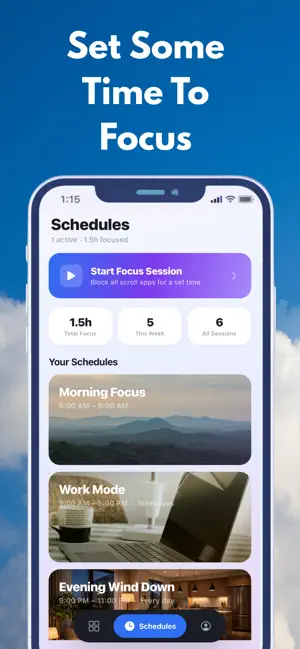
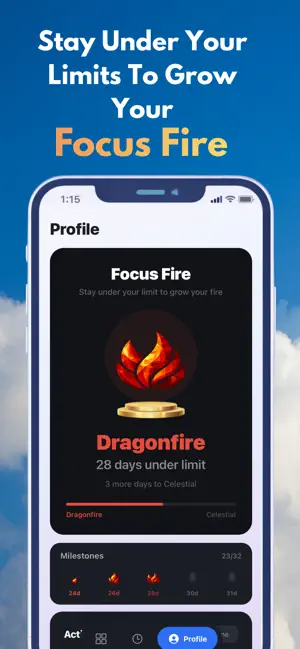
LOCK THE APPS THAT OWN YOU Screen time apps just tell you that you spent 2 hours on TikTok, then let you keep scrolling. Scroll Limit actually locks the apps that pull you in, and gives you only 3 unlocks a day. When you hit a wall instead of an endless feed, the habit finally breaks. HOW IT WORKS Pick the apps you keep losing time to. Scroll Limit locks them using Apple's Screen Time. Open one and you hit a lock screen, not a feed. Want in? You get 3 unlocks a day, and each one is a deliberate choice, not a reflex. 3 LIVES A DAY You start every day with 3 unlocks. Spend one only when you really mean to. Run out and your locked apps stay locked until tomorrow. It is a hard limit you set for yourself, so being "just a little" on your phone is no longer automatic. YOUR HOME SCREEN Your locked apps sit front and center in a clean pyramid with their real icons. See your remaining unlocks at a glance on the lives banner. Tap any app to unlock it for a set time, then watch it lock itself back down. FOCUS FIRE Keep at least one unlock in reserve each day and your Focus Fire climbs a level. Burn all three and it drops. Rise through 8 tiers, from Spark to Eternal, by holding back day after day. It is a streak that rewards restraint, not just showing up. UNLOCK CHALLENGE Unlocking is never one tap. A quick challenge stands between you and the app, just enough friction to make you pause and ask if you really need it. FOCUS SESSIONS Need to lock in? Start a focus session and block all your apps for a set time. Choose your difficulty: Easy: cancel anytime with an exit challenge Medium: harder exit challenges Deep Focus: no cancelling until the timer runs out SCHEDULES Set recurring locked blocks around your routine. Morning Focus locks apps from 6 to 9 AM. Work Mode keeps you off social during business hours. Evening Wind Down disconnects you before bed. Build your own with flexible day and time selection. PRIVACY FIRST All your data stays on your device. Scroll Limit uses Apple's privacy-preserving Screen Time API. We never see which apps you use or how long you use them. No accounts. No servers. No tracking. Download Scroll Limit and lock the apps that own you. Terms of Use (EULA): https://www.apple.com/legal/internet-services/itunes/dev/stdeula/
What’s new
Version 2.0.5 · Updated August 19, 2026
Bug fixes and be “Are You Cooked?” feature
App privacy
The developer, Mohamed Yassin, reported these privacy practices to Apple.
Data Not Collected
The developer does not collect any data from this app.
Alternatives to Scroll Limit
Looking for apps like Scroll Limit? Here are 6 similar apps on the App Store. The highest rated is Scrolloc: Screen Time Control (5.0/5), and all 6 are free to download.
-
 MuteLock
-
 time Saved: Limit Screen Time
-
 Scrolloc: Screen Time Control
5.0
-
 Totem: Screen Time Control
-
 Pomodoro Focus Timer: Twen5
-
 Widget Vault: Live Widgets
| App | Rating | Price | Last updated | Compare |
|---|---|---|---|---|
| Scroll Limit | 5.0 / 5 (1 rating) | Free | August 19, 2026 | |
| MuteLock | – | Free | Feb 4, 2026 | Compare |
| time Saved: Limit Screen Time | – | Free | Mar 6, 2026 | Compare |
| Scrolloc: Screen Time Control | 5.0 / 5 (1) | Free | Mar 5, 2026 | Compare |
| Totem: Screen Time Control | – | Free | Jul 1, 2026 | Compare |
| Pomodoro Focus Timer: Twen5 | – | Free | Jul 24, 2026 | Compare |
| Widget Vault: Live Widgets | – | Free | Oct 5, 2026 | Compare |
Compare Scroll Limit with the top alternatives: ratings, updates, ASO score and keyword gaps →