

Pixel to Beads
怡兰 刘 Utilities iPhoneiPadiPod touch
Pixel to Beads is a free Utilities app for iPhone and iPad by 怡兰 刘. Requires iOS 14. Updated May 2, 2026.
- Price
- Free
- on the App Store
- Size
- 47 MB
- Age 9+
- Updated
- May 2
- 2026 · v1.0.0
Screenshots
About Pixel to Beads
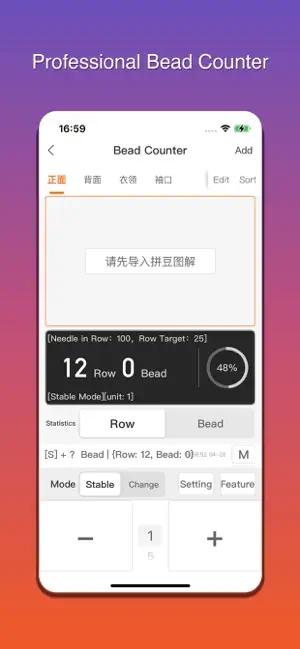
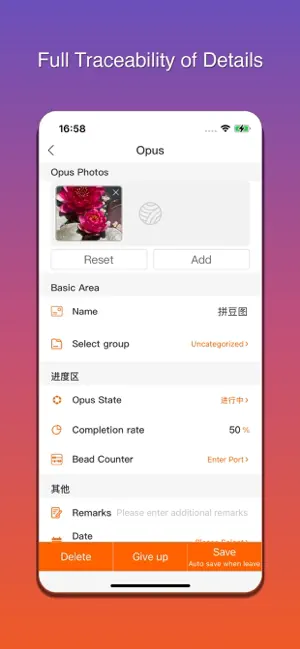
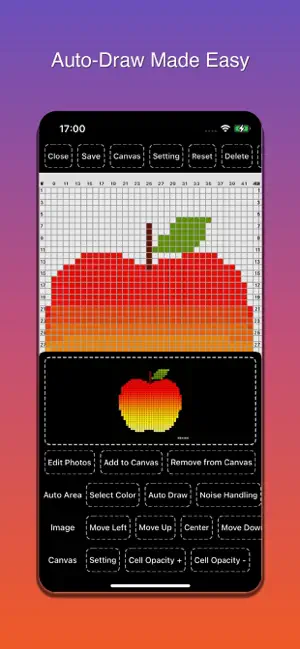
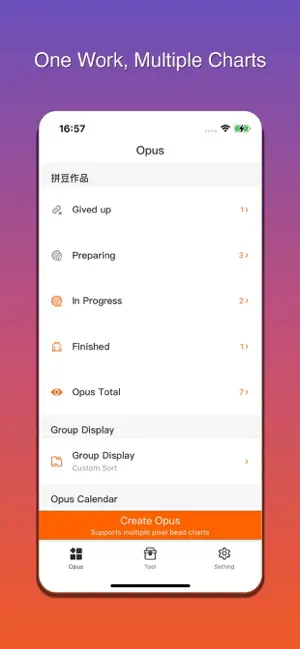
Pixel Beads is the ultimate companion app for bead art enthusiasts. Whether you're a beginner placing your first beads or an experienced creator designing intricate patterns, Pixel Beads gives you the tools to design, count, manage, and share your pixel bead projects with ease. --- ### Pixel Canvas & Drawing Design stunning bead patterns on a fully customizable pixel canvas — up to 280x280 cells. - **Multiple drawing modes**: Single-cell fill, rectangle batch draw, flood fill, eraser, color picker, and move tool - **Mirror modes**: Left-right and top-bottom symmetry drawing — create symmetric patterns in half the time - **Multi-select mode**: Select multiple cells at once for batch fill or erase - **Auto Draw**: Import a reference image and automatically convert it into a pixel bead pattern - **Noise optimization**: Intelligently detect and merge similar colors to reduce bead variety and simplify your project - **Layer management**: Stack multiple layers for complex pattern design - **Undo / Redo**: Unlimited undo steps — create freely without worry - **Coordinate system**: Display row and column coordinates to precisely locate every bead - **Grid customization**: Set bold grid intervals for easy bead counting ### Charts & Symbol System - **Knitting & Crochet Symbol Handbook**: 500+ professional symbols with Chinese/Japanese/English trilingual reference - **Custom symbols**: Combine base symbols and decorators to create your own unique symbols - **Text charts**: Add text annotations directly on the canvas - **Crochet chart creation**: Supports circle, square, ellipse, spiral, and other shape elements - **Shared charts**: Browse and use chart templates shared by other users (rabbit, tiger, dragon, snowflake, and more) ### Bead Counter A smart counting tool designed specifically for the bead-placing process — never lose count again. - **Row & bead dual-axis counting**: Track both current row number and bead count per row simultaneously - **Change mode**: Set initial bead count, trigger rows, bead change amount, and repeat times — get automatic prompts for increase/decrease operations - **Stable mode**: Fixed bead count mode, ideal for regular patterns - **Auto count**: Set a countdown interval to trigger counting automatically — hands-free operation - **Chart sync**: When the row count changes, the chart automatically scrolls to the corresponding row — what you count is what you see - **Operation log**: Full record of every add/subtract action, with one-tap clear - **Vibration alerts**: Subtle phone vibration when a row goal is reached or a bead change is needed ### Project Management & Analytics - **Full project lifecycle**: Track every project from preparation through in-progress to completion - **Multiple charts per project**: Link multiple bead charts to a single project for complex creations ### Data Management - **iCloud backup & sync**: One-tap upload to iCloud, seamless sync across all your devices - **CSV bulk import/export**: Import and export bead data in bulk for easy data migration - **Project file sharing**: Export `.pxproj` project files to share with friends or continue on another device ### Membership Benefits - Monthly / Annual / Lifetime membership options - Unlimited bulk import and export - Unlimited iCloud sync - Create unlimited projects - Create canvases larger than 16x16 - Full counter feature unlock - Advanced features: rectangle batch draw, copy & paste between projects, and more --- **What if the app doesn't meet your needs?** > Option 1: Use the in-app Technical Support feedback — we review feedback regularly and release updates accordingly. > Option 2: Leave your request in the App Store review section — we actively monitor and respond to all comments. Your subscription supports the developer and helps ensure continuous stable updates and feature improvements. ===EULA=== [Standard Apple Terms of Use (EULA)](https://www.apple.com/legal/internet-services/itunes/dev/stdeula/)
App privacy
The developer, 怡兰 刘, reported these privacy practices to Apple.
Data Used to Track You
The following data may be used to track you across apps and websites owned by other companies:
- Identifiers: User ID
Data Not Linked to You
The following data, which may be collected but is not linked to your identity, may be used for the following purposes:
- Identifiers: User ID, Device ID
- Diagnostics: Crash Data
Used for: Analytics, App Functionality
Alternatives to Pixel to Beads
Looking for apps like Pixel to Beads? Here are 6 similar apps on the App Store. The highest rated is Beadcraft - Bead Pattern Maker (5.0/5), and 5 of the 6 are free to download.
-
 DotMosaic
-
 BeadSnap: Perler Bead Patterns
-
 ColorWalk Diary
-
 拼豆屋
拼豆屋
-
 拼豆图纸生成
-
 Beadcraft - Bead Pattern Maker
5.0
Beadcraft - Bead Pattern Maker
5.0
| App | Rating | Price | Last updated | Compare |
|---|---|---|---|---|
| Pixel to Beads | – | Free | May 2, 2026 | |
| DotMosaic | – | Free | Sep 4, 2026 | Compare |
| BeadSnap: Perler Bead Patterns | – | Free | Sep 4, 2026 | Compare |
| ColorWalk Diary | – | 0.99 USD | Apr 19, 2026 | Compare |
| 拼豆屋 | – | Free | Apr 23, 2026 | Compare |
| 拼豆图纸生成 | – | Free | Aug 20, 2026 | Compare |
| Beadcraft - Bead Pattern Maker | 5.0 / 5 (3) | Free | Sep 21, 2026 | Compare |
Compare Pixel to Beads with the top alternatives: ratings, updates, ASO score and keyword gaps →