

DRFT - Meeting Word Alerts
Bryan Cabrera Productivity iPhoneiPadiPod touchMac
DRFT - Meeting Word Alerts is a free Productivity app for iPhone and iPad by Bryan Cabrera. Rated 4.6/5 from 9 ratings. Requires iOS 26.0.
- Rating
- 4.6
- 9 ratings
- Price
- Free
- on the App Store
- Size
- 6 MB
- Age 4+
- Updated
- Oct 6
- 2026 · v2.1.0
Screenshots


About DRFT - Meeting Word Alerts
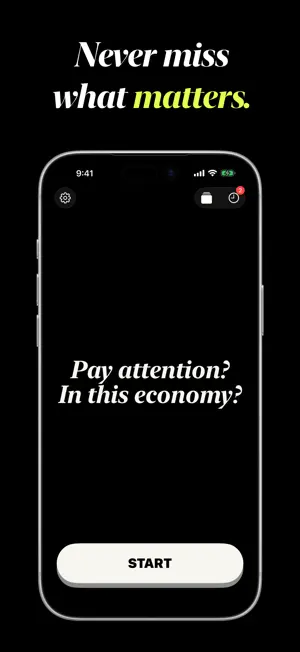
Set a word. Zone out. Get alerted the moment it's said. DRFT listens for your name — or any word you pick — and alerts you the second it's spoken. Speech recognition runs on-device. Audio is never recorded and never leaves your phone. Not another meeting notetaker. No bot joins your call, and there's no transcript to read afterward — just the one moment that mattered. HOW IT WORKS 1. Add the words you care about — your name, a project, a deadline. 2. Tap Start and put your phone down. 3. Get alerted the moment one is spoken. DRFT+ turns it into a one-line summary of what was said. FREE • 3 words, 10 saved moments • On-device speech recognition DRFT+ — one purchase, yours forever • AI summaries written on-device by Apple Intelligence (iPhone 15 Pro and later) • Unlimited words, saved moments, and word profiles • Sync between iPhone and Mac WHAT PEOPLE SAY "I've used it for meetings and lecture videos so far, and it's really nice having something that helps catch important keywords without me feeling like I have to be on alert the whole time." — laurencl99, App Store review "With so many distractions it's perfect to be able to have something track certain keywords so that my attention can refocus and I don't miss any important detail." — flat6miami, App Store review Notifications are optional. Decline them and DRFT still saves every detection to History. No ads, no tracking, no subscription. Works on iPhone and Mac. Set a word. Tap Start. We'll get the rest. Built by one person. Terms of Use: https://bryancabrera.xyz/drft/terms
Ratings & reviews
4.6
9 ratings
What’s new
Version 2.1.0 · Updated October 6, 2026
This update brings DRFT to the Lock Screen and the Dynamic Island. Live Activity • See the last word DRFT caught, with its level and progress, on the Lock Screen and in the Dynamic Island while DRFT listens • The Dynamic Island expands when DRFT catches a word • Tap the Live Activity to open the moment for the word it shows • Stop listening right from the Live Activity Word Levels • Each catch adds 1 XP toward its word’s next level • Word levels keep their progress when you delete moments • With DRFT+, word levels add up across your devices This update also includes the following improvements and bug fixes: • Stop listening from a detection notification • DRFT shows Paused while a phone call or another app is using the microphone • The app icon badge shows your unread moments • Summaries finish even after you stop listening • Settings opens as a sheet from Home • Support for iOS 26.0 and later • Improves performance while DRFT listens and saves moments • Fixes an issue where DRFT could quit unexpectedly at launch on some versions of iOS 26 • Fixes an issue where DRFT+ sync could stall while iPhone is locked Reset All Data now also clears your DRFT+ data on your other devices.
App privacy
The developer, Bryan Cabrera, reported these privacy practices to Apple.
Data Not Collected
The developer does not collect any data from this app.
Alternatives to DRFT - Meeting Word Alerts
Looking for apps like DRFT - Meeting Word Alerts? Here are 6 similar apps on the App Store. The highest rated is Priority Task Manager (5.0/5), and all 6 are free to download.
-
 Priority Task Manager
5.0
Priority Task Manager
5.0
-
 Einfall: Quick Capture
5.0
Einfall: Quick Capture
5.0
-
 DaysAgo: Last Done
5.0
DaysAgo: Last Done
5.0
-
 Tendo: Calm ADHD Daily Planner
-
 Story: Get it done with AI
5.0
Story: Get it done with AI
5.0
-
 Swearing Jar
5.0
Swearing Jar
5.0
| App | Rating | Price | Last updated | Compare |
|---|---|---|---|---|
| DRFT - Meeting Word Alerts | 4.6 / 5 (9 ratings) | Free | October 6, 2026 | |
| Priority Task Manager | 5.0 / 5 (2) | Free | Oct 5, 2026 | Compare |
| Einfall: Quick Capture | 5.0 / 5 (1) | Free | Sep 21, 2026 | Compare |
| DaysAgo: Last Done | 5.0 / 5 (2) | Free | Jul 8, 2026 | Compare |
| Tendo: Calm ADHD Daily Planner | – | Free | Oct 20, 2026 | Compare |
| Story: Get it done with AI | 5.0 / 5 (4) | Free | Aug 20, 2025 | Compare |
| Swearing Jar | 5.0 / 5 (1) | Free | Mar 27, 2026 | Compare |