

VTimer: Custom Interval Timer
Yeongsang Kim Utilities iPhoneiPadiPod touch
VTimer: Custom Interval Timer is a free Utilities app for iPhone and iPad by Yeongsang Kim. Requires iOS 15.0. Updated September 29, 2026.
- Price
- Free
- on the App Store
- Size
- 38 MB
- Age 4+
- Updated
- Sep 29
- 2026 · v2.3.2
Screenshots
About VTimer: Custom Interval Timer
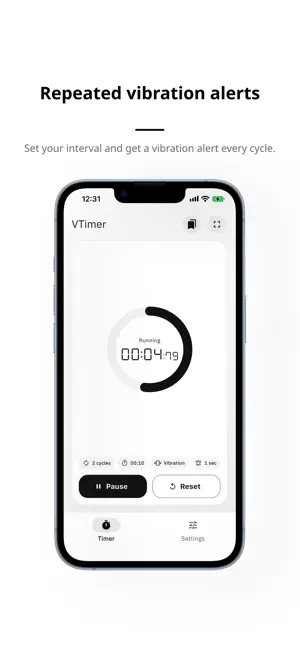
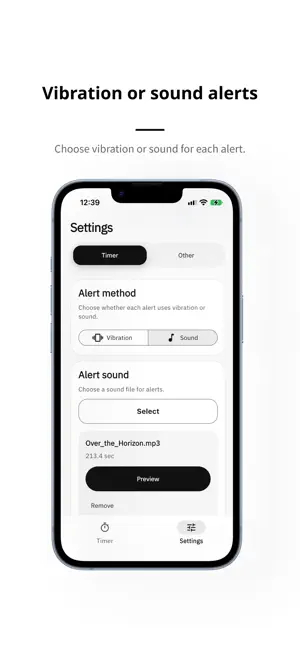
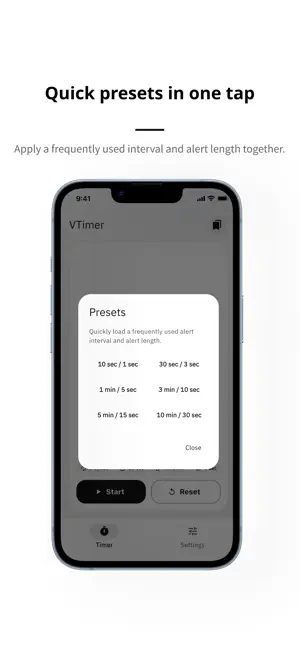
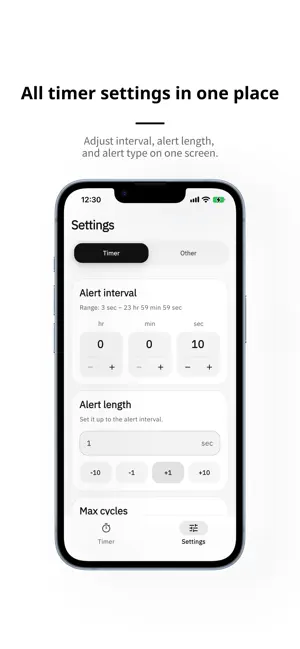
VTimer is a customizable interval timer that repeats vibration or sound alerts at intervals you set. You can adjust the alert interval and alert length separately, making it easy to fit the timer to workouts, stretching, breathing exercises, study sessions, timed problem-solving, and other repeating routines. Choose vibration or sound for each repeat. In sound mode, you can pick an audio file from your device, preview it, and apply it in a few taps so the timer fits your routine. On the timer screen, you can check the remaining time, current status, and completed cycle count at a glance. Quick presets let you apply commonly used settings instantly, while simple start, pause, and reset controls keep the experience focused and easy to use. Full-screen mode hides unnecessary elements and shows the timer in large digits. Key benefits - Set the alert interval and alert length separately - Choose repeating vibration or sound alerts - Select and preview your own alert sound - Check remaining time, alert mode, and completed cycles at a glance - Apply common intervals quickly with presets - View the timer in large digits in full-screen mode - Personalize the timer look with theme and color options Features 1. Timer - Countdown display - Visual progress ring - Running, alerting, and paused status display - Completed cycle count - Full-screen mode 2. Settings - Set the alert interval in hours, minutes, and seconds - Alert length - Vibration or sound mode - Custom sound selection, preview - Theme mode and color options 3. Quick Start - Presets for commonly used intervals - Fast setup with a single tap 4. Running Session - Start, pause, and reset controls - Check the current session flow at a glance Notes - On iPhone, vibration can feel different between foreground use and background or lock-screen alerts. - Background alerts follow iOS system notification behavior and device settings. If you want an interval timer that repeats exactly the way you prefer, VTimer gives you flexible control without unnecessary complexity. Terms of Use (EULA): https://www.apple.com/legal/internet-services/itunes/dev/stdeula/ Privacy Policy: https://steadyseller.com/home/en/privacy-policy
What’s new
Version 2.3.2 · Updated September 29, 2026
- Set alert intervals in hours, minutes, and seconds. - Improved preview and playback reliability for saved sounds. - Improved overall usability.
App privacy
The developer, Yeongsang Kim, reported these privacy practices to Apple.
Data Used to Track You
The following data may be used to track you across apps and websites owned by other companies:
- Identifiers: Device ID
- Usage Data: Advertising Data
Data Not Linked to You
The following data, which may be collected but is not linked to your identity, may be used for the following purposes:
- Identifiers: Device ID
- Usage Data: Advertising Data, Product Interaction, Other Usage Data
- Diagnostics: Crash Data, Performance Data, Other Diagnostic Data
Used for: Third-Party Advertising, Analytics
Alternatives to VTimer: Custom Interval Timer
Looking for apps like VTimer: Custom Interval Timer? Here are 6 similar apps on the App Store. The highest rated is Better Timer: Multi & Repeat (4.8/5), and all 6 are free to download.
-
 Haptic Pulse Timer
-
 Better Timer: Multi & Repeat
4.8
Better Timer: Multi & Repeat
4.8
-
 Drawn timers
-
 Timer tick
-
 TockTock Timer
-
 Plan Ahead Calendar
| App | Rating | Price | Last updated | Compare |
|---|---|---|---|---|
| VTimer: Custom Interval Timer | – | Free | September 29, 2026 | |
| Haptic Pulse Timer | – | Free | Oct 8, 2026 | Compare |
| Better Timer: Multi & Repeat | 4.8 / 5 (6) | Free | Oct 3, 2026 | Compare |
| Drawn timers | – | Free | May 21, 2026 | Compare |
| Timer tick | – | Free | Oct 3, 2026 | Compare |
| TockTock Timer | – | Free | May 25, 2026 | Compare |
| Plan Ahead Calendar | – | Free | Jun 17, 2026 | Compare |