

MadTunes
立剑 孙 Music iPhoneiPadiPod touchMac
MadTunes is a paid Music app for iPhone and iPad by 立剑 孙. Requires iOS 18. Updated June 21, 2026.
- Price
- 24.99 USD
- on the App Store
- Size
- 5 MB
- Age 4+
- Updated
- Jun 21
- 2026 · v26.06.21
Screenshots



About MadTunes
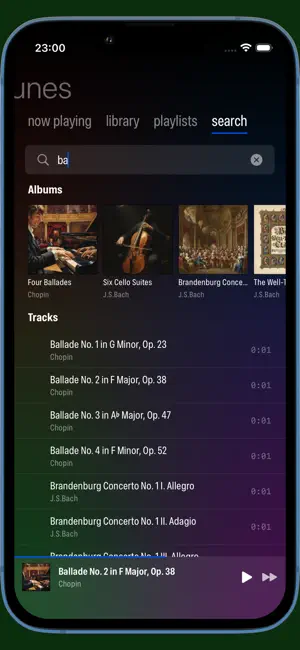
MadTunes is a local music player designed for audiophiles and music producers, featuring accurate, pure high-fidelity audio playback. **Why MadTunes?** As a music creator, you need playback tools that accurately reveal mixing details. Validated through over 100 rigorous tests, only the system-native AVPlayer (from AVFoundation Framework) ensures optimal audio quality on macOS. MadTunes builds upon this foundation, faithfully presenting original audio without additional sound processing, letting you hear the true studio-grade sound. **Key Features:** • **Broad Format Support** — MP3, FLAC, AAC, WAV, AIFF, Ogg Vorbis, Opus, and more mainstream audio formats (audio files only); • **Pace-Uninterrupted Loop Playback** — Designed for loopable audio, pace-uninterrupted transition at loop points; • **Accurate Stereo** — Faithfully reproduces original mixing, no HRTF interference; • **Powerful Keyboard Navigation** — Full keyboard support on macOS, from grid navigation to queue management without mouse; • **Smart Search & Filter** — Keyword search + four-column cascading filter (Genre/Album Artist/Song Artist/Album); • **Flexible Playing Queue** — Drag to reorder, play next, shuffle, complete playback control; • **Playlist Management** — Support for static playlists, Hierarchical-Predicate-Driven Dynamic Playlists, and folder playlists (play audio files directly from specified folders); • **Dynamic Playlist Data Source** — Configure dynamic playlist data source as "All Music" or specific folder playlists; • **Audio Output Device Selection** — Route audio to specific audio interfaces for audiophile needs, including virtual audio drivers for integration with Apple MainStage; • **Optimized for Apple Devices** — validated through over 100 tests to ensure best audio quality on macOS; MadTunes collects no user data. All music files are processed locally—your privacy is fully protected. **Supported Formats:** MP3, FLAC, AAC, M4A, WAV, AIFF, Ogg Vorbis, Opus, CAF
What’s new
Version 26.06.21 · Updated June 21, 2026
- **MP3 "Album Artist" metadata fix**: Fixed the inability of reading "Album Artist" field from MP3 metadata. - **SwiftUI canvas measurement patch**: Patched some SwiftUI-related canvas measurement methods to make sure the UI behaves sane on future OS releases. - **Concurrency fixes**: Fixed some concurrency issues detected thanks to the Swift 6.4 beta compiler. These issues were not discoverable by the Swift 6.3 toolchain (as of Xcode 26.5). - **ESC key behavior fix**: Fixed some behavioral chaotic issues with ESC key when the metadata sheet presents. - **Audio playback jitter fix (metadata sheet)**: Fixed the audio playback jitter issue happened on the first time calling the metadata sheet after starting the app. - **Audio playback jitter fix (predicate config)**: Fixed the audio playback jitter issue happened when calling the predicate configuration sheet of a playlist.
App privacy
The developer, 立剑 孙, reported these privacy practices to Apple.
Data Not Collected
The developer does not collect any data from this app.
Alternatives to MadTunes
Looking for apps like MadTunes? Here are 6 similar apps on the App Store. The highest rated is Previewra (5.0/5), and 4 of the 6 are free to download.
-
 DrMobile MPD Client
-
 Previewra
5.0
Previewra
5.0
-
 ZENTEEK - Audiophile Player
-
 fidelplayer: Hi-Res Audio
-
 Flaccy – Lossless FLAC Player
-
 MyMojo - Player for Chord Poly
| App | Rating | Price | Last updated | Compare |
|---|---|---|---|---|
| MadTunes | – | 24.99 USD | June 21, 2026 | |
| DrMobile MPD Client | – | 4.99 USD | Oct 10, 2026 | Compare |
| Previewra | 5.0 / 5 (1) | 0.49 USD | Jan 31, 2026 | Compare |
| ZENTEEK - Audiophile Player | – | Free | Sep 13, 2026 | Compare |
| fidelplayer: Hi-Res Audio | – | Free | Oct 11, 2026 | Compare |
| Flaccy – Lossless FLAC Player | – | Free | Oct 21, 2026 | Compare |
| MyMojo - Player for Chord Poly | – | Free | Mar 3, 2026 | Compare |
Compare MadTunes with the top alternatives: ratings, updates, ASO score and keyword gaps →