

GroceryTrack: Budget Tracker
Soleo Finance iPhoneiPadiPod touch
GroceryTrack: Budget Tracker is a free Finance app for iPhone and iPad by Soleo. Rated 4.5/5 from 4 ratings. Requires iOS 15.6. Updated October 10, 2026.
- Rating
- 4.5
- 4 ratings
- Price
- Free
- on the App Store
- Size
- 93 MB
- Age 4+
- Updated
- Oct 10
- 2026 · v1.9.0
Screenshots


About GroceryTrack: Budget Tracker
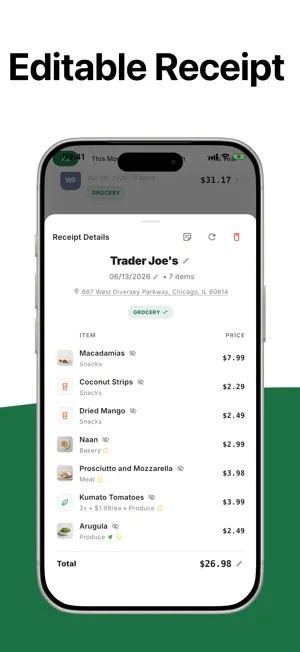
GroceryTrack turns every grocery receipt, paper or digital, into a clear, private picture of your spending, your pantry, and what to buy next. No loyalty cards. No store integrations. No spreadsheets. SNAP, FORWARD, SHARE, OR CHOOSE A FILE • Snap a photo of any paper receipt. Our AI reads the items, categorizes them, and totals them in seconds. • Forward digital receipts from your inbox: Instacart, DoorDash, Walmart, Whole Foods, Amazon Fresh, Uber Eats, Costco, Target, or anywhere that emails you a receipt. • Share a PDF, an image, or a link to an online receipt from Mail, Files, Messages, or Safari, or pick a PDF from Files on the Scan tab. • Check it right after scanning: fix the store, date, total, or any line, and see the tax the receipt printed. • Added the same receipt twice? It is labeled as a possible duplicate, and you keep both or delete the extra. KNOW WHERE YOUR MONEY GOES • Your month's grocery total sits at the top. Restaurant receipts, non-grocery purchases, bag fees, and deposits are left out, so the number is honest. • A 7-day chart splits each day into grocery and restaurant spend. • Thirteen clear categories, each with its own icon and a plain rule: Produce, Meat & Seafood, Dairy & Eggs, Deli & Prepared, Bakery, Frozen, Pantry, Snacks, Beverages, Household & Personal Care, Pet, and more. See dollar amounts and percentages side by side. • Recategorize any item in one tap. Your choice always wins. ASK YOUR RECEIPTS • "What do I buy most often?" "When was my last trip to Whole Foods?" "How much did I spend on groceries last month?" The Ask tab answers in plain language, from your own receipts. A PANTRY THAT RUNS ITSELF • Every grocery item you scan lands in a live pantry with a freshness estimate that knows fridge from freezer. Chicken you froze on day two keeps freezer life. • Set your own best-by dates, count down multi-packs ("2 of 6 left"), and portion-track single items so nothing quietly expires in the back. • A "needs attention" section surfaces what to use soon. One tap turns what's running low into a shopping list, and AI suggests recipes from what you already have. • Choose how far back your pantry looks, from one week to forever. A BUDGET THAT FITS YOUR LIFE • A short 7-question setup builds a personal monthly target from your household size, cooking habits, store types, dietary style, food waste, and delivery use. • Adjust your budget anytime with a slider in your profile. • Restaurant spending is tracked separately so it doesn't blow up your grocery goal. WORKS WITH WHAT YOU ALREADY USE • Send your shopping list to Apple Reminders, and block out your grocery day in Calendar. • Home Screen widget (small or medium) shows your month-to-date grocery total. • Optional weekly and monthly spending summaries, delivered as notifications. • Connect Claude, ChatGPT, or any MCP client to your grocery data. Read-only. • Works offline. Receipts sync when you're back online. PRIVATE BY DEFAULT • Sign in with Apple, Google, or email. Optional Face ID or Touch ID lock. • No ads. No session recordings. We never sell your shopping data. FREE TO START, PRO IF YOU WANT MORE GroceryTrack is free for 10 scans a month with 3 months of history, and every new account starts with 30 days of Pro. GroceryTrack Pro unlocks unlimited scans, your full history, year-on-year summaries, the Grocery Year heatmap, CSV export, and a choice of AI model. BUILT FOR iPHONE AND iPAD A clean design that follows light and dark mode. Pick your currency and time zone, and they travel with you. Feedback or a feature request? Use the in-app feedback form or write to [email protected]. We read every message. Terms of Use: https://grocerytrack.food/terms Privacy Policy: https://grocerytrack.food/privacy EULA: https://www.apple.com/legal/internet-services/itunes/dev/stdeula/
What’s new
Version 1.9.0 · Updated October 10, 2026
Clearer categories Every number you see by category depends on the category on each line, so we tightened the set. • Pet and Non-Grocery are new. Cat food and gift cards no longer sit in Other. • Four categories have clearer names: Meat & Seafood, Dairy & Eggs, Deli & Prepared, and Household & Personal Care. • Every category has its own icon and a one-line definition, shown when you pick one. • Bag fees, deposits, tips and discounts stay on the receipt so the total adds up. They no longer count in your charts. • Three plain rules settle the close calls. Frozen beats everything. It is how an item is sold that counts, not what it started as. And food you eat from the pack is Snacks, while food you cook with is Pantry. The first time you open this version, one screen shows the new categories and what will move on your own receipts. Tap Update my categories and your history is re-sorted. You need to be online for this step. Categories you changed yourself stay as you set them. Receipts • Receipts show their tax under the total, with each band the receipt printed. A receipt that printed no tax shows no tax row. • Fix the total right after scanning. Tap it on the review screen, or tap Sum line items to add your lines up. • Correct a line item's price and the total follows, unless the receipt's total includes tax or fees. Those we leave alone. • Receipt history tags a receipt that looks like one you already added with Possible duplicate. Tap it to keep both or delete the extra. Also in this version • After your third scan, or about a week in, we ask "How's it going?" One line is plenty, and it comes straight to us. • A screenshot attached to feedback now reaches support. • The duplicate warning inside a receipt is readable in dark mode. Something wrong or missing? Write to [email protected].
App privacy
The developer, Soleo, reported these privacy practices to Apple.
Data Not Linked to You
The following data, which may be collected but is not linked to your identity, may be used for the following purposes:
- Contact Info: Email Address, Name
- Identifiers: User ID
- Usage Data: Product Interaction
- User Content: Photos or Videos, Customer Support
- Diagnostics: Crash Data, Performance Data
Used for: Developer’s Advertising or Marketing, Analytics, Product Personalization, App Functionality
Alternatives to GroceryTrack: Budget Tracker
Looking for apps like GroceryTrack: Budget Tracker? Here are 6 similar apps on the App Store. The highest rated is Tallycart: Grocery Budget (5.0/5), and all 6 are free to download.
-
 Groceries Tracker: Budget App
4.8
Groceries Tracker: Budget App
4.8
-
 Cartify: Grocery Price Tracker
-
 GrocSnap: Grocery Tracker
4.7
GrocSnap: Grocery Tracker
4.7
-
 Tallycart: Grocery Budget
5.0
Tallycart: Grocery Budget
5.0
-
 Yomio Budget & Expense Tracker
5.0
Yomio Budget & Expense Tracker
5.0
-
 FamilyLedger - Expense Tracker
| App | Rating | Price | Last updated | Compare |
|---|---|---|---|---|
| GroceryTrack: Budget Tracker | 4.5 / 5 (4 ratings) | Free | October 10, 2026 | |
| Groceries Tracker: Budget App | 4.8 / 5 (4) | Free | Oct 23, 2026 | Compare |
| Cartify: Grocery Price Tracker | – | Free | May 29, 2026 | Compare |
| GrocSnap: Grocery Tracker | 4.7 / 5 (7) | Free | Jul 23, 2026 | Compare |
| Tallycart: Grocery Budget | 5.0 / 5 (2) | Free | Jun 16, 2026 | Compare |
| Yomio Budget & Expense Tracker | 5.0 / 5 (4) | Free | Oct 19, 2026 | Compare |
| FamilyLedger - Expense Tracker | – | Free | Mar 18, 2026 | Compare |