

TRIX: Eisenhower Task Planner
Wooyoung Kim Productivity iPhoneiPadiPod touch
TRIX: Eisenhower Task Planner is a free Productivity app for iPhone and iPad by Wooyoung Kim. Requires iOS 17.0. Updated September 27, 2026.
- Price
- Free
- on the App Store
- Size
- 27 MB
- Age 4+
- Updated
- Sep 27
- 2026 · v1.5.0
Screenshots


About TRIX: Eisenhower Task Planner
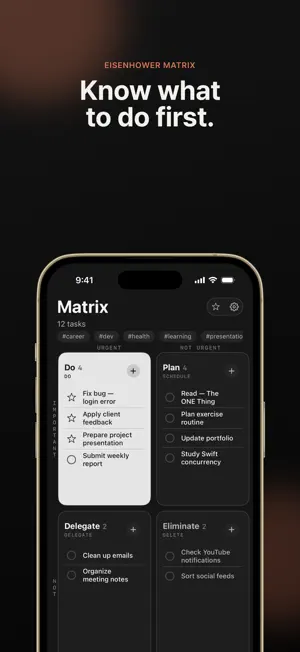
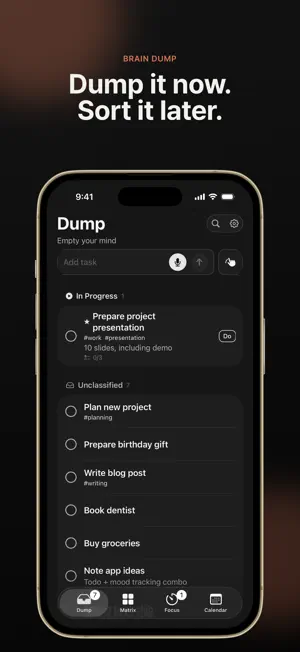
Too many tasks, no idea where to start? TRIX has the answer. Swipe to prioritize. Pick your Big3. Focus with Pomodoro. One seamless workflow built for ADHD brains - no complex setup required. Brain Dump > Swipe Classification > Big3 Selection > Focus Mode - own your day in four simple steps. --- [BRAIN DUMP] Clear Your Mind Capture tasks the moment they pop into your head. Don't organize - just dump. Collecting everything in one place reduces mental clutter and anxiety. Meeting ideas, grocery lists, tomorrow's report - write it all down. Add tags, notes, and reminders. Find anything instantly with search. [SWIPE TO CLASSIFY] Fast as Tinder Swipe your tasks into the Eisenhower Matrix's four quadrants. Determine importance and urgency intuitively with a single gesture. Swipe up: Urgent Swipe down: Not urgent Swipe left: Important Swipe right: Not important One swipe, one decision. Made a mistake? Undo instantly. [EISENHOWER MATRIX] Priorities at a Glance Classified tasks are automatically placed on a 2x2 matrix - the proven decision-making framework used by President Dwight Eisenhower. Q1 DO: Important + Urgent - Act now Q2 SCHEDULE: Important + Not Urgent - Plan it Q3 DELEGATE: Not Important + Urgent - Hand it off Q4 DELETE: Neither - Let it go Focus your energy only on what truly matters. [BIG3] Just Three Things Today Select the three most critical tasks from your DO quadrant. Research shows three is the optimal number of important tasks per day. No more overwhelm from endless to-do lists. Complete your Big3, earn rewards, and track them right on your lock screen widget. [FOCUS MODE] Pomodoro Timer Tackle your Big3 with Pomodoro. Choose from 4 presets: Quick (10min), Standard (25min), Extended (50min), or Deep Work (90min). Break tasks into micro-steps and check them off one by one. Built-in traffic light system prevents hyperfocus burnout: Green - Yellow - Red signals when to take a break. Especially designed for ADHD-style hyperfocus management. Track your timer on the lock screen with Live Activity. [CALENDAR & REVIEW] Track Your Growth Review completed tasks by date with a heatmap calendar. Analyze weekly and monthly stats: tasks completed, total focus time, quadrant completion rates, and traffic light distribution. Daily Score turns your productivity into numbers. Build streaks and stay motivated. --- More Features - Tags & Search: Organize with tags, find tasks instantly - Micro-Steps: Break big tasks into small checkable steps - Reminders: Per-task notifications + daily Big3 reminder - Auto Carry-Over: Yesterday's unfinished Q1-Q3 tasks move to today - Completed Archive: Browse past achievements, restore if needed - Data Backup: Export/import JSON, sync to Calendar app --- Why TRIX? - ADHD-Friendly UX: Swipe and tap - no complex menus. Minimal cognitive load by design. - Proven Methods: Eisenhower Matrix + Pomodoro Technique in one seamless workflow. - Lock Screen Widgets: Big3 widget + Focus Timer Live Activity - stay on track without opening the app. - Dark/Light Themes: Easy on the eyes, respects your system setting. - Fully Offline: Works without internet. Subway, airplane - anywhere. - Privacy First: All data stays on your device. No servers, no tracking. - Ad-Free: Zero ads. Pure focus experience. --- Perfect for you if: - You have too many tasks and don't know where to start - You struggle with focus or hyperfocus due to ADHD - Other task apps feel too complicated - You want Pomodoro and task management in one app - You want to build a consistent daily productivity routine --- With TRIX, today's priorities become crystal clear. Download now and start by clearing your mind.
What’s new
Version 1.5.0 · Updated September 27, 2026
Check things off from the Lock Screen - Lock Screen Checklist: turn it on in Settings > Lock Screen to complete tasks without opening the app - Matrix as your Lock Screen wallpaper: connect a Shortcuts automation and your wallpaper updates to your latest matrix every time you close the app (Settings > Show Matrix on Lock Screen) - Rename quadrants: change the Do / Plan / Delegate / Eliminate names in Settings > Matrix Customize - One-tap complete in Dump: Settings > Brain Dump > "Tap to Complete" - Widget corners now match the app, and fixed Korean text appearing in English and Japanese
App privacy
The developer, Wooyoung Kim, reported these privacy practices to Apple.
Data Not Collected
The developer does not collect any data from this app.
Alternatives to TRIX: Eisenhower Task Planner
Looking for apps like TRIX: Eisenhower Task Planner? Here are 6 similar apps on the App Store.
-
 iomatrix
-
 Productivity Matrix
-
 NEMO – Eisenhower Matrix Memo
-
 FocusMinder: ADHD Planner
-
 두두 - 아이젠하워 매트릭스
-
 Matrix ToDo: ADHD Planner
| App | Rating | Price | Last updated | Compare |
|---|---|---|---|---|
| TRIX: Eisenhower Task Planner | – | Free | September 27, 2026 | |
| iomatrix | – | Free | Sep 22, 2026 | Compare |
| Productivity Matrix | – | Free | Apr 10, 2026 | Compare |
| NEMO – Eisenhower Matrix Memo | – | Free | Oct 9, 2026 | Compare |
| FocusMinder: ADHD Planner | – | Free | Sep 22, 2026 | Compare |
| 두두 - 아이젠하워 매트릭스 | – | Free | May 14, 2026 | Compare |
| Matrix ToDo: ADHD Planner | – | Free | Aug 24, 2026 | Compare |