

Shadow Focus
Jeff Seibert Productivity iPhoneiPadiPod touchApple Watch
Shadow Focus is a free Productivity app for iPhone and iPad by Jeff Seibert. Requires iOS 26.0. Updated November 18, 2026.
- Price
- Free
- on the App Store
- Size
- 154 MB
- Age 4+
- Updated
- Nov 18
- 2026 · v1.0.1
Screenshots
Save to Pinterest

About Shadow Focus
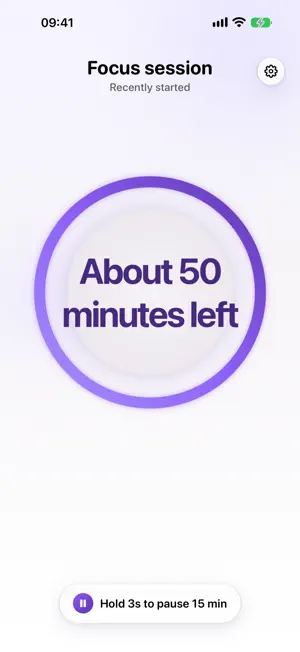
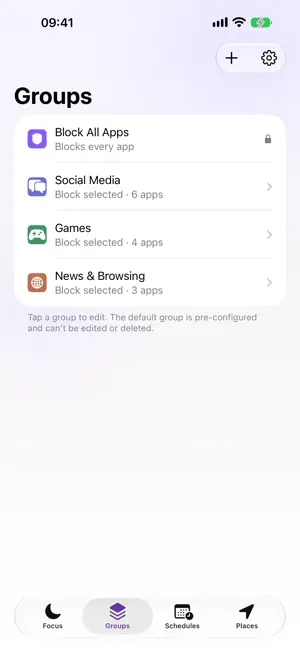
The doomscrolling usually starts before you notice it. Shadow Focus blocks the apps you pick, for as long as you pick. Apple's Screen Time does the enforcing. It was built for ADHD, autism, and AuDHD brains. Focus never asks how you know. ONE TAP TO START Short is about 25 minutes, Medium about 50 minutes, Long about 90 minutes, and Custom is whatever length you want. Pick "Until I leave" and the session ends once Focus confirms you left the spot. After a one-tap start, an Undo button stays for 10 seconds in case you tapped by mistake. Nothing counts down by the second. A ring fills as you go, labeled in plain language like "About 25 minutes left." A notice arrives before the session ends, if you've allowed notifications. WHAT GETS BLOCKED Social Media, Games, and News & Browsing are ready on day one, or you can block every app at once. Add your own through Apple's picker, which keeps that list private even from us. Your groups also show up in Spotlight search. Every session has two ways out. Open Shadow Focus and hold the pause control for 3 seconds, and your apps come back for 15 minutes. Pause as many times as you need in one session. Or skip the hold entirely and end the whole session in one tap from Control Center. WHAT IT RECORDS Focus records the time you actually spent, and nothing more. End a session at 4 minutes and what you did was focus for 4 minutes. History shows your total time and sessions, nothing more. No comparisons, no streaks, and nothing ever turns red. SLEEP, PLACES, AND SCHEDULES An overnight Sleep schedule blocks your apps and ends at the wake time you set, even if your phone stayed locked and no steps were counted. It can end earlier when Focus sees you are up. You can also press and hold "I'm awake" for 3 seconds. A wake alarm is available and stays off until you turn it on. Save a place, like the library or your desk, and Focus can start when you arrive. It ends after Focus confirms you left. You can also set your own hours with day presets. Deleting a group, place, or schedule shows an Undo button for 30 seconds. Control Center has Start Focus and End Focus controls. COMFORT In Settings you can change the font, calm the motion, switch off haptics, or ask for quieter notifications. Accommodations in Settings also adapt Focus for sensory sensitivity and for trouble with numbers. PRIVACY Free at launch, with no ads and no account. Your groups, places, and schedules stay on your iPhone and in your own encrypted iCloud. Health data stays on your iPhone and Apple Watch and is never sent to us. Export or delete everything from Data Management in Settings. Privacy policy: shadowsheeplabs.com/privacy Consumer health data policy: shadowsheeplabs.com/consumer-health-data-policy
What’s new
Version 1.0.1 · Updated November 18, 2026
Sleep now ends at the wake time you set, Undo catches a mistaken tap, and large text and VoiceOver work better. Remove All Data also clears your location data now. - Sleep ends at your wake time. Your apps unblock then, even if the phone stayed locked and no steps were counted. - Sleep schedules have an optional wake alarm. It is off by default. The switch is in the Sleep schedule editor. - After a one-tap start on the dashboard, an Undo button shows for 10 seconds. - Deleting a group, place or schedule shows an Undo button for 30 seconds. - Apple Focus modes that use the Focus filter now show as a session in Focus. - Settings has Font and Animations rows. - Groups of apps appear in Spotlight search. - The session-complete screen has a title and icon for each kind of session, and a Sleep summary. - Movement-goal blocking is removed. Sessions left over from it end quietly. - The Sleep shield shows only OK. - Blocking comes back when a pause ends, even if the system's pause-end signal is late or never arrives. - Morning ends on time when the app is closed. - A location session ends only after Focus confirms you left the place. - Every place can be deleted, including places that came from contact cards, and each delete has an undo. Accessibility - Large text sizes and contrast work better on quick-start tiles, place rows, the Sleep ring, and the paused session screen. - Controls that had no name now have VoiceOver labels. - Suggestions can be added or dismissed from a touch-and-hold menu, and the Quick Focus card has a Dismiss button. Privacy - Remove All Data now also clears visit history, learned places and other location data. - Focus stores which contact card is yours, not a copy of the card. Older saved copies are removed on launch. - Session detail files are protected and left out of backups, are kept 90 days, and are included in export and erase. - The learned-pattern export now includes the suggestions Focus made, active and archived. Bug fixes and stability improvements.
App privacy
The developer, Jeff Seibert, reported these privacy practices to Apple.
Data Not Linked to You
The following data, which may be collected but is not linked to your identity, may be used for the following purposes:
- Location: Precise Location
Used for: App Functionality
Alternatives to Shadow Focus
Looking for apps like Shadow Focus? Here are 6 similar apps on the App Store. The highest rated is TaskHero (4.7/5), and all 6 are free to download.
-
 DoubleDone: ADHD To-Do List
-
 Wordly
-
 TaskHero
4.7
-
 Fashion Design - Tracing Paper
4.1
-
 Compress PDF reduce pdf size
4.5
-
 CalenDraw: Calendar Notes
4.5
| App | Rating | Price | Last updated | Compare |
|---|---|---|---|---|
| Shadow Focus | – | Free | November 18, 2026 | |
| DoubleDone: ADHD To-Do List | – | Free | Nov 15, 2026 | Compare |
| Wordly | – | Free | Sep 18, 2026 | Compare |
| TaskHero | 4.7 / 5 (43) | Free | Nov 22, 2026 | Compare |
| Fashion Design - Tracing Paper | 4.1 / 5 (8) | Free | May 20, 2026 | Compare |
| Compress PDF reduce pdf size | 4.5 / 5 (37) | Free | Sep 15, 2025 | Compare |
| CalenDraw: Calendar Notes | 4.5 / 5 (3,528) | Free | Nov 12, 2026 | Compare |
Compare Shadow Focus with the top alternatives: ratings, updates, ASO score and keyword gaps →