

RestStop Finder
Yusuf Can Samiloglu Navigation iPhoneiPadiPod touch
RestStop Finder is a free Navigation app for iPhone and iPad by Yusuf Can Samiloglu. Requires iOS 17.0. Updated October 17, 2026.
- Price
- Free
- on the App Store
- Size
- 19 MB
- Age 4+
- Updated
- Oct 17
- 2026 · v3.2.0
Screenshots


About RestStop Finder
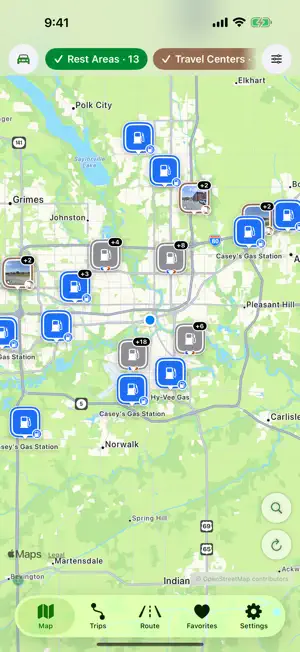
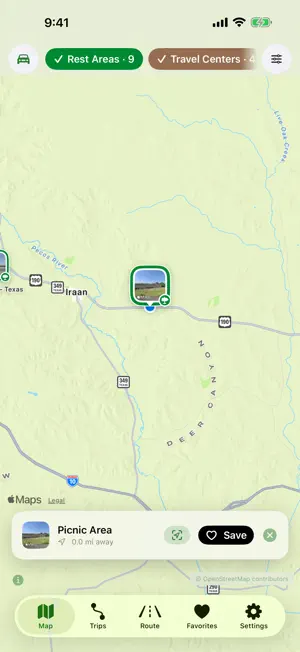
RestStop Finder puts the rest areas along US highways on one clear map, and helps you plan the drive around them. THE MAP • Rest areas across the United States are built into the app, so they appear right away and still show without a connection • Choose what to see on one bar: rest areas, travel centers, fuel, food, restrooms and lodging, each in its own color • Your saved places stay on the map, marked with a heart • Rest areas show their truck parking spaces where the US DOT lists them • Tap a pin to open its place card without leaving the app: Apple's photos and ratings where Apple Maps knows the place, Look Around where Apple has street imagery, and one tap to see more in Apple Maps • Current weather, the hourly forecast and severe-weather alerts at each rest stop, from Apple Weather • Directions in Apple Maps, Google Maps or Waze ROAD TRIPS • Set a start and a destination, add up to eight stops, and reorder them by dragging • Find rest stops, gas and food along the way, and see how far each one is off your route • Results stay in a panel you can pull up or tuck away while the map shows the whole route • On divided highways, rest areas on the other side are marked and listed after the ones you can reach • See each stop's arrival time in that stop's own time zone, with sunrise and sunset when they matter • Import a GPX or KML file from Files and keep planning here. The file stays on your device • Add your own photos and notes, share the plan, or open the whole route in Apple Maps CITY TRIPS • Browse a city's top sights, food, museums, parks and more, and add places as you go • Optimize the walking order in one tap. It never makes the walk longer, and you can undo it CARPLAY • Rest areas, truck and RV parking, and parking lots near you, on your car's screen, with directions RESTSTOP PRO Planning is free, and your first trip is too. Pro adds: • Keep as many road and city trips as you like • A parking layer with US DOT truck parking and parking lots, with live truck-parking space counts in Illinois • An EV charging layer with connector types, power levels and networks • RV and Truck modes: turn on travel centers and truck parking in one tap, then enter your vehicle's size and weight for clearance and weight warnings • Gas, EV charging, food and lodging along your route on the Route tab • Your ETA and next stop on the Lock Screen and in the Dynamic Island while you drive • A Home Screen widget with your nearest rest stops • Download the latest rest-stop data to your device Pro is available as a monthly or yearly subscription, or as a one-time lifetime purchase. Subscriptions renew automatically until you cancel them in your Apple Account settings. PRIVATE BY DESIGN • No account, no ads, no tracking • Your favorites, trips, photos and notes stay on your device • To show what's around, the app asks public map and data services about the area you're looking at. Settings › Data & Privacy lists every one of them. Nothing is stored about you Rest stop and parking data © OpenStreetMap contributors (ODbL), with US DOT and state feeds for truck parking and NREL for EV charging. Weather from Apple Weather. Terms of Use: https://elly2504.github.io/reststopfinder-web/terms Privacy Policy: https://elly2504.github.io/reststopfinder-web/privacy
What’s new
Version 3.2.0 · Updated October 17, 2026
Map • One bar of color-coded categories: pick several at once, and all filters sit in one sheet • Your saved places show on the map with a heart • Car, RV or Truck from the bar: RV and Truck turn on travel centers and truck parking (Pro) • Rest areas show their truck parking spaces where the US DOT lists them • With location off, the map still shows rest areas where you last looked • Tapping a group of pins zooms into it Place cards • A card opens at once with the place's name and picture, then "Photos & Ratings" opens Apple's place card with a link to Apple Maps • Look Around and Apple Maps details are free for everyone • The hourly forecast is free, and weather alerts name the agency that issued them • Opening hours follow the place's own time zone and count overnight hours • Truck and RV warnings read short tons and US heights, and say when a posted limit can't be read Route • Long routes no longer freeze, and results sit in a panel you can pull up or tuck away • On divided highways, rest areas on the other side of the road are marked and listed after the ones you can reach • Tap a pin on the route map to open its place, or a group of pins to zoom in • No location? Type a start point • The Lock Screen ETA starts when you start driving and ends when you park (Pro) Trips • Import a GPX or KML file from Files as a road trip. The file never leaves your device • See each stop's arrival time in its own time zone, with sunrise and sunset when they matter • Optimize the walking order of a city trip in one tap. It never gets longer, and you can undo it • City trips: Top Sights and the other chips find far more places, and a failed search says so • Saving waits for the route, and deleting or leaving unsaved changes asks first Also • Rest Stop Alerts are withdrawn while we rebuild them; the app never asks for "Always" location • The Home Screen widget reads its own list of nearby stops and never opens your saved trips and favorites • Settings › Data & Privacy names every service the app talks to
App privacy
The developer, Yusuf Can Samiloglu, reported these privacy practices to Apple.
Data Not Linked to You
The following data, which may be collected but is not linked to your identity, may be used for the following purposes:
- Location: Precise Location
Used for: App Functionality
Alternatives to RestStop Finder
Looking for apps like RestStop Finder? Here are 6 similar apps on the App Store. The highest rated is RestMap (4.4/5), and all 6 are free to download.
-
 Next Rest Stop
-
 RestMap
4.4
RestMap
4.4
-
 USA Rest Stops
3.3
USA Rest Stops
3.3
-
 RV Dump Sites
1.0
RV Dump Sites
1.0
-
 DumpScout
3.2
DumpScout
3.2
-
 RV Camping Planner: Camp Route
3.8
RV Camping Planner: Camp Route
3.8
| App | Rating | Price | Last updated | Compare |
|---|---|---|---|---|
| RestStop Finder | – | Free | October 17, 2026 | |
| Next Rest Stop | – | Free | Oct 24, 2026 | Compare |
| RestMap | 4.4 / 5 (14) | Free | Oct 16, 2026 | Compare |
| USA Rest Stops | 3.3 / 5 (258) | Free | Sep 21, 2026 | Compare |
| RV Dump Sites | 1.0 / 5 (1) | Free | Oct 3, 2026 | Compare |
| DumpScout | 3.2 / 5 (5) | Free | Jul 10, 2026 | Compare |
| RV Camping Planner: Camp Route | 3.8 / 5 (379) | Free | Oct 26, 2026 | Compare |
Compare RestStop Finder with the top alternatives: ratings, updates, ASO score and keyword gaps →