

Text Redact: Blur & Censor
Ilnur Mugaev Photo & Video iPhoneiPadiPod touch
Text Redact: Blur & Censor is a free Photo & Video app for iPhone and iPad by Ilnur Mugaev. Rated 5.0/5 from 1 ratings. Requires iOS 16.0.
- Rating
- 5.0
- 1 ratings
- Price
- Free
- on the App Store
- Size
- 6 MB
- Age 4+
- Updated
- Aug 24
- 2026 · v26.8.1
Screenshots


About Text Redact: Blur & Censor
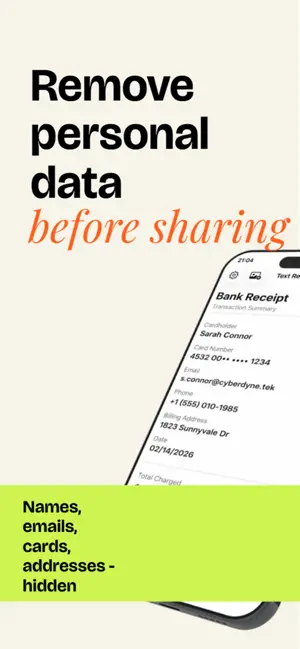
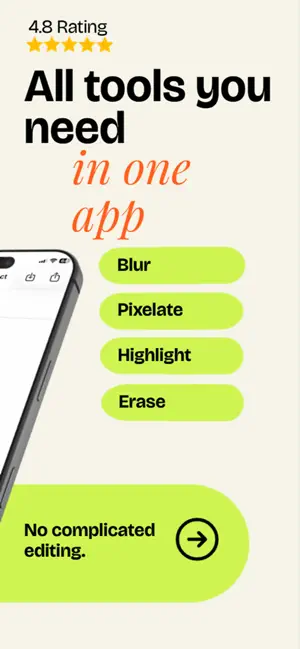
Text Redact — a simple and reliable tool to protect personal data on images and video. Redact text on screenshots, documents and photos before sharing. The app automatically recognizes text (OCR) — just tap a word and it will be hidden. Add a watermark to your photos and video to keep your work signed. FEATURES: • Automatic text recognition on images • 9 editing tools: fill, blur, pixelate, highlight, underline, strikethrough, draw, eraser and watermark • Watermark of any kind: text, a logo from your library, a symbol or an emoji • Place it with your fingers — drag, rotate, resize — and adjust color, opacity and angle • Tile the watermark across the whole frame: staggered, grid or concentric, with adjustable spacing • Video: the watermark covers the entire clip and exports in high quality • Customize color, opacity and thickness for each tool • Undo and redo actions • Full-quality export: PNG for photos (lossless), MOV for video • Save to Photos or share via any app • Light and dark theme support • Works completely offline — your data never leaves the device PERFECT FOR: • Hiding names and phone numbers on chat screenshots • Protecting personal data on documents • Signing photos and video with your own watermark before publishing • Preparing images for social media posts • Redacting confidential information before sharing PREMIUM SUBSCRIPTION: 3 free exports included (photo or video). For unlimited use, subscribe: • Weekly subscription • Yearly subscription (best value) Payment is charged to your Apple ID account upon confirmation. Subscription automatically renews unless canceled at least 24 hours before the end of the current period. Manage subscriptions in App Store settings. Terms of Use (EULA): https://www.apple.com/legal/internet-services/itunes/dev/stdeula/ Privacy Policy: https://docs.google.com/document/d/e/2PACX-1vTNC-u2tvf_PbGAPbBBQhGDnbx4XjXKIxgDjG6ygPhzjDHZp6USkUGVZSnwFbNmt0B-j9eOHur-ZRDy/pub
What’s new
Version 26.8.1 · Updated August 24, 2026
Watermarks for photos and videos • Any kind of mark: text, a logo from your library, a symbol or an emoji • Drag, rotate and resize it right on the frame • Fine-tune color, opacity, size and angle • Tile it across the frame: staggered, grid or concentric, with adjustable spacing • Video: the mark covers the whole clip, source quality preserved • Redact and watermark in one go — a single export Redesigned tool panels • Compact sheets that keep your image in view while you adjust • System color picker and shared recent colors across every tool • A new arrow button in the bottom bar opens the current tool's settings • Small fixes and improvements
App privacy
The developer, Ilnur Mugaev, reported these privacy practices to Apple.
Data Not Collected
The developer does not collect any data from this app.
Alternatives to Text Redact: Blur & Censor
Looking for apps like Text Redact: Blur & Censor? Here are 6 similar apps on the App Store. The highest rated is Photo Art - AI Photo Generator (5.0/5), and all 6 are free to download.
-
 Photo Art - AI Photo Generator
5.0
-
 Headshot Photo Generator
4.1
-
 Luma AI - Photo Editor & Maker
3.7
-
 AI Photo Generator - PIXU
5.0
-
 AI Face Editor - FacePea
4.3
-
 Travel Animator 3D Video-TripQ
5.0
| App | Rating | Price | Last updated | Compare |
|---|---|---|---|---|
| Text Redact: Blur & Censor | 5.0 / 5 (1 rating) | Free | August 24, 2026 | |
| Photo Art - AI Photo Generator | 5.0 / 5 (2) | Free | Jun 22, 2026 | Compare |
| Headshot Photo Generator | 4.1 / 5 (14) | Free | Oct 30, 2026 | Compare |
| Luma AI - Photo Editor & Maker | 3.7 / 5 (6) | Free | Jun 3, 2026 | Compare |
| AI Photo Generator - PIXU | 5.0 / 5 (4) | Free | Oct 5, 2026 | Compare |
| AI Face Editor - FacePea | 4.3 / 5 (6) | Free | Apr 20, 2026 | Compare |
| Travel Animator 3D Video-TripQ | 5.0 / 5 (6) | Free | Dec 23, 2025 | Compare |