

JSON Viewer and Editor
Sahana A S Productivity iPhoneiPadiPod touch
JSON Viewer and Editor is a free Productivity app for iPhone and iPad by Sahana A S. Requires iOS 13.0. Updated October 6, 2026.
- Price
- Free
- on the App Store
- Size
- 41 MB
- Age 4+
- Updated
- Oct 6
- 2026 · v1.3.0
Screenshots

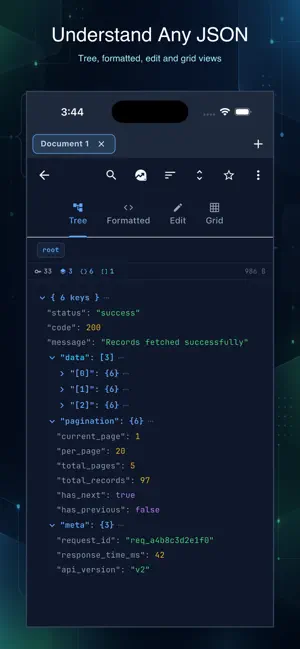


About JSON Viewer and Editor
Open, inspect, edit and repair JSON files on your iPhone or iPad. JSON Viewer and Editor works offline, requires no account and keeps your documents on your device. VIEW JSON CLEARLY Browse objects and arrays in an expandable tree, search values and follow breadcrumb paths through deeply nested data. Switch to formatted code with syntax highlighting and line numbers whenever you need the raw document. EDIT AND REPAIR Edit JSON in the text editor or change values directly from the tree. Add, delete, duplicate and reorder nodes. JSON Fixer can repair common problems such as trailing commas, missing quotes and unquoted keys. COMPARE FILES Open two documents side by side and inspect additions, deletions and changed values. Import from Files, paste text or fetch JSON from a URL. VALIDATE AND QUERY Validate documents against JSON Schema Draft 7 and see useful error locations. Run JSONPath expressions and inspect matching values immediately. CONVERT AND EXPORT Convert JSON to YAML, CSV, XML or key-value text. Export results to PDF or Excel, save them to Files, print them or share them with another app. API AND HAR TOOLS Send GET, POST, PUT, PATCH and DELETE requests with custom headers and bodies. Inspect response status, timing and size, then open the response in the JSON viewer. HAR files open with a request summary for easier debugging. BUILT FOR REAL FILES • Open JSON documents directly from the Files app • Search, sort and navigate nested data • Resume your previous session • Save frequently used documents as favorites • Start from ready-made JSON templates • Use dark or light appearance • Work in 15 supported interface languages The free version includes the core viewer, formatter and editor and is supported by advertising. A one-time Pro purchase removes advertising and unlocks unlimited tabs, JSON Compare, schema validation, the API client and advanced conversion and export tools. There is no subscription. PURCHASES • JSONVEdit Pro Lifetime — $9.99, one payment • Payment is charged to your Apple Account at confirmation of purchase • One-time purchase — no subscription and no renewals Terms of Use (EULA): https://www.apple.com/legal/internet-services/itunes/dev/stdeula/ Privacy Policy: https://cosmovex.web.app/apps/jsonvedit/privacy-policy
What’s new
Version 1.3.0 · Updated October 6, 2026
This update introduces JSONVEdit Pro and makes opening JSON files more reliable. • Files no longer appear unavailable in the document picker • One purchase now removes ads and unlocks every Pro tool • Purchase errors remain visible instead of closing the sheet silently • Added Restore Purchase, Terms of Use and Privacy Policy links • Improved the post-purchase review flow • Fixed layout issues on smaller screens and in longer translations
App privacy
The developer, Sahana A S, reported these privacy practices to Apple.
Data Not Linked to You
The following data, which may be collected but is not linked to your identity, may be used for the following purposes:
- Identifiers: Device ID
Used for: Analytics
Alternatives to JSON Viewer and Editor
Looking for apps like JSON Viewer and Editor? Here are 6 similar apps on the App Store. The highest rated is Open Minis (4.9/5), and all 6 are free to download.
-
 JSON Tools: XLSX CSV to JSON
2.7
JSON Tools: XLSX CSV to JSON
2.7
-
 myTextViewer
3.8
myTextViewer
3.8
-
 EasyEditText
4.5
EasyEditText
4.5
-
 Notepad ++
1.2
Notepad ++
1.2
-
 Open Minis
4.9
Open Minis
4.9
-
 SingleFile for Safari
4.6
SingleFile for Safari
4.6
| App | Rating | Price | Last updated | Compare |
|---|---|---|---|---|
| JSON Viewer and Editor | – | Free | October 6, 2026 | |
| JSON Tools: XLSX CSV to JSON | 2.7 / 5 (12) | Free | Oct 31, 2024 | Compare |
| myTextViewer | 3.8 / 5 (158) | Free | Jan 25, 2026 | Compare |
| EasyEditText | 4.5 / 5 (66) | Free | Feb 19, 2026 | Compare |
| Notepad ++ | 1.2 / 5 (59) | Free | Sep 17, 2026 | Compare |
| Open Minis | 4.9 / 5 (94) | Free | Oct 11, 2026 | Compare |
| SingleFile for Safari | 4.6 / 5 (63) | Free | Oct 19, 2026 | Compare |