

My Sound Alarm
TAKAYOSHI YOSHIKAWA Utilities iPhoneiPadiPod touch
My Sound Alarm is a free Utilities app for iPhone and iPad by TAKAYOSHI YOSHIKAWA. Rated 4.5/5 from 17 ratings. Requires iOS 26.0. Updated October 5, 2026.
- Rating
- 4.5
- 17 ratings
- Price
- Free
- on the App Store
- Size
- 26 MB
- Age 4+
- Updated
- Oct 5
- 2026 · v1.7.0
Screenshots
About My Sound Alarm
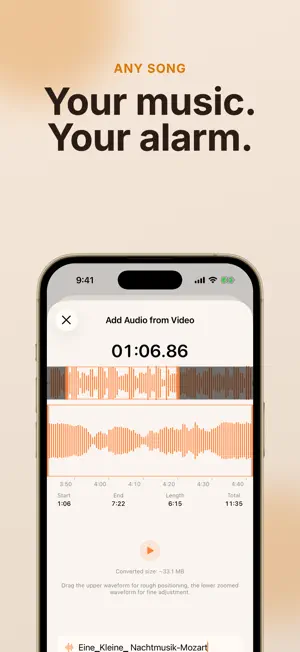
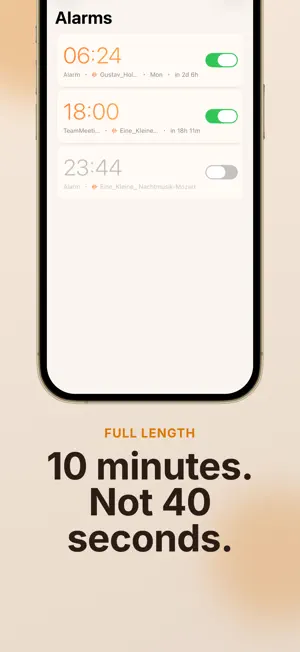
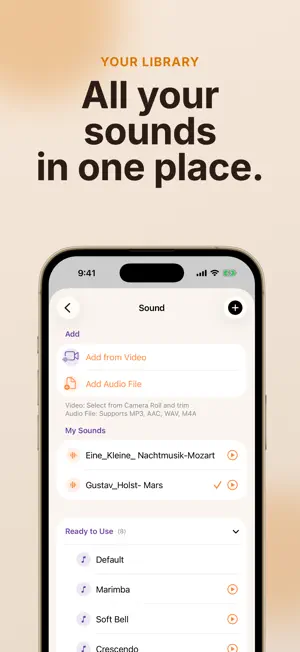
Wake up to the music you love. Keep only the part you want — the chorus, the hook, the line you sing along to. KEY FEATURES Wake Up to the Part You Love Most people do not want a whole song. They want one part of it. Open a video or an audio file, look at the waveform, and drag to select the section you like. You can listen while you adjust it. The waveform shows you where the sound is loud and where it is quiet. A short section works well. Your alarm plays it to the end, then plays it again, until you get up. Twenty or thirty seconds of the chorus is often all you need. Your Own Files This app uses the audio you already have. A song file. A voice recording. Sound from a video you saved. You do not need a subscription. There is no music catalog to search. Take the Audio From a Video Choose a video from your Camera Roll and keep only the sound. This works well for videos you saved or recorded yourself. Import Audio Files MP3, AAC, WAV, and M4A files all work. You can open them from the Files app. Built on Apple's Alarm System This app uses AlarmKit, the alarm system from Apple. Your alarm rings the same way the built-in Clock app rings. It is not a background trick that can fail when you need it. See Your Sounds Each alarm shows a picture of its sound: a frame from your video, or the album art from your file. It is easy to tell your alarms apart. No 40-Second Limit An iPhone ringtone can only be about 40 seconds long. This app is different. You can take up to 10 minutes from a video, and audio files have no time limit at all. Share Sheet Send audio or video to this app from other apps. Repeat Days Choose the days for each alarm. Weekdays, weekends, or any days you want. Snooze Pick 1, 2, 5 or 10 minutes with one tap, or set any value you like. Night Mode Your iPhone becomes a bedside clock. The numbers are large and soft, so you can read them in a dark room. SUPPORTED FORMATS MP3 / AAC / WAV / M4A / Audio from video (MOV, MP4) NOTES - Needs iOS 26 or later (AlarmKit) - A longer sound uses more storage. A 10-minute alarm sound is about 50 MB.
Ratings & reviews
4.5
17 ratings
What’s new
Version 1.7.0 · Updated October 5, 2026
■ A short welcome for new users The first time you open the app, a few screens show how to turn part of a song into an alarm. Then you can start right away: from a video, from an audio file, or with a built-in sound. ■ Alarm permission at a better time The app now asks for alarm permission after the welcome screens, not the moment it opens. If you already use the app, nothing changes for you. Thanks for using My Sound Alarm!
App privacy
The developer, TAKAYOSHI YOSHIKAWA, reported these privacy practices to Apple.
Data Not Collected
The developer does not collect any data from this app.
Alternatives to My Sound Alarm
Looking for apps like My Sound Alarm? Here are 6 similar apps on the App Store. The highest rated is Reco Alarm - Record & Wake Up (5.0/5), and 5 of the 6 are free to download.
-
 Reco Alarm - Record & Wake Up
5.0
Reco Alarm - Record & Wake Up
5.0
-
 Alarmifex: Custom Alarm Sounds
4.0
Alarmifex: Custom Alarm Sounds
4.0
-
 Chime Alarm
5.0
Chime Alarm
5.0
-
 AlarmTune
-
 Ringy Alarm
5.0
Ringy Alarm
5.0
-
 Clock - Alarm Clock
3.2
Clock - Alarm Clock
3.2
| App | Rating | Price | Last updated | Compare |
|---|---|---|---|---|
| My Sound Alarm | 4.5 / 5 (17 ratings) | Free | October 5, 2026 | |
| Reco Alarm - Record & Wake Up | 5.0 / 5 (1) | Free | Jun 20, 2026 | Compare |
| Alarmifex: Custom Alarm Sounds | 4.0 / 5 (2) | Free | Oct 4, 2026 | Compare |
| Chime Alarm | 5.0 / 5 (1) | Free | May 10, 2026 | Compare |
| AlarmTune | – | 2.99 USD | Sep 15, 2026 | Compare |
| Ringy Alarm | 5.0 / 5 (7) | Free | Sep 1, 2026 | Compare |
| Clock - Alarm Clock | 3.2 / 5 (6) | Free | Sep 24, 2026 | Compare |
Compare My Sound Alarm with the top alternatives: ratings, updates, ASO score and keyword gaps →