

Easy MIDI Player
Kenichi Ando Music iPhoneiPadiPod touchMac
Easy MIDI Player is a free Music app for iPhone and iPad by Kenichi Ando. Requires iOS 15.0. Updated October 21, 2026.
- Price
- Free
- on the App Store
- Size
- 64 MB
- Age 4+
- Updated
- Oct 21
- 2026 · v2.1.0
Screenshots
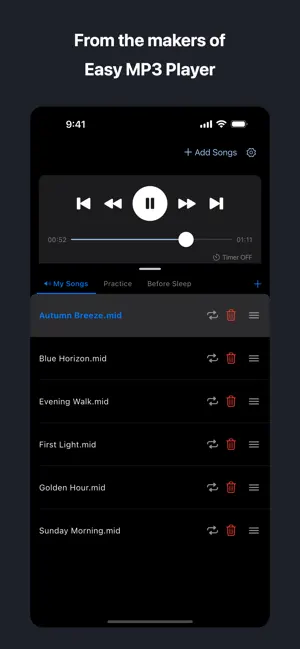


About Easy MIDI Player
The player you know from Easy MP3 Player, now as an app made just for MIDI. Same screens, same controls: pick a song and press play. The only difference is that it plays MIDI files. A built-in GM sound set does the playing, so there is no separate sound module to set up. What makes it different 1. Open it and it plays Pick a MIDI file (.mid, .midi, .smf, .kar) and it starts. No sound setup, no converting. 2. Choose your folder once Point the app at the folder holding your songs, one time. From then on they are waiting the moment you open the app. No walking through the Files app again. You can register as many folders as you like. 3. Reorder with your finger Press and hold a song, then drag it up or down. Remove the ones you no longer want, right there. 4. A playlist for each occasion Make playlists with names that suit you: Practice, Recital, Before Sleep. Switching between them does not interrupt playback. 5. Ten-band equalizer Adjust from low to high across ten bands. Your settings are still there next time you open the app. 6. A sleep timer that stops for you Choose 15, 30, 45, 60 or 90 minutes. When the time is up, playback stops on its own. 7. Control it from the lock screen Play, pause, skip and seek from the lock screen or Control Center. Unlocked with a one-time purchase - Playback speed From 0.5x to 2x. The pitch stays where it is; only the speed changes. Useful when you want to slow a fast piece down and hear what is happening. - Key (transpose) Up to twelve semitones up or down. The drum part is left alone. - Part mixer Mute a part, change its volume, or swap its instrument. Mute the part you are practising and play along with the rest. - No ads The banner at the bottom of the screen goes away. - Export and import playlists Save the playlists you made to a file, and load them back. One payment. Nothing further to pay. Supported files Standard MIDI File format 0 and 1 (.mid, .midi, .smf, .kar) Supported devices iPhone and iPad Open-source software MIDI playback uses TinySoundFont. Copyright (C) 2017-2023 Bernhard Schelling (Based on SFZero, Copyright (C) 2012 Steve Folta) MIT License Sounds: GeneralUser GS by S. Christian Collins. Contact https://tenmais.jp/contact/
What’s new
Version 2.1.0 · Updated October 21, 2026
Version 2.1.0 - The app is now available in 10 languages: English, Japanese, German, French, Italian, Spanish, Portuguese, Chinese (Simplified and Traditional) and Korean. It follows your device language. - In regions where ad consent is required, the consent screen now appears before the tracking permission request.
App privacy
The developer, Kenichi Ando, reported these privacy practices to Apple.
Data Used to Track You
The following data may be used to track you across apps and websites owned by other companies:
- Location: Coarse Location
- Identifiers: Device ID
Data Linked to You
The following data, which may be collected and linked to your identity, may be used for the following purposes:
- Location: Coarse Location
- Identifiers: Device ID
Used for: Third-Party Advertising, Analytics
Alternatives to Easy MIDI Player
Looking for apps like Easy MIDI Player? Here are 6 similar apps on the App Store. The highest rated is PitchLock: AUv3 Vocal Tuner (5.0/5), and 4 of the 6 are free to download.
-
 PitchLock: AUv3 Vocal Tuner
5.0
PitchLock: AUv3 Vocal Tuner
5.0
-
 PodCall|Podcast Voice Recorder
-
 MIDI Producer
5.0
MIDI Producer
5.0
-
 Notely - Sheet Music Composer
-
 Fingering Strings •
4.1
Fingering Strings •
4.1
-
 Sheet Music: Composer & Maker
| App | Rating | Price | Last updated | Compare |
|---|---|---|---|---|
| Easy MIDI Player | – | Free | October 21, 2026 | |
| PitchLock: AUv3 Vocal Tuner | 5.0 / 5 (2) | 7.99 USD | Oct 25, 2026 | Compare |
| PodCall|Podcast Voice Recorder | – | Free | Jul 13, 2026 | Compare |
| MIDI Producer | 5.0 / 5 (1) | Free | Oct 8, 2026 | Compare |
| Notely - Sheet Music Composer | – | Free | Jul 22, 2026 | Compare |
| Fingering Strings • | 4.1 / 5 (23) | 3.99 USD | Jun 17, 2026 | Compare |
| Sheet Music: Composer & Maker | – | Free | Oct 28, 2026 | Compare |
Compare Easy MIDI Player with the top alternatives: ratings, updates, ASO score and keyword gaps →