

TrackFlow: Money Log
Qinglei Tu Finance iPhoneiPadiPod touch
TrackFlow: Money Log is a free Finance app for iPhone and iPad by Qinglei Tu. Requires iOS 26.0. Updated October 16, 2026.
- Price
- Free
- on the App Store
- Size
- 3 MB
- Age 4+
- Updated
- Oct 16
- 2026 · v2.2
Screenshots

About TrackFlow: Money Log
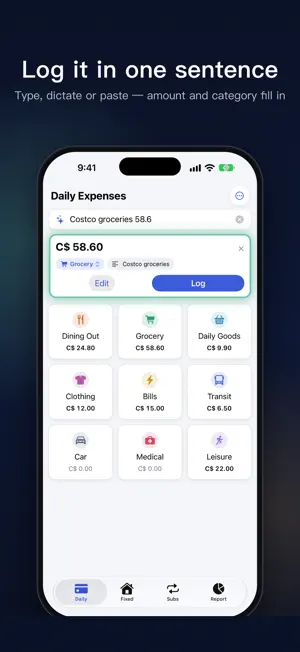
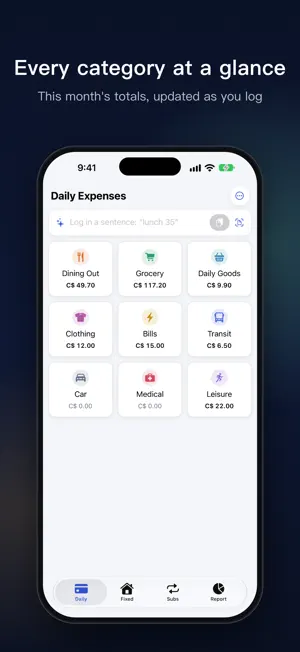
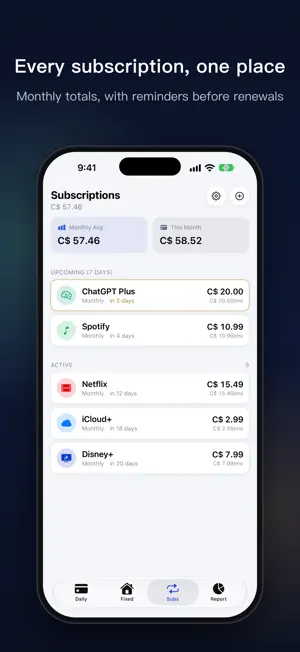
TrackFlow makes it easy to log every expense and see where your money goes. Log it in one sentence Type, dictate or paste a sentence like "lunch 35", and the amount, category and note fill in for you. Nothing is saved until you confirm. Tap a category, done Your categories sit in a grid, so one tap starts an entry. The built-in calculator handles + and −, and each category shows what you've spent this month. Fixed costs, carried forward Rent, utilities, phone, internet and insurance are tracked separately from daily spending. Turn on Carry Forward Last Month and they roll into each new month. Subscriptions in one place See every subscription with its monthly total, and get reminded before renewals and free trials end. Reports Review spending by day, week, month or year with clear charts. Each period gets a recap of what you spent and what changed. Ask a question like "Grocery this month" and get the answer right away. Export a PDF report or a CSV of your transactions. And more • Home Screen widgets and a Control Center quick-log control • Siri and Shortcuts: say "Log an expense in TrackFlow" • Scan a receipt to read the amount, merchant and date • iCloud sync across your devices • CSV import and export • Multiple currencies with your own base currency and rates • Chinese and English interface Privacy No account, no ads, no analytics. Your data stays on your device and in your own iCloud. On devices that support Apple Intelligence, Smart Suggestions run on the device; elsewhere the app uses its built-in rules and works the same.
What’s new
Version 2.2 · Updated October 16, 2026
• One-sentence entry: type a sentence and the amount and category are recognized • Ask: look up your spending with a question • Period recap on the Report tab • A new navy theme • Siri, Shortcuts, Spotlight and a Control Center quick-log control • More reliable renewal reminders and a better iPad entry screen
App privacy
The developer, Qinglei Tu, reported these privacy practices to Apple.
Data Not Linked to You
The following data, which may be collected but is not linked to your identity, may be used for the following purposes:
- Financial Info: Other Financial Info
- Contact Info: Other User Contact Info
Used for: App Functionality
Alternatives to TrackFlow: Money Log
Looking for apps like TrackFlow: Money Log? Here are 6 similar apps on the App Store. The highest rated is Money Log: Expense & Budget (5.0/5), and all 6 are free to download.
-
 MoneyLog+
-
 Money Log: Expense & Budget
5.0
Money Log: Expense & Budget
5.0
-
 Simple Wallet: Expense Tracker
-
 Pocket Money Log
5.0
Pocket Money Log
5.0
-
 MoneyLog - Expense Tracker
-
 Money Tracker - Money Manager
| App | Rating | Price | Last updated | Compare |
|---|---|---|---|---|
| TrackFlow: Money Log | – | Free | October 16, 2026 | |
| MoneyLog+ | – | Free | Sep 22, 2025 | Compare |
| Money Log: Expense & Budget | 5.0 / 5 (2) | Free | Jun 9, 2026 | Compare |
| Simple Wallet: Expense Tracker | – | Free | Sep 24, 2026 | Compare |
| Pocket Money Log | 5.0 / 5 (1) | Free | Feb 26, 2026 | Compare |
| MoneyLog - Expense Tracker | – | Free | Jun 4, 2026 | Compare |
| Money Tracker - Money Manager | – | Free | Mar 5, 2024 | Compare |