

Fifths: Drone Tone Generator
Richard Chirino Music iPhoneiPadiPod touch
Fifths: Drone Tone Generator is a free Music app for iPhone and iPad by Richard Chirino. Rated 5.0/5 from 1 ratings. Requires iOS 26.0.
- Rating
- 5.0
- 1 ratings
- Price
- Free
- on the App Store
- Size
- 75 MB
- Age 4+
- Updated
- Sep 25
- 2026 · v2.0.0
Screenshots
About Fifths: Drone Tone Generator
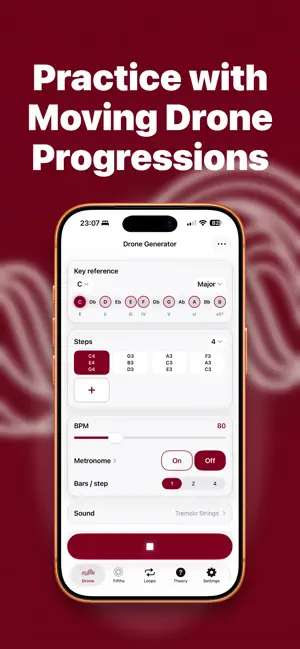
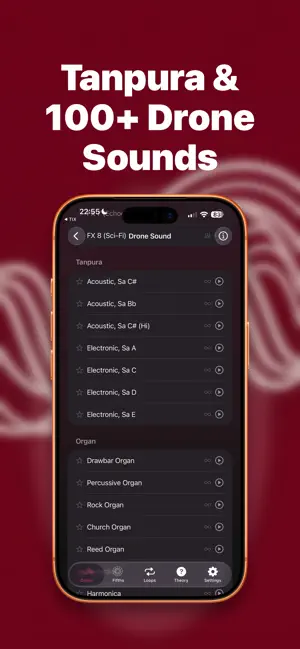
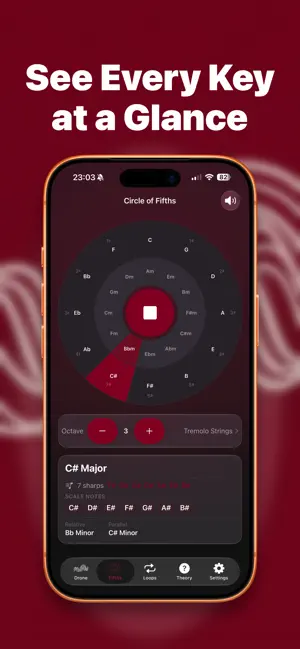
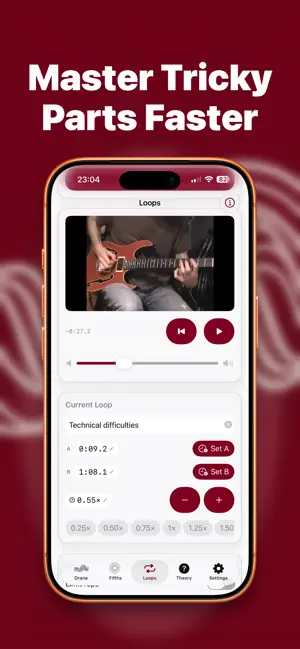
Fifths is built around one idea: practicing with musical context, not just isolated exercises. Create moving drone progressions, explore harmony through the circle of fifths, and turn YouTube lessons into focused practice loops. Build the exact practice environment you need for intonation, improvisation, fretboard awareness, phrasing, ear training, and learning real songs section by section. When you want a fixed reference, Fifths also works as a focused single-note drone, or a continuous tanpura for a rich harmonic center. And when your hands are on your instrument, just ask Siri: start a drone, load a preset, start the metronome, or answer today's question without touching your phone. Use Fifths to: - Build looping drone progressions for scale, melody, and improvisation practice - Create single-note or multi-note drone steps to outline changing harmonic centers - Hold a single drone when you want a stable key center for ear training or intonation work - Practice in time with a built-in metronome from 30 to 400 BPM, synced to your drone progressions, with subdivisions from eighths and triplets to swing, sixteenth patterns, quintuplets, and septuplets - Control Fifths hands-free with Siri and Shortcuts: start drones by key or preset, start the metronome, look up scale notes and intervals, check your practice streak, and hear and answer the Daily question - Load ready-made chord progressions from a library of pop, rock, minor-key, blues, jazz, and classical examples, organized around the circle of fifths - Turn YouTube lessons into saved practice loops, and share loops with other Fifths users - Slow down difficult sections, set rep targets, and let Fifths automatically ramp up speed as you progress - Fine-tune loop start and end points and adjust volume - Quickly search for a song's key and BPM while you practice - Explore the circle of fifths visually and hear key relationships instantly - See key signatures, relative keys, parallel keys, and scale notes at a glance - Train faster with daily questions, streaks, and multiple quiz difficulties - Add the Music Theory Daily widget to keep a fresh question on your Home Screen, and answer it right from the widget - Practice with 100+ sounds including strings, choir, organ, guitar, winds, pads, and synth textures - Save presets, favorite sounds, loops, and sounds tailored to your workflow - Customize the Drone screen by reordering or hiding sections, plus note naming, reference pitch, octave range, fade time, and quiz length - Keep practicing alongside other audio apps Fifths Pro unlocks unlimited saved loops, longer drone progressions, the full sample progressions library, the full sound library, and Medium and Hard quiz difficulty. Whether you are working on intonation, improvisation, key signatures, modes, intervals, songs, or general musicianship, Fifths gives you a practice tool that is immediate, musical, and built for repetition. Privacy Policy: https://fifthsdrone.com/privacy.html Terms of Use (Apple Standard EULA): https://www.apple.com/legal/internet-services/itunes/dev/stdeula/
What’s new
Version 2.0.0 · Updated September 25, 2026
Fifths 2.0: iOS 27, Siri, subdivisions and more Built for iOS 27 • Soft scroll edges and a navigation bar that shrinks as you scroll • Smoother drag-to-reorder in Customize Interface Ask Siri You can now use Fifths with your voice or from the Shortcuts app: • "Start a D minor drone in Fifths" or "Play my Warm-up preset in Fifths" • "Start the metronome in Fifths" • "What are the notes in Fifths" and "What's the interval in Fifths" for quick answers to theory questions • "What's today's Daily question in Fifths", then answer it out loud: "The answer is F sharp in Fifths" • "What's my practice streak in Fifths" or "How much have I practiced this week in Fifths" With Apple Intelligence you can also play sample progressions, start a quiz or ask what's in a saved preset. Settings › Siri lists everything Fifths can do by voice. Metronome subdivisions The metronome now plays eighths, triplets, sixteenths and more, with softer clicks between the beats. Tap Subdivision under Steps & Tempo to hear them change as you pick. The tempo range is now 30–400 BPM, and new −/+ buttons let you adjust it one step at a time. Answer the Daily question from your widget The large Daily widget is now interactive, so you can answer without opening the app. A more flexible Drone screen The loaded-preset card is now its own section, so you can move it or hide it in Customize Interface.
App privacy
The developer, Richard Chirino, reported these privacy practices to Apple.
Data Not Collected
The developer does not collect any data from this app.
Alternatives to Fifths: Drone Tone Generator
Looking for apps like Fifths: Drone Tone Generator? Here are 6 similar apps on the App Store. The highest rated is Simple Drones (5.0/5), and all 6 are free to download.
-
 Tuning Drone & Tanpura Tone
1.3
Tuning Drone & Tanpura Tone
1.3
-
 DroneTone: Drone Note
1.0
DroneTone: Drone Note
1.0
-
 Simple Drones
5.0
Simple Drones
5.0
-
 Drone Wheel
3.0
Drone Wheel
3.0
-
 Rangiin | Sitar Synth + AUv3
5.0
Rangiin | Sitar Synth + AUv3
5.0
-
 Shruthi Box
| App | Rating | Price | Last updated | Compare |
|---|---|---|---|---|
| Fifths: Drone Tone Generator | 5.0 / 5 (1 rating) | Free | September 25, 2026 | |
| Tuning Drone & Tanpura Tone | 1.3 / 5 (3) | Free | Sep 15, 2026 | Compare |
| DroneTone: Drone Note | 1.0 / 5 (1) | Free | Aug 19, 2026 | Compare |
| Simple Drones | 5.0 / 5 (2) | Free | Mar 24, 2026 | Compare |
| Drone Wheel | 3.0 / 5 (4) | Free | Oct 11, 2026 | Compare |
| Rangiin | Sitar Synth + AUv3 | 5.0 / 5 (7) | Free | Sep 14, 2026 | Compare |
| Shruthi Box | – | Free | Sep 3, 2026 | Compare |